

The Nintendo Switch actually offers multiple levels of intensity and style when you factory reset its firmware, a process also known as a ‘hard reset’. Doing so is a great final step that should resolve just about any software troubleshooting issue. You’ll also find yourself wanting to perform a factory reset on your Nintendo Switch before reselling it to protect your data.
Please note that you lose a lot of data when factory resetting a Nintendo Switch. Make sure you backup your best Switch games before you do.
How to factory reset your Nintendo Switch
The easiest way to hard reset your Switch is from the main menu. A variety of options are available from this screen, including Initialize Console – which will wipe your system clean.
Here’s how to start the Switch reset process:
Step 1: On the Home screen, go to the System Settings menu located at the bottom of the screen – it’s the icon that looks like a gear.
Step 2: Hit the A button to pull up a list of options on the left side of the screen.
Step 3: From the list of options, select System.
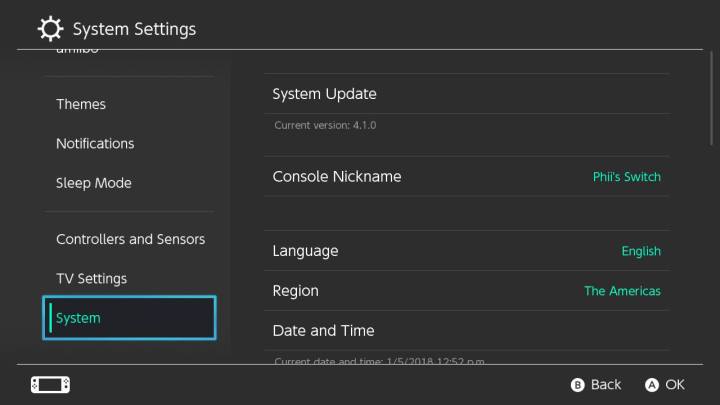
Step 4: The System menu options will appear on the right side of the screen. You need to scroll down again to the bottom option, Initialize. This will then pull up a new menu with several options for resetting your Nintendo Switch. Read on to figure out which one is best for you.
Nintendo Switch factory reset: Options
If you followed the above steps properly, you’ll now have several options presented to you. Choose carefully to get the correct kind of reset.
Reset cache: Use this option if you want to wipe internet browser data from your Switch but keep everything else. This includes saved user IDs and passwords for various websites, such as Twitter and Facebook, as well as your Switch browser history.
Reset keyboard: The Switch’s virtual keyboard pays attention to the things you type and saves data about words and phrases you use often. It uses that data to offer predictive type options of words you use often, so you don’t have to type down every word as you’re using the keyboard, speeding up the process. This option wipes that predictive text data.
Format microSD card: In order to use a microSD card as extra memory for the Switch, it has to be formatted. This option will delete any data on a microSD card you plug into the Switch, allowing it to be used in the console when you’re done. If you’re encountering errors using a microSD card on the Switch, this is the option you want.
Initialize console: This is the big one. This option returns your Switch to its out-of-the-box state, deleting all saved data, screenshots, videos, Switch user names, web browser data, game data, and system updates. It will also reset system settings like parental controls to their defaults. If you have a Nintendo user account linked to online services like the Nintendo eShop, the account will still exist online, but it will no longer be linked to the Switch. According to Nintendo, any data from the Switch you stored on a microSD card won’t be deleted. Aside from your screenshots and videos, though, the data on your microSD card will become unusable.
Only use this option as a last resort, either if you’re getting rid of the Switch altogether or you’re encountering errors that are so troublesome no other option will fix the console. Nintendo notes that you also need your console to be connected to the internet to reformat it.
After factory resetting your Switch
It’s possible you will lose some of your data while restoring your Nintendo Switch to its factory settings. But not everything will be lost; you will be able to reinstall the games that you’ve previously purchased.
After a player has linked their Switch to their Nintendo account again, they’ll be able to download games or DLC from Nintendo’s eShop conveniently. No one has to spend any time worrying about the physical copies of their favorite games. Gamers will have the chance to reinstall them at a slightly later time.
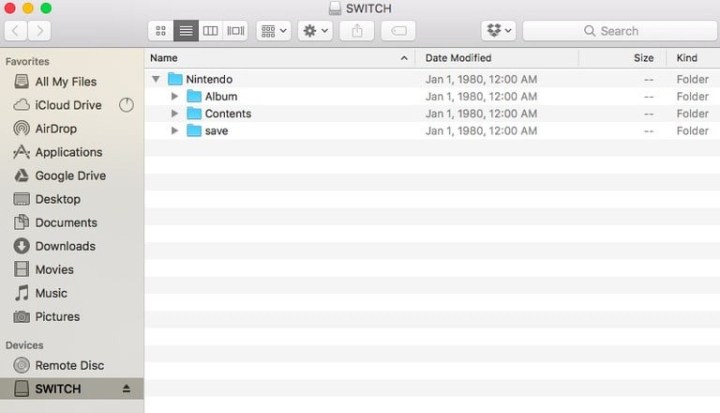
What the player will need to do is insert their microSD card into the computer before trying to reformat anything. After sliding the card in, select the Album folder. From there, you could find and reload pre-saved images, screenshots, or additional files back onto the computer. Once finishing that, simply slide the SD card back out and insert it into the Switch console. At that point, the Switch device should revert to its default settings.
Editors’ Recommendations