

The AMBER Alert system is an excellent tool for finding and recovering children abducted in your area. According to the U.S. government, this system has helped recover 1,029 children throughout all participating regions – 87 through Wireless Emergency Alerts alone.
The AMBER alert system is one of our best resources for reporting and recovering abducted children. As of December 2023, the U.S. government reports that 1,186 children were rescued because of the AMBER program, which launched back in 1996. Fortunately, our go-to mobile devices and wearables have AMBER alerts and other emergency notifications automatically configured, so the populace is promptly alerted when a child is reported missing.
AMBER and emergency notifications are pretty loud, though, and can occur at any moment of the day. If you’d like to disable these alerts, we’ll teach you how to do so for both iPhone and Android devices.
How to turn off AMBER alerts on iPhone
AMBER alerts are categorized as Government Alerts alongside Emergency Alerts and Public Safety Alerts. Provided you have a modern iPhone (like the iPhone 15), and your carrier is AT&T, T-Mobile, or Verizon, you should be able to toggle all three on and off.
Step 1: Tap to open the Settings app.
Step 2: Tap Notifications.
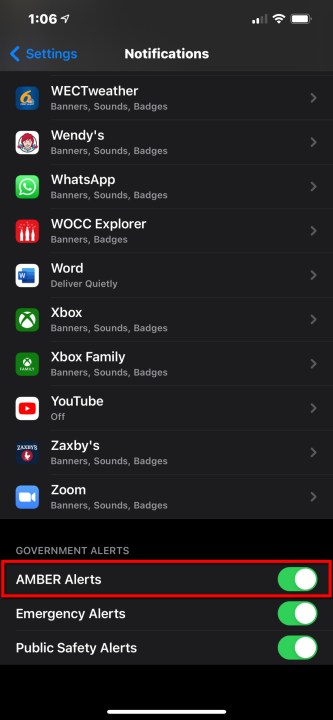
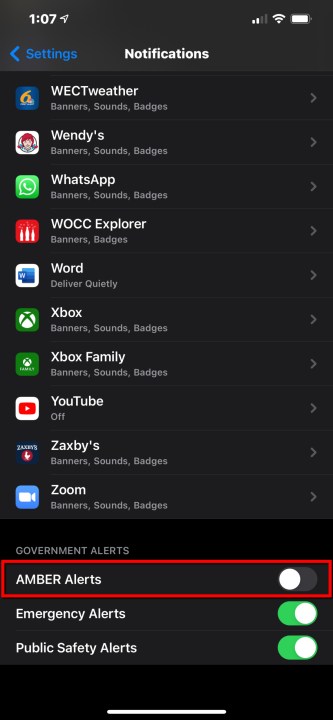
Step 3: Scroll down and tap the toggle next to AMBER Alerts listed under Government Alerts. Repeat this step to re-enable this feature later as needed or to toggle off the other two alerts.
How to turn off AMBER alerts on Android
You can find the AMBER Alert’s interface on Android 12 and 13 devices under the new emergency safety sub-menu available on modern Android devices.
Step 1: Find and open the Settings app on your phone.
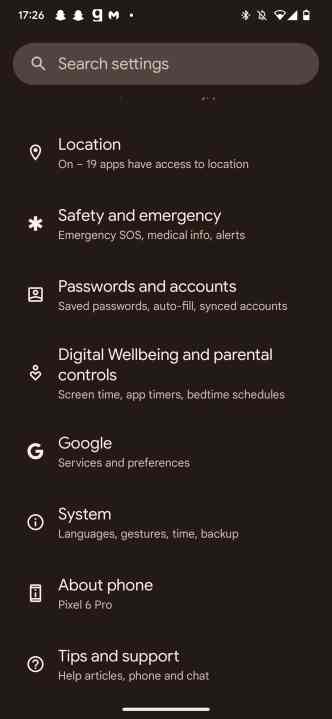
Step 2: Scroll down to the Safety and Emergency sub-menu
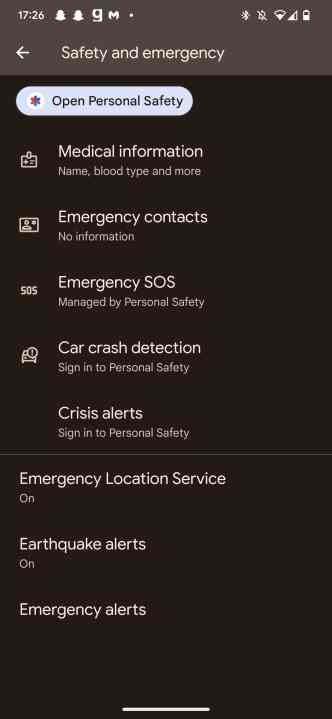
Step 3: Once there, navigate to Wireless Emergency Alerts.
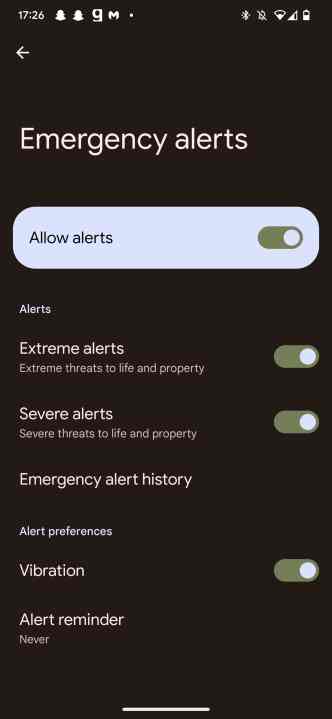
Step 4: From then on, you’d be able to toggle AMBER alerts off, if you so please.
Repeat this step to re-enable this feature later as needed or to toggle off the other alerts.
What are AMBER alerts?
Though it’s easy to want to be rid of annoying alerts and needless notifications, sometimes it pays to pay attention to what notifications are being disabled and why they’re enabled to begin with. AMBER alerts short for America’s Missing: Broadcast Emergency Response, are alerts issued by the U.S. Government to draw attention to either a missing person in an area, an extreme weather event, or other miscellaneous emergencies.
Though disabling these features may help ease notification fatigue, you’re also able to see information about topics that would typically be the subject of AMBER alerts on Google, Bing, or even Facebook.
One thing to note! Even if you disable AMBER alerts, you’ll still receive other emergency alerts on your phone (like the national test the FCC and FEMA conducted on October 4, 2023). To disable these types of alerts, you’ll need to turn off Government Alerts.
On the iPhone, you can find this by going to the Settings app, Notifications, and then disabling the toggle next to Government Alerts. On your Android phone, search for Wireless emergency alerts in the Settings app and disable the main Allow alerts toggle.
You should almost certainly always keep emergency alerts enabled, but if — for some reason — you want or need to disable them, this should have you covered.
Editors’ Recommendations