

Amazon Music Unlimited might be linked to your Amazon Prime account, but it’s not a necessary feature you have to pay for. Indeed, even if you cancel Amazon Music Unlimited, you can continue to enjoy the leaner Amazon Music service for free as part of your subscription.
Whether you’re fed up with price rises or something else besides, if you want some tips ditching the Unlimited portion of your music streaming service, here’s how to do it.
Looking to sign up to a new music streaming service when you’re done? Here are some of our favorites.
How to cancel Amazon Music Unlimited on the website
If you’re on a desktop or laptop, or prefer to use the web interface for Amazon account management, you can cancel your Amazon Music Unlimited account with just a few clicks.
Step 1: Navigate to Amazon.com and select Hello, sign in in the top-right, if you are not already signed in.
Step 2: Open your account by selecting your account name in the top-right.
Step 3: Select Memberships & Subscriptions from the drop-down menu.
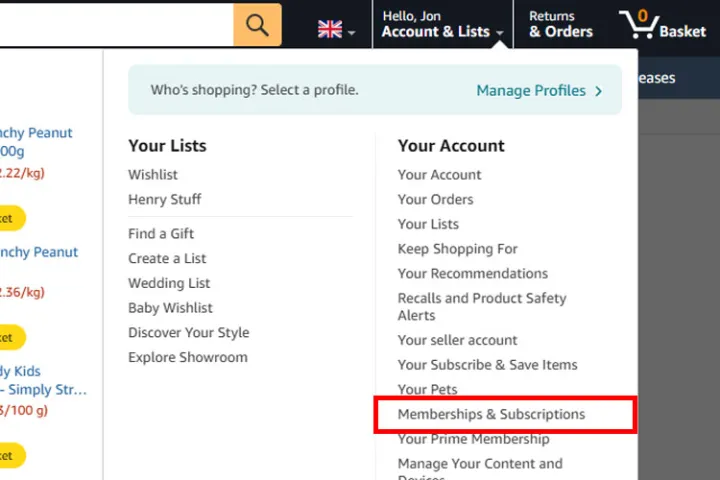
Step 4: Find your Amazon Music Unlimited subscription from the list of Amazon subscriptions. On the right-hand side you should see a Cancel membership button. Select it.
Step 5: When prompted for a reason for the cancellation, give it if you wish, but make sure to select Submit and continue to cancel. Amazon may throw up several “Are you sure?” style messages and buttons to select during this process, but if you are sure you do want to cancel, stick to your guns and make sure you’re selecting the button that continues with cancellation.
Step 6: When you reach the final page, select Confirm cancellation to finalize it. You will retain access to Amazon Music Unlimited until your next billing date, at which point your account will revert to the standard Amazon Music package — you can read all about them in our Amazon Music explainer.
How to cancel Amazon Music Unlimited on Android
You can also use the Amazon Music app to cancel your Unlimited subscription. Here’s how to do it on Android.
Step 1: Open the Amazon Music app and select the cog-icon in the top-right, then select Settings.
Step 2: Under the “Your Account” subheading, select Amazon Music Unlimited Member.
Step 3: Select Cancel Subscription and when prompted, confirm your cancellation.
How to cancel Amazon Music Unlimited on iPhone and iPad
To cancel Amazon Music Unlimited on your iOS device, you do so through the general Settings menu.
Step 1: Open the Settings app on your iPhone or iPad and select your name.
Step 2: Select Subscriptions.
Step 3: Select the Amazon Music Subscription, then select Cancel If prompted, confirm your cancellation.
How to cancel Amazon Music Unlimited via iTunes
If you signed up to Amazon Music Unlimited via iTunes, you can cancel it through Apple’s support site.
Step 1: Navigate to https://support.apple.com/.
Step 2: Scroll down to My Support and login to your Apple account.
Step 3: Look for Billing and subscriptions and select it. Then look through your various subscriptions, and follow the on-screen prompts to cancel Amazon Music Unlimited when you find it.
If you signed up through Apple, Google, or a mobile service provider, you may need to contact them directly to have them cancel your account.
Interested in signing up to a new music streaming service? Here are some of our favorites.