
Daily Guardian UAEDaily Guardian UAE
  • Home
  • UAE
  • What’s On
  • Business
  • World
  • Entertainment
  • Lifestyle
  • Sports
  • Technology
  • Travel
  • Web Stories
  • More
    • Editor’s Picks
    • Press Release
What's On

iPhone 18 Pro could bring a big boost to satellite connectivity 

February 14, 2026

Sony launches a subscription service to lease PlayStation 5 consoles, but you can’t get one

February 14, 2026

HP wants you to rent your next gaming laptop

February 14, 2026

Samsung begins One UI 9 testing ahead of next foldable launch

February 14, 2026

Your favorite old ChatGPT models are going away

February 14, 2026
Facebook X (Twitter) Instagram
Finance Pro
Facebook X (Twitter) Instagram
Daily Guardian UAE
Subscribe
  • Home
  • UAE
  • What’s On
  • Business
  • World
  • Entertainment
  • Lifestyle
  • Sports
  • Technology
  • Travel
  • Web Stories
  • More
    • Editor’s Picks
    • Press Release
Daily Guardian UAEDaily Guardian UAE
Home » How to change your iPhone call and messaging apps in iOS 18.2
Technology

How to change your iPhone call and messaging apps in iOS 18.2

By dailyguardian.aeNovember 2, 20242 Mins Read
Share
Facebook Twitter LinkedIn Pinterest Email

The upcoming iOS 18.2 release will allow users to change their default calling and messaging apps on their iPhones. In other words, you will no longer need to use Apple’s native apps if you don’t want to. Here are the relatively easy steps to do so.

Please note: iOS 18.2 remains in beta. As such, the steps below might change before the update is released to the public.

How to change your default calling and messaging apps

There are just a few steps you need to take to change your default calling and messaging apps. Apple has arranged all the defaults you can change into a combined hub, making it easy to change everything at once.

Step 1: Open the Settings app on your iPhone with iOS 18.2 or later installed.

Step 2: Scroll down and tap on the Apps option.

Step 3: In the Apps section, you’ll find a new Default apps option at the top. Select it.
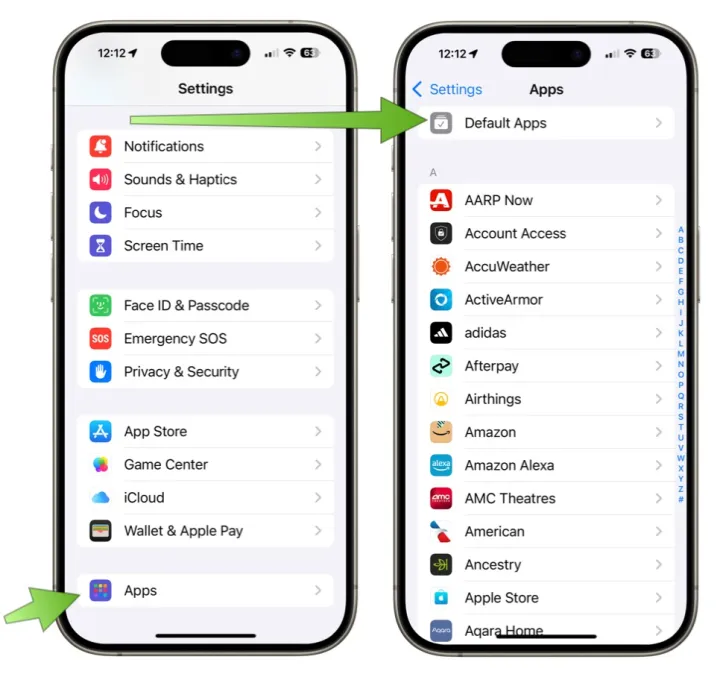
Screenshot showing how to change default apps on iOS 18.2.

Step 4: You’ll see options for both Calling and Messaging. Tap on the one you want to change.

Step 5: From there, you’ll see a list of the compatible apps installed on your iPhone. Choose the app you want to set as your default calling or messaging app.
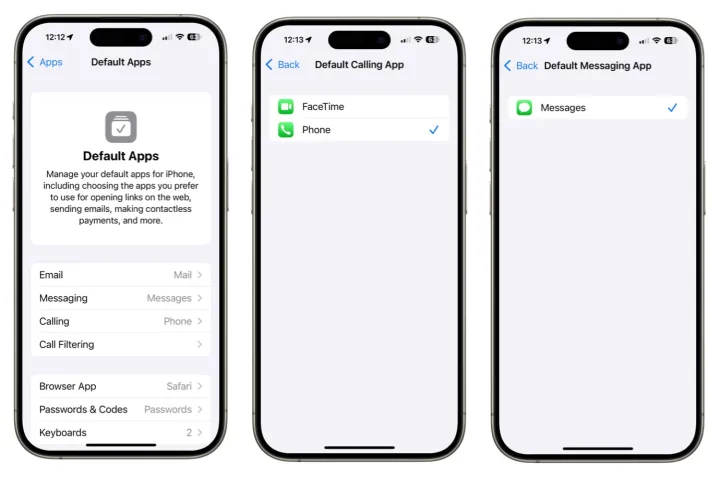
Screenshots showing how to change the default apps on iOS 18.2.

Native app alternatives

But why would you change your calling or messaging app? After all, Apple’s iMessage offers many great features, including SharePlay and Memoji. Additionally, the official Phone app is the go-to app for making direct calls with handsets. Heck, you’re probably very used to just using Apple’s versions, so why change?

Some alternatives, like WhatsApp, Signal, and Telegram, are preferred because they facilitate international communication, while others provide an extra layer of security. Additionally, some apps are chosen for their availability on platforms beyond those provided by Apple. In some cases, this makes it easier to communicate with a wider audience. Down at the simplest level, you may prefer to use a different app because it offers features Apple’s don’t. Whatever reason, you’ll be able to dive into the Apple Appe Store and check out the alternatives.

Once iOS 18.2 is released, Apple is making it possible to select a third-party solution as your default calling and messaging apps. That’s good for choice and competition.

The iOS 18.2 update is expected to be released to the public before the end of the year.


Share. Facebook Twitter Pinterest LinkedIn Tumblr Email

Keep Reading

iPhone 18 Pro could bring a big boost to satellite connectivity 

Sony launches a subscription service to lease PlayStation 5 consoles, but you can’t get one

HP wants you to rent your next gaming laptop

Samsung begins One UI 9 testing ahead of next foldable launch

Your favorite old ChatGPT models are going away

Claude is leveling up against Gemini and ChatGPT with powerful free tools

Chatbots rated more empathetic than humans in controlled tests

This could be our first look at Samsung’s upcoming wide foldable phone

Meta’s smart glasses could soon identify people in real time

Editors Picks

Sony launches a subscription service to lease PlayStation 5 consoles, but you can’t get one

February 14, 2026

HP wants you to rent your next gaming laptop

February 14, 2026

Samsung begins One UI 9 testing ahead of next foldable launch

February 14, 2026

Your favorite old ChatGPT models are going away

February 14, 2026

Subscribe to News

Get the latest UAE news and updates directly to your inbox.

Latest Posts

Claude is leveling up against Gemini and ChatGPT with powerful free tools

February 13, 2026

Chatbots rated more empathetic than humans in controlled tests

February 13, 2026

GEBO Armaturen Accelerates Global Growth with Strategic MEA Hub and Asia-Pacific Market Entry

February 13, 2026
Facebook X (Twitter) Pinterest TikTok Instagram
© 2026 Daily Guardian UAE. All Rights Reserved.
  • Privacy Policy
  • Terms
  • Advertise
  • Contact

Type above and press Enter to search. Press Esc to cancel.