
Daily Guardian UAEDaily Guardian UAE
  • Home
  • UAE
  • What’s On
  • Business
  • World
  • Entertainment
  • Lifestyle
  • Sports
  • Technology
  • Travel
  • Web Stories
  • More
    • Editor’s Picks
    • Press Release
What's On

Samsung’s smart glasses are coming, and they’ve got Meta in their sights

March 7, 2026

Google Pixel 11 Pro might not look much different, after all

March 7, 2026

2026 MWC Publisher Award Roundup: The 9 Innovations That Stole The Show

March 7, 2026

Microsoft’s next Xbox console is Project Helix, and it will run PC games too

March 7, 2026

Amazon’s new Fire TV interface helps you find something to watch faster

March 7, 2026
Facebook X (Twitter) Instagram
Finance Pro
Facebook X (Twitter) Instagram
Daily Guardian UAE
Subscribe
  • Home
  • UAE
  • What’s On
  • Business
  • World
  • Entertainment
  • Lifestyle
  • Sports
  • Technology
  • Travel
  • Web Stories
  • More
    • Editor’s Picks
    • Press Release
Daily Guardian UAEDaily Guardian UAE
Home » How to change your iPhone call and messaging apps in iOS 18.2
Technology

How to change your iPhone call and messaging apps in iOS 18.2

By dailyguardian.aeNovember 2, 20242 Mins Read
Share
Facebook Twitter LinkedIn Pinterest Email

The upcoming iOS 18.2 release will allow users to change their default calling and messaging apps on their iPhones. In other words, you will no longer need to use Apple’s native apps if you don’t want to. Here are the relatively easy steps to do so.

Please note: iOS 18.2 remains in beta. As such, the steps below might change before the update is released to the public.

How to change your default calling and messaging apps

There are just a few steps you need to take to change your default calling and messaging apps. Apple has arranged all the defaults you can change into a combined hub, making it easy to change everything at once.

Step 1: Open the Settings app on your iPhone with iOS 18.2 or later installed.

Step 2: Scroll down and tap on the Apps option.

Step 3: In the Apps section, you’ll find a new Default apps option at the top. Select it.
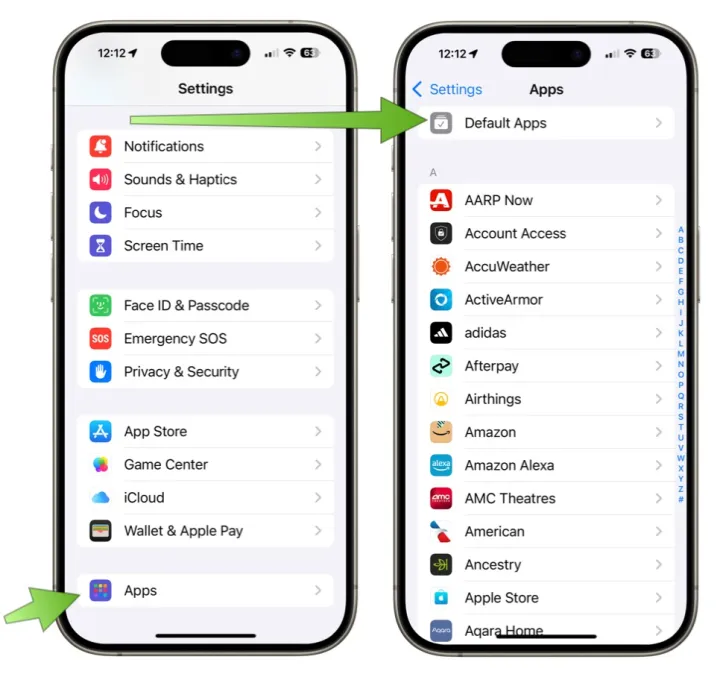
Screenshot showing how to change default apps on iOS 18.2.

Step 4: You’ll see options for both Calling and Messaging. Tap on the one you want to change.

Step 5: From there, you’ll see a list of the compatible apps installed on your iPhone. Choose the app you want to set as your default calling or messaging app.
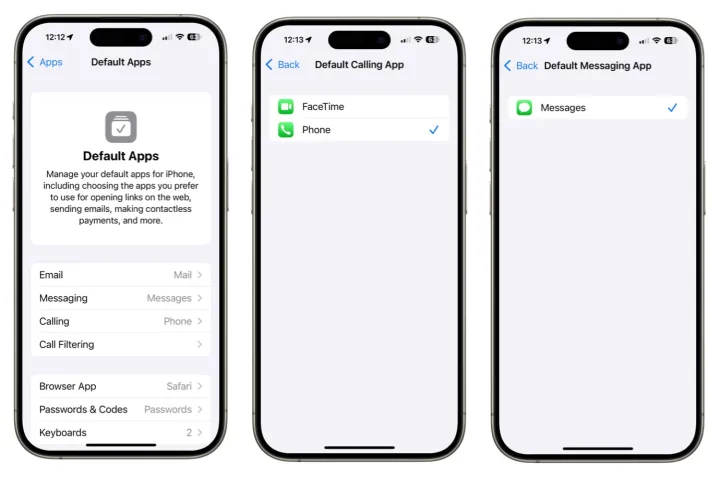
Screenshots showing how to change the default apps on iOS 18.2.

Native app alternatives

But why would you change your calling or messaging app? After all, Apple’s iMessage offers many great features, including SharePlay and Memoji. Additionally, the official Phone app is the go-to app for making direct calls with handsets. Heck, you’re probably very used to just using Apple’s versions, so why change?

Some alternatives, like WhatsApp, Signal, and Telegram, are preferred because they facilitate international communication, while others provide an extra layer of security. Additionally, some apps are chosen for their availability on platforms beyond those provided by Apple. In some cases, this makes it easier to communicate with a wider audience. Down at the simplest level, you may prefer to use a different app because it offers features Apple’s don’t. Whatever reason, you’ll be able to dive into the Apple Appe Store and check out the alternatives.

Once iOS 18.2 is released, Apple is making it possible to select a third-party solution as your default calling and messaging apps. That’s good for choice and competition.

The iOS 18.2 update is expected to be released to the public before the end of the year.


Share. Facebook Twitter Pinterest LinkedIn Tumblr Email

Keep Reading

Samsung’s smart glasses are coming, and they’ve got Meta in their sights

Google Pixel 11 Pro might not look much different, after all

2026 MWC Publisher Award Roundup: The 9 Innovations That Stole The Show

Microsoft’s next Xbox console is Project Helix, and it will run PC games too

Amazon’s new Fire TV interface helps you find something to watch faster

Apple is promoting Microsoft Office apps for MacBook Neo, and the target is obvious

Microsoft’s new browser tool will make websites more keyboard-friendly

Xbox Project Helix may cost $1,200 with massive performance upgrades

Valve hints at Steam Machine delay… but the plot thickens

Editors Picks

Google Pixel 11 Pro might not look much different, after all

March 7, 2026

2026 MWC Publisher Award Roundup: The 9 Innovations That Stole The Show

March 7, 2026

Microsoft’s next Xbox console is Project Helix, and it will run PC games too

March 7, 2026

Amazon’s new Fire TV interface helps you find something to watch faster

March 7, 2026

Subscribe to News

Get the latest UAE news and updates directly to your inbox.

Latest Posts

Apple is promoting Microsoft Office apps for MacBook Neo, and the target is obvious

March 7, 2026

Microsoft’s new browser tool will make websites more keyboard-friendly

March 7, 2026

Xbox Project Helix may cost $1,200 with massive performance upgrades

March 7, 2026
Facebook X (Twitter) Pinterest TikTok Instagram
© 2026 Daily Guardian UAE. All Rights Reserved.
  • Privacy Policy
  • Terms
  • Advertise
  • Contact

Type above and press Enter to search. Press Esc to cancel.