
Daily Guardian UAEDaily Guardian UAE
  • Home
  • UAE
  • What’s On
  • Business
  • World
  • Entertainment
  • Lifestyle
  • Sports
  • Technology
  • Travel
  • Web Stories
  • More
    • Editor’s Picks
    • Press Release
What's On

CORE42 AND ASSOLOMBARDA TO PROMOTE SOVEREIGN ENABLED AI ADOPTION ACROSS LOMBARDY’S INDUSTRIAL ECOSYSTEM

October 13, 2026

CASAGRAND APPOINTS JASEERA BUILDING CONTRACTING AS MAIN CONTRACTOR FOR CASAGRAND HERMINA AT DUBAI ISLANDS

October 13, 2026

Warrior Academy Jumeirah Islands Nears Capacity in 6 Months

October 13, 2026

‘Rogue AI’ Risk in UAE as 98% See Tools Breach Data Limits

October 13, 2026

ICBA Links Dubai Training to Field Practice in Uzbekistan

October 13, 2026
Facebook X (Twitter) Instagram
Finance Pro
Facebook X (Twitter) Instagram
Daily Guardian UAE
Subscribe
  • Home
  • UAE
  • What’s On
  • Business
  • World
  • Entertainment
  • Lifestyle
  • Sports
  • Technology
  • Travel
  • Web Stories
  • More
    • Editor’s Picks
    • Press Release
Daily Guardian UAEDaily Guardian UAE
Home » How to convert a PowerPoint to Google Slides
Technology

How to convert a PowerPoint to Google Slides

By dailyguardian.aeAugust 30, 20243 Mins Read
Share
Facebook Twitter LinkedIn Pinterest Email

While PowerPoint is widely used to develop presentations, using Google Slides has become a popular alternative. Part of what makes it so popular is that it’s free to use, as is other Google software such as Google Docs and Google Sheets – which is a stark contrast to the premium price you’ll pay for Microsoft Office and PowerPoint.

Even if you know how to use Microsoft PowerPoint, you might want to jump ship to Slides, and Google makes it easy to do so. In fact, it takes little more than a few clicks to convert a PowerPoint to Google Slides. Whether you need to change the format for a coworker or want to permanently switch to the free platform, here’s a look at how to convert your PowerPoint into a Google Slides presentation.

Converting a PowerPoint file using Google Slides

Step 1: Open Google Slides and click Blank under Start a New Presentation.

The area to start a new presentation in Google Slides.

Step 2: At the top, under the title settings, click File > Open.

The Open button in Google Slides used for converting a PowerPoint file into a Google Slides format.

Step 3: Click the Upload tab and choose the Select a File From Your Device button. Locate your PowerPoint file and open it (the extension will be .pptx).

Google will now convert that PowerPoint file into a Google Slides format. Once the process is completed, it will automatically be saved into your Google Slides account via Google Drive.

Conveniently, you can now edit that presentation online and, when the need arises, convert it back to a Microsoft PowerPoint file (File > Download > Microsoft PowerPoint).

The Upload section in Google Slides for opening a new file.

Using Google Drive

Another way to convert a PowerPoint file to Google Slides is to use Google Drive.

Step 1: Go to your Google Drive account’s home page. Click the New button and then File Upload. Select your PowerPoint file.

Adding a new file in Google Drive via the New and File Upload buttons.

Step 2: Select the file on Google Drive, right-click it, and click the Open With tab. Finally, click the Google Slides tab.
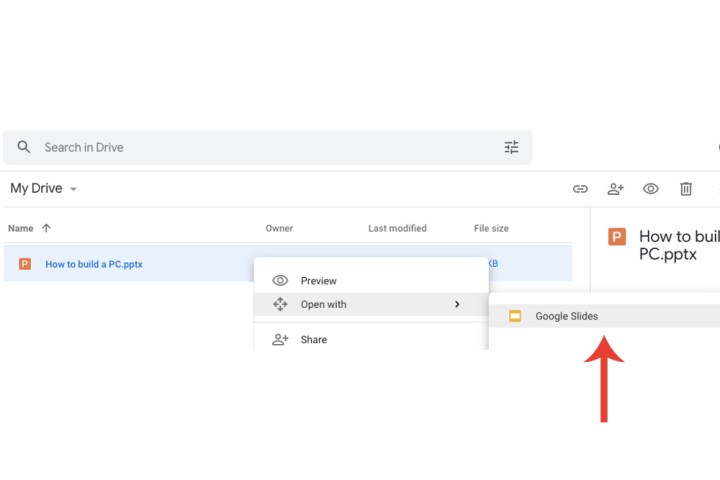
Opening a PowerPoint presentation file on Google Drive with the Google Slides tab.

Step 3: The PowerPoint will be displayed within Google Slides. Unlike uploading directly via Google Slides, you will have to save the file for this method. Select the File tab and click the Save As Google Slides option from the drop-down menu.
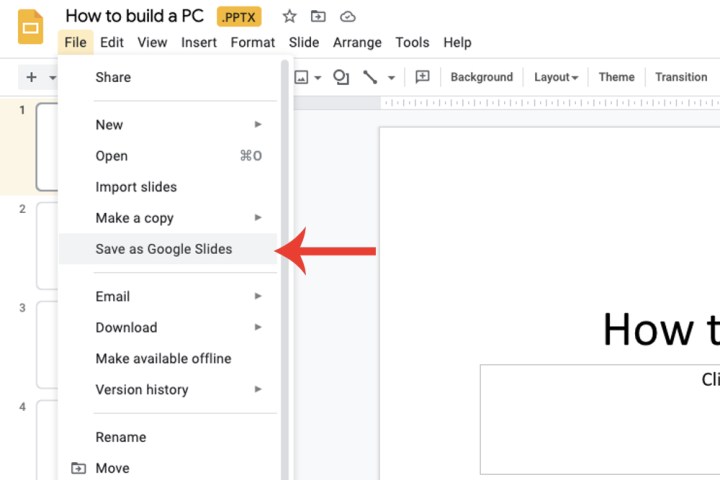
The tab to save a PowerPoint file as a Google Slides file.

Importing specific slides

Google Slides’ ability goes beyond just converting an entire PowerPoint file. You can also choose specific slides you want to import as opposed to the entire presentation itself.

Step 1: Open a new Google Slides presentation. Within the File tab, select the Import Slides option and then choose the Upload tab. Select the PowerPoint file from your PC.
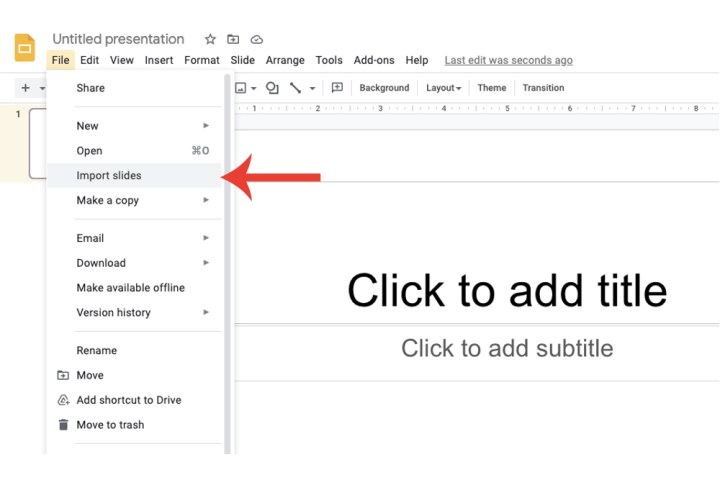
The Import Slides tab on Google Slides.

Step 2: Google will now populate a thumbnail-based view of all the slides contained within that PowerPoint file and allow you to select which specific ones you wish to import and convert. Click the Import Slides button when you’re done.
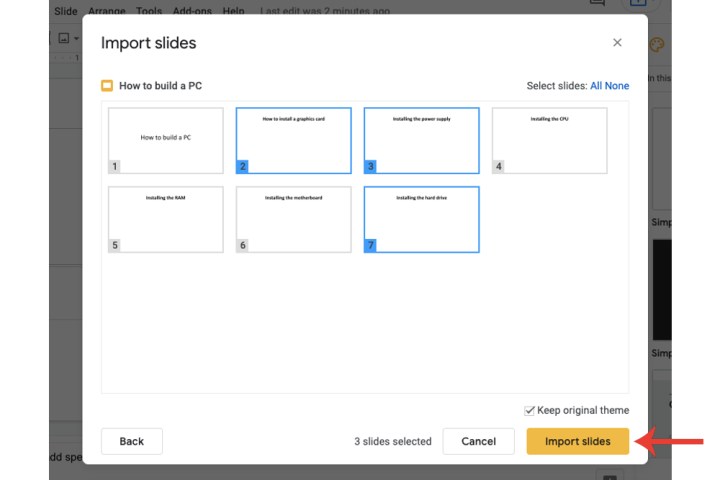
The area where you can select specific slides from a PowerPoint file to import into Google Slides.

While both presentation creation applications are powerful, if you don’t know the basics of composing impactful slides, your presentation will fall flat. Take a look at our collection of PowerPoint best practices — not only will it improve your presentations, it might help you decide which software to use.


Share. Facebook Twitter Pinterest LinkedIn Tumblr Email

Keep Reading

Lenovo AeroBlade imagines a laptop as thin as a foldable phone, thanks to solid-state cooling

Lenovo puts Nvidia RTX Spark into its new Yoga Pro laptops for local AI at IFA 2026

Motorola’s new Edge 70 Plus packs a 200MP camera and a massive battery

We got GTA VI limited-edition DualSense controllers before GTA VI

Anker unveils smarter chargers and power banks built to fight heat and battery degradation

Anker’s new Soundcore Sleep earbuds can mask snoring and even track your heart rate

TCL P80 series finally marries eye-friendly NXTPAPER tech with an AMOLED panel

Anker’s new MindBase wants to be the brain of your entire home security system

I found 5 cleaning deals worth sweeping up this Labor Day

Editors Picks

CASAGRAND APPOINTS JASEERA BUILDING CONTRACTING AS MAIN CONTRACTOR FOR CASAGRAND HERMINA AT DUBAI ISLANDS

October 13, 2026

Warrior Academy Jumeirah Islands Nears Capacity in 6 Months

October 13, 2026

‘Rogue AI’ Risk in UAE as 98% See Tools Breach Data Limits

October 13, 2026

ICBA Links Dubai Training to Field Practice in Uzbekistan

October 13, 2026

Subscribe to News

Get the latest UAE news and updates directly to your inbox.

Latest Posts

TCL is Official Display Partner of Red Bull Wings Cup in the UAE

October 13, 2026

Forbes Middle East to Host Fourth “Sustainability Leaders Summit”

October 13, 2026

SIF 2026 opens Wednesday with 80+ speakers exploring growth in the new global economy

October 13, 2026
Facebook X (Twitter) Pinterest TikTok Instagram
© 2026 Daily Guardian UAE. All Rights Reserved.
  • Privacy Policy
  • Terms
  • Advertise
  • Contact

Type above and press Enter to search. Press Esc to cancel.