

If you’ve never used Google Docs or Google Drive before, it’s completely free to get started, and there’s an entire world of web-connected features you’ll be able to use, both online and offline.
Your Google Docs dashboard can be optimized and organized by way of helpful filters, settings, and the classic PC tidy-up tool — digitized folders. Making a new folder in Google Docs is pretty simple, but we thought it best to create this step-by-step guide for reference. On top of detailed instructions, we’ll also answer some of your frequently asked questions about creating folders in Google Docs.
How to create a folder in Google Docs
Before we lay out the steps to do so, it’s important to highlight the fact that Google has decided to restrict folders exclusively to your Google Drive account. So when you do create a folder within Google Docs, remember its primary location will be situated within Drive instead of the former.
Alternatively, if you’re signed into Google Drive, you can click the New icon at the the top-left corner of the screen, then click New Folder. You can also upload one by clicking Upload folder.
Step 1: Open a new document or open an existing one within Google Docs.
Step 2: Next to the document’s title setting, a small folder button will appear that’s titled Move when hovering over it. Click that icon.
Step 3: Now select the New Folder button at the bottom of the window.
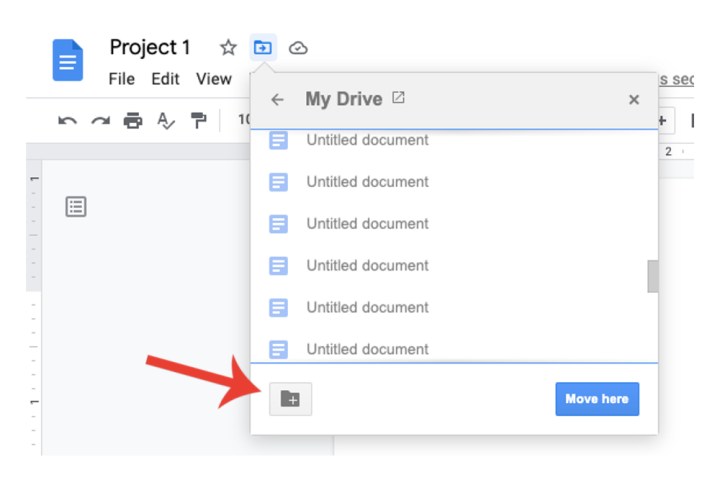
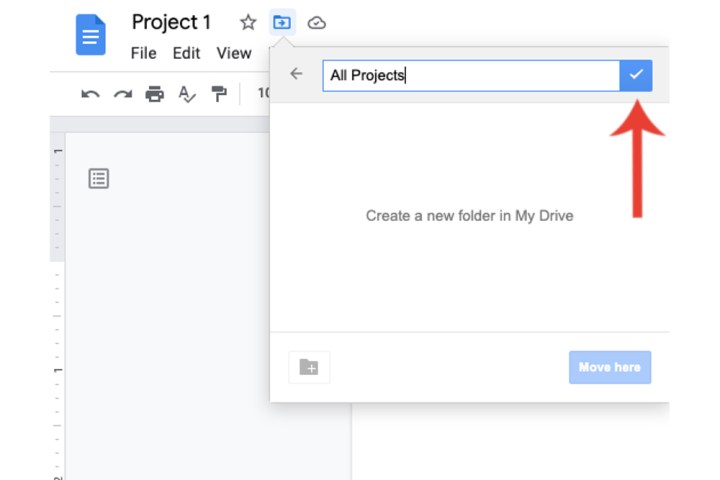
Step 4: The title of Untitled Folder will automatically be entered and highlighted in the title field. Type an appropriate name for your folder.
Step 5: Click the blue-tick icon box next to the title field.
Step 6: Select the Move Here button.

How to access folders in Google Docs
Now that you’ve created a folder in Google Docs, how do you access it? Conveniently, you don’t need to switch back and forth between Google Drive and Docs to do so.
Step 1: Head to the main home page of Google Docs where it lists all your documents. Next to the Grid View and Sort Options menus, click Open File Picker.

Step 2: Google Docs will now list all the folders contained within your Google Drive account. The Documents file type will automatically be selected. Select a folder where you saved your document to by double-clicking it or selecting it once and using the Open option at the bottom.
Here, you’ll see any files you moved to the folder. Double-click the document of your choice to open it within Google Docs.

How many folders can I make in Google Docs?
There’s no cap on how many folders you can make in Google Docs, but there is a limit on your Google account’s storage space. By default, every new Google user receives 15GB of cloud storage that is shared across Gmail, Google Drive, and Google Photos. Once this storage limit is met, you’ll need to either delete some files, or start transferring data to external flash drives, or HDDs.
How do I get more storage space on Google Drive?
You can add additional storage to your Google account by signing up for a Google One plan.
Right now, the Basic plan is only $0.49 per month for the first three months, then $1.99 per month for the rest of the year (or $20 annually). The Basic plan includes 100GB of storage, VPN access, and other Google benefits.
If you want even more storage, there’s also the Premium plan, which is currently marked down to $2.49 per month for the first three months, then $9.99 per month until year’s end (or $100 annually). Not only do you get 2TB of storage at this tier (in addition to all the same benefits as the Basic plan), but you’ll also be able to share your subscription with up to five other users.
For more tips on how to make the most of Google Docs, head over to our guide on how to use Google Docs.
Editors’ Recommendations