

Deactivating your Slack account is a good way to stop getting notifications or reminders from a service you no longer use — though you can always delete it if you want a more permanent solution. Slack might be a great tool for work and socializing, but if you no longer need it, there’s no harm in ditching it for something else.
Here’s how to quickly and easily deactivate (or delete) your Slack account in just a few short steps.
There are a number of reasons to stop using Slack, but if you’re running into one of these common Slack problems, it might be worth trying to fix it first. Want to just delete a few Slack messages? We have a guide to that too.
How to deactivate a Slack account
Have your Slack login information ready before you begin. You can log in either to the web app or the desktop client — these steps should work for both.
Step 1: Find your Profile picture in the upper-right corner of your Slack window and select it.
Step 2: In the dropdown menu, select Profile.
Step 3: Select the Three-dot button under your profile, aka the More option.
Step 4: Select Account settings.
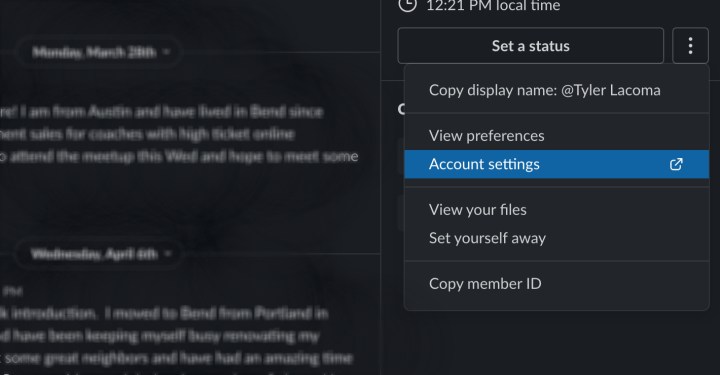
Step 5: You’ll then be taken to a new page with a variety of account info. Scroll down until you reach the button to Deactivate your account. Select it.
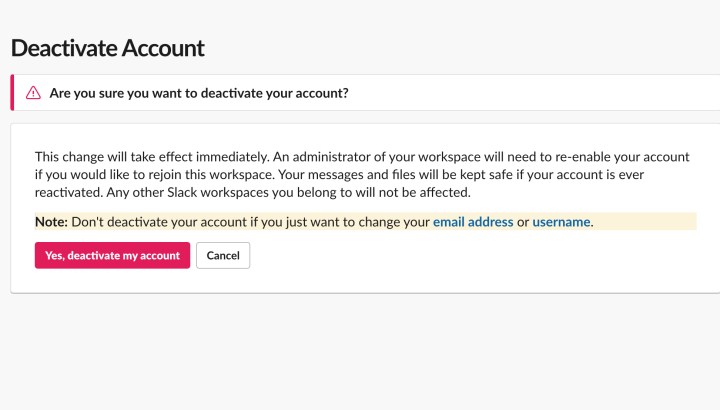
You’ll see that Slack gives you several important pieces of advice, including that you can contact the owner of this specific Slack workspace and request that they delete all your profile information entirely through their channels. If you want to fully remove your presence from this Slack, this is a good additional step to take when you’re done (more of the effects of deleting your account below).

Step 6: Confirm that you really do want to delete your account. Enter your account login and password again to finalize the choice. Your account will be immediately deactivated at this time.
What to know about deleting a Slack account
-
If you are simply switching to a new email, you don’t have to delete your Slack account entirely. There’s a Settings option to effortlessly replace the current email you use in Slack without losing anything. Likewise, you can also change your username at any time.
-
Deactivating your account like this will only delete it from this particular Slack workspace. If you have multiple Slacks, your other Slack accounts will remain intact; it will not affect them. If you want to delete yourself from Slack entirely, you’ll have to do it one at a time.
-
The reason it’s called “deactivating” instead of deleting is that your messages and files will remain part of the Slack workspace. An administrator for that workplace can reinstate your account – if, say, you end up coming back for another project at a later time. However, if you want to delete your messages, here’s how to clear our your Slack chatlog.
-
Slack can integrate with a variety of apps. If you have installed apps that work with Slack and then deactivate all your Slack accounts, those apps may no longer work, or at least not in the same way. Be prepared to log in a different way, or ask a Workspace Owner for specific allowances when it comes to apps that you’ll still need.
-
If you are a Primary Owner of a workspace, you can’t deactivate your account like this. For a workspace to exist, someone needs to be the Primary Owner. You will have to transfer Primary Ownership to another account or shut down the Slack space entirely.
Considering whether it’s worth it to stay with Slack? It’s always a good idea to examine your alternatives. Take a look at our guide on Slack versus Microsoft Teams to learn more.
Editors’ Recommendations