

The taste-testing season for Apple’s wave of next-gen software has already begun. Where iOS 18 went heavy on AI and generously lifted off from Android’s feature set, iPadOS 18 didn’t quite get the same kind of attention from Apple. Making the beastly M4-powered iPad Pro run more macOS-like workflows? Well, that didn’t happen. But the future still looks a tad brighter, thanks to Apple Intelligence.
If you are itching to try iPadOS 18 on your Apple tablet, it has never been easier to get an early build running on a compatible iPad. But here’s the standard disclaimer.
We’re talking about a developer beta here, which means you might run into some weird and unexpected bugs — battery drain being one of them. Needless to say, don’t install it on a machine that serves as your work companion. But if you’ve already made up your mind, follow these steps and dive straight into iPadOS.
iPads that can run the iPadOS 18 beta
The situation is a bit tricky this time around. All the below iPads will technically be able to run iPadOS 18, but not all of them will get the full experience. For example, the whole suite of Apple Intelligence features will require an iPad with at least an M-series processor, which means every mainline iPad, alongside those in the mini and Air series, which pack A-series silicon, are out of luck.
Below is the full list of machines that can boot iPadOS 18:
- iPad Pro (M4)
- iPad Pro 12.9-inch (3rd generation and later)
- iPad Pro 11-inch (1st generation and later)
- iPad Air (M2)
- iPad Air (3rd generation and later)
- iPad (7th generation and later)
- iPad mini (5th generation and later)
How to register for the iPadOS 18 Developer Beta?
As mentioned above, the test build Apple has released is only for developers, but you can still get it via a simple registration process that requires your Apple ID. If you are already registered with Apple’s beta-testing program, you don’t need to go through the registration process.
For folks who are installing a developer build for the first time, simply use the following steps to get your account ready for receiving the over-the-air (OTA) update:
Step 1: On your iPad, open the web browser of your choice and go to the Apple developer website (developer.apple.com).
Step 2: In the top-right corner of the page, select Account.
Step 3: Next, enter your Apple ID credentials to go through the Sign in to Apple Developer protocol and agree to the terms.
How to install iPadOS 18
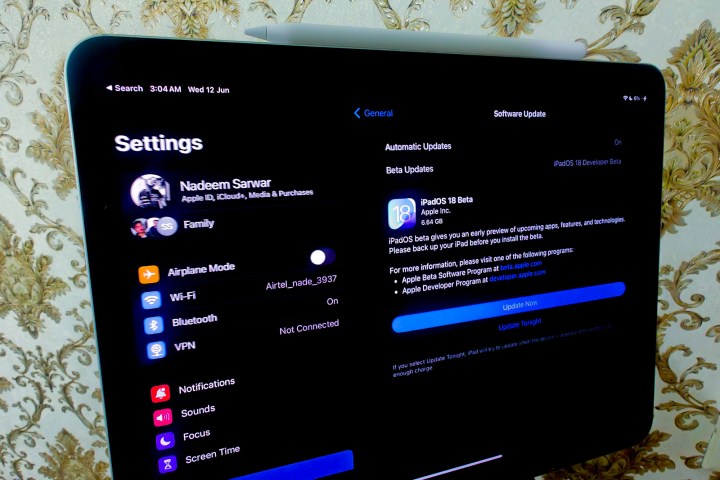
Once you’ve registered your Apple ID for beta software testing, you now have to download it like any other software update. Follow these steps to proceed:
Step 1: Open the Settings app on your compatible iPad.
Step 2: Scroll down and select General.
Step 3: On the General page, select Software update.
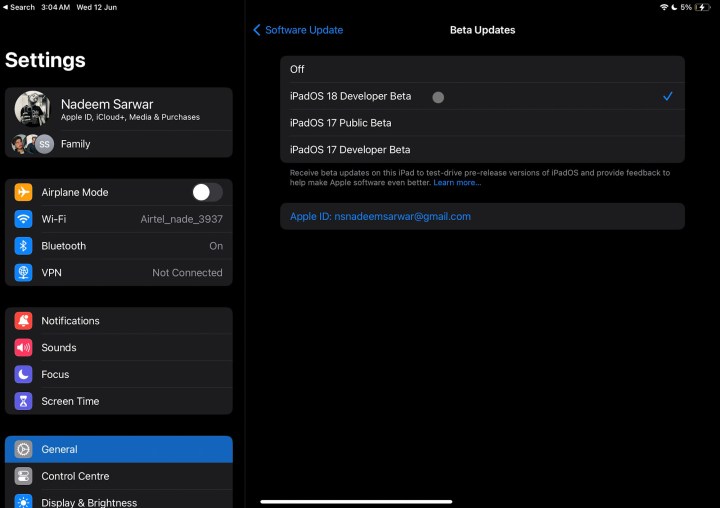
Step 4: On the next page, you will see Beta Updates.
Step 5: Select it, and then select iPadOS 18 Developer Beta.
Step 6: Go back to the General page. You will soon see an update window appear.
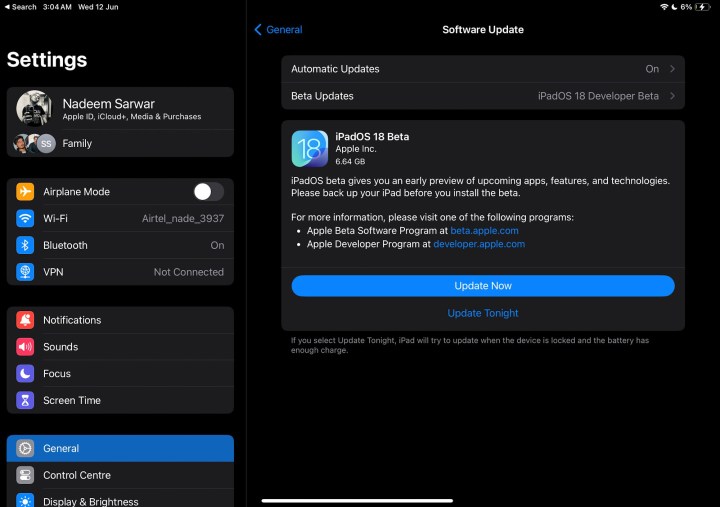
Step 7: Select the blue Update Now button, enter the device passcode, and iPadOS 18 Developer Beta will be installed on your tablet.
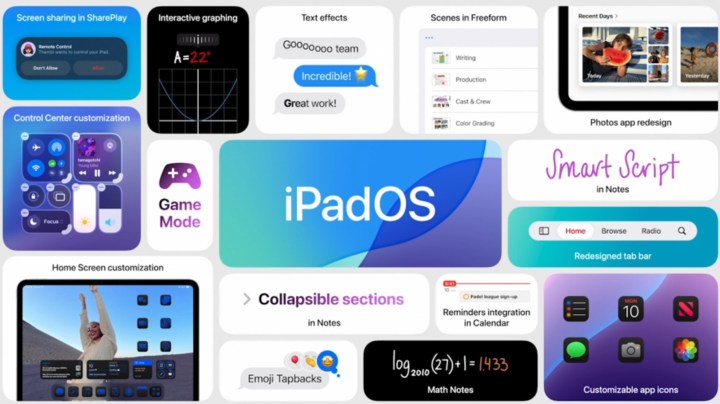
It looks like iPadOS 18 is shaping up to be a meaningful refresh of the tablet experience, one that puts more focus on functional benefits than a visual overhaul. It finally brings a calculator to Apple’s tablet portfolio. For the first time, third-party apps will integrate with Control Center. You can also now customize the lock screen shortcuts, such as the Flashlight and Camera, with your preferred default apps.
Additionally, a new floating tab bar is being introduced in some apps to enhance navigation. SharePlay is adding a screen-sharing feature that lets you tap and draw on another person’s screen and remotely control their iPad for tech support. One of the most innovative new features is Smart Script, which comes to life courtesy of machine learning wizardry.
As impressive as some of these features are, remember — iPadOS 18 is still in very early stages right now. If you want to throw caution to the wind and use it this instant, these are the steps to follow. But if you aren’t one for bugs, we’d recommend waiting for the public beta later this summer or the final release coming in the fall.
Editors’ Recommendations