
Daily Guardian UAEDaily Guardian UAE
  • Home
  • UAE
  • What’s On
  • Business
  • World
  • Entertainment
  • Lifestyle
  • Sports
  • Technology
  • Travel
  • Web Stories
  • More
    • Editor’s Picks
    • Press Release
What's On

Apple says users are snapping up Macs faster than ever and created a supply shortage

May 1, 2026

Xbox mode is landing on all Windows PCs, bringing a full-screen experience

May 1, 2026

Spotify adds verified artist badges so that you know you’re listening to a human, and not AI

May 1, 2026

Netflix gets its own “Clips” vertical video feed to lure you away from TikToks and Reels

May 1, 2026

INIU Pocket Rocket P50 Spring Deal: Compact Power for Everyday Use

May 1, 2026
Facebook X (Twitter) Instagram
Finance Pro
Facebook X (Twitter) Instagram
Daily Guardian UAE
Subscribe
  • Home
  • UAE
  • What’s On
  • Business
  • World
  • Entertainment
  • Lifestyle
  • Sports
  • Technology
  • Travel
  • Web Stories
  • More
    • Editor’s Picks
    • Press Release
Daily Guardian UAEDaily Guardian UAE
Home » How to download the Android 15 beta right now
Technology

How to download the Android 15 beta right now

By dailyguardian.aeApril 12, 20243 Mins Read
Share
Facebook Twitter LinkedIn Pinterest Email

Android 15, Google’s next major Android update, is now available for testing. Following a couple of developer previews launched earlier this year, Google released the first Android 15 beta on April 11 — making it available for anyone to try.

Although not a revolutionary update, there’s still plenty to like about Android 15. Thanks to its upgraded screen recording, powerful notification tools, and more, there are tons of Android 15 features for you to play around with.

If you want to download the Android 15 beta and try the software for yourself, here’s everything you need to know.

What devices can download the Android 15 beta?

Before you get too excited about downloading the Android 15 beta, you need to ensure you have a supported device.

As of right now, the Android 15 beta is only available for the following Google Pixel devices:

If you don’t have any of the above Pixels, you’re — unfortunately — out of luck. But if you do, the next steps for downloading Android 15 are incredibly simple.
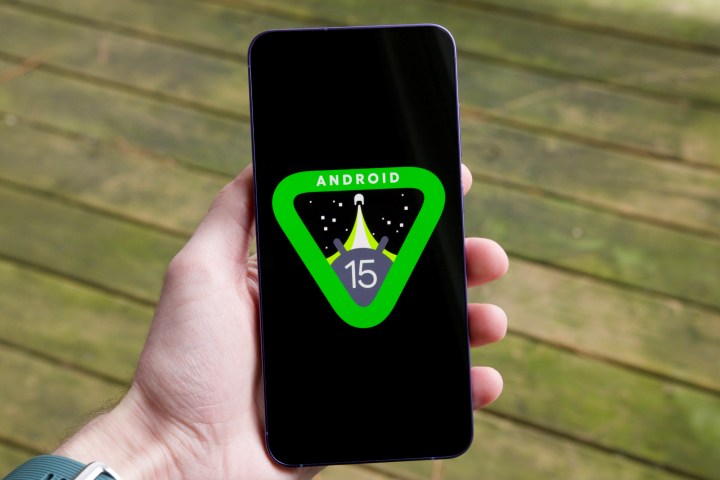
The Android 15 logo on a smartphone.

How to download the Android 15 beta

Assuming you have one of the above Pixels, here’s what you need to do to download the Android 15 beta:

Step 1: On your phone, open your web browser and go to the Android Beta Program website.

Step 2: Select View your eligible devices.

Step 3: Scroll down the page until you see your list of eligible devices.

Step 4: Select the blue Opt in button.
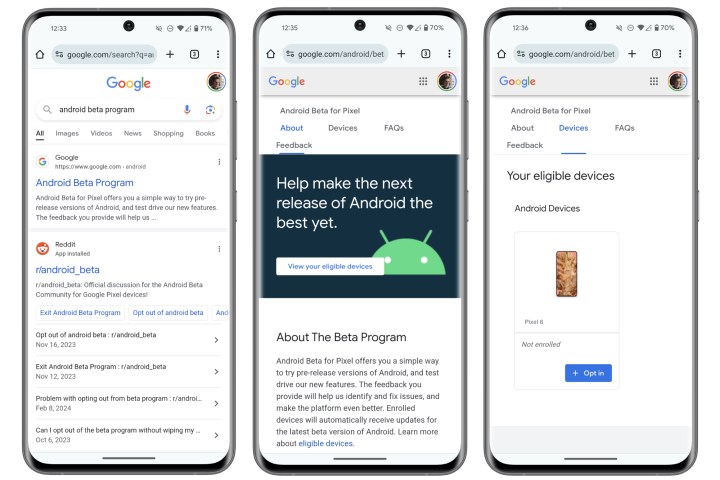
Screenshots of visiting the Android Beta Program website to download the Android 15 beta.

Step 5: Select the Confirm and enroll button.

Step 6: Select OK on the pop-up that appears.

Step 7: Go to the Settings app on your phone.

Step 8: Scroll down and select System.
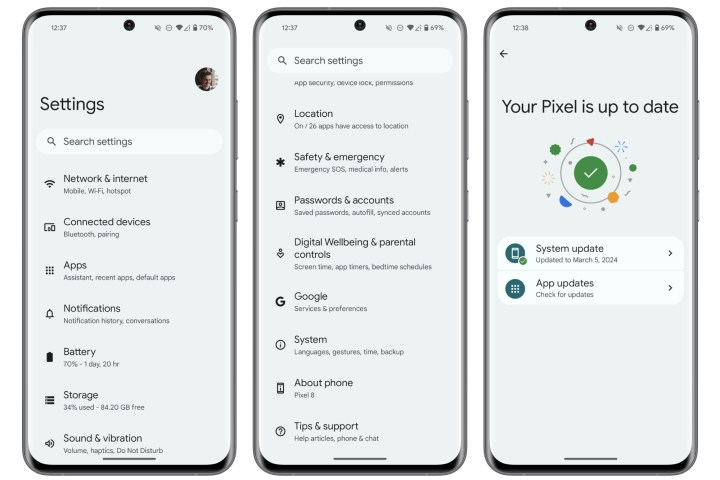
Screenshots of navigating the Settings app on a Pixel phone to download the Android 15 beta.

Step 9: Select Software updates.

Step 10: Select System update.

Step 11: Select Check for update.

Next, you should see the Android 15 beta appear as an available download.

Android 15 render.

Should you download the Android 15 beta?

Downloading the Android 15 beta is about as easy as it gets. But here’s an important question: Should you download the beta right now?

Although this version of Android 15 is more stable than the previous developer previews, be warned that this is still unfinished software. That means you’ll almost certainly experience bugs, worse performance, less battery life, etc. As such, we do not recommend installing the Android 15 beta on your primary device. If you have a spare Pixel lying around and want to see what’s going on, have at it. But if you rely on your Pixel as your one and only smartphone, we’d advise waiting until the final release later this year.

Android 15 is expected to receive three more beta updates between now and July, followed by the full release at some point later in 2024.

Editors’ Recommendations


Share. Facebook Twitter Pinterest LinkedIn Tumblr Email

Keep Reading

Apple says users are snapping up Macs faster than ever and created a supply shortage

Xbox mode is landing on all Windows PCs, bringing a full-screen experience

Spotify adds verified artist badges so that you know you’re listening to a human, and not AI

Netflix gets its own “Clips” vertical video feed to lure you away from TikToks and Reels

INIU Pocket Rocket P50 Spring Deal: Compact Power for Everyday Use

ChatGPT is going to stop talking about goblins and gremlins as it sheds”nerdy” persona

Meta’s creepiest lawsuit in recent years will make you rethink its AI smart glasses

The 6,000 mAh battery on the Razr Fold should worry Samsung and Google: Here’s why

Oxford study says a chummy AI friend will lie and feed into your false beliefs

Editors Picks

Xbox mode is landing on all Windows PCs, bringing a full-screen experience

May 1, 2026

Spotify adds verified artist badges so that you know you’re listening to a human, and not AI

May 1, 2026

Netflix gets its own “Clips” vertical video feed to lure you away from TikToks and Reels

May 1, 2026

INIU Pocket Rocket P50 Spring Deal: Compact Power for Everyday Use

May 1, 2026

Subscribe to News

Get the latest UAE news and updates directly to your inbox.

Latest Posts

ChatGPT is going to stop talking about goblins and gremlins as it sheds”nerdy” persona

May 1, 2026

Meta’s creepiest lawsuit in recent years will make you rethink its AI smart glasses

May 1, 2026

The 6,000 mAh battery on the Razr Fold should worry Samsung and Google: Here’s why

May 1, 2026
Facebook X (Twitter) Pinterest TikTok Instagram
© 2026 Daily Guardian UAE. All Rights Reserved.
  • Privacy Policy
  • Terms
  • Advertise
  • Contact

Type above and press Enter to search. Press Esc to cancel.