
Daily Guardian UAEDaily Guardian UAE
  • Home
  • UAE
  • What’s On
  • Business
  • World
  • Entertainment
  • Lifestyle
  • Sports
  • Technology
  • Travel
  • Web Stories
  • More
    • Editor’s Picks
    • Press Release
What's On

Save 57% on a Samsung Chromebook that’s great for school basics

January 7, 2026

Apple is planning a massive iPhone camera upgrade, but it’s years away

January 7, 2026

This snap-on accessory brings touch to your MacBook without breaking the bank

January 7, 2026

Al-Futtaim Unveils Al Badia Villas: Redefining Premium, Smart, and Sustainable Living in Dubai Festival City

January 7, 2026

Govee’s CES showcase shows smart lighting as part of everyday life

January 7, 2026
Facebook X (Twitter) Instagram
Finance Pro
Facebook X (Twitter) Instagram
Daily Guardian UAE
Subscribe
  • Home
  • UAE
  • What’s On
  • Business
  • World
  • Entertainment
  • Lifestyle
  • Sports
  • Technology
  • Travel
  • Web Stories
  • More
    • Editor’s Picks
    • Press Release
Daily Guardian UAEDaily Guardian UAE
Home » How to generate AI art right in Google Search
Technology

How to generate AI art right in Google Search

By dailyguardian.aeDecember 28, 20232 Mins Read
Share
Facebook Twitter LinkedIn Pinterest Email

After a year of different iterations and programs promising the best in AI-generated art, the easiest way to access your next text-to-image masterpiece might now be to Google it.

The brand’s Labs AI experimental hub has been available since the spring, and one of its most recent features allows you to input a query to generate an AI image directly into Google Search and have that image populate into results.

Enabling Google’s Search Generative Experience (SGE) allows you to accept AI-generated results in your search and in pages while browsing. Setting the feature up is simple and can be done on a Google Chrome browser on desktop or the Google app on mobile. Follow these easy steps to start creating AI-generated art directly from Google Search.

  • Visit the Labs website at labs.google.
  • Scroll down to the Google Search section and click Get Started.
  • Select the SGE, generative AI in Search toggle.

This option will likely be enabled by default if you need to install the Google Chrome browser or the Google app. However, you always have the option to turn the feature off when you’re not interested in participating in the AI experiment.

To use the generative AI feature, you only need to type your query into the search box at Google.com or the search box at the top of the browser. Using the default example prompt, “draw a picture of a capybara wearing a chef’s hat and cooking breakfast,” generated several unique images of the animals preparing breakfast foods.

In one generation, I got a more realistic image of a capybara in a chef’s hat and the animal making pancakes and waffles. Then, in a second generation, I got an image of a portrait of a capybara making eggs and another image of the animal making a smoothie.
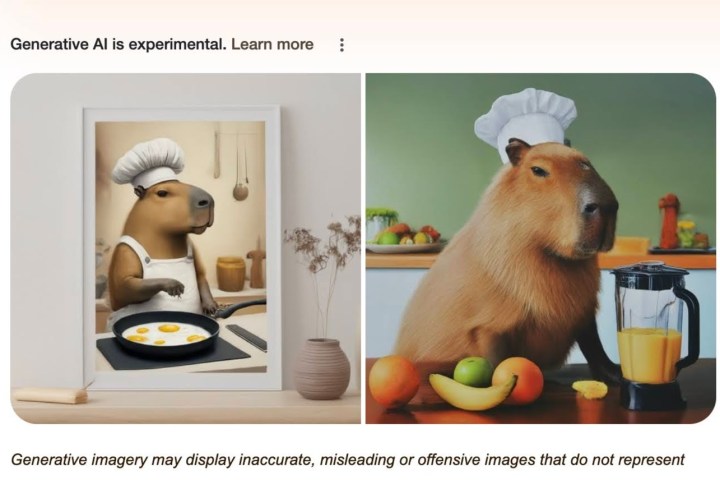
Capybara in a chef's hat prompt.

Clicking each image gives a description of the art and also notes that they are AI-generated. The main image results also note that generative AI is experimental and includes a warning of potential “inaccurate, misleading or offensive images.” You can then use the text box below to put follow-up questions and inquiries, similar to Microsoft Bing Chat.

To scroll beyond the AI image search, you get the standard Google Search results, including links referencing Google’s SGE and other AI image generation topics. You can imagine that the text and link search results you get will match the image query you inputted.

Editors’ Recommendations


Share. Facebook Twitter Pinterest LinkedIn Tumblr Email

Keep Reading

Save 57% on a Samsung Chromebook that’s great for school basics

Apple is planning a massive iPhone camera upgrade, but it’s years away

This snap-on accessory brings touch to your MacBook without breaking the bank

Govee’s CES showcase shows smart lighting as part of everyday life

You might soon be able to play mini games inside Threads DMs

This coin-sized recorder wants to remember your meetings for you

I’ve used the Galaxy TriFold and it solves a foldable phone issue I didn’t know I had

Your Zenbook A16 gets an 18-core Snapdragon X2 Elite Extreme

Acer’s Swift 16 AI touchpad could make your tablet optional

Editors Picks

Apple is planning a massive iPhone camera upgrade, but it’s years away

January 7, 2026

This snap-on accessory brings touch to your MacBook without breaking the bank

January 7, 2026

Al-Futtaim Unveils Al Badia Villas: Redefining Premium, Smart, and Sustainable Living in Dubai Festival City

January 7, 2026

Govee’s CES showcase shows smart lighting as part of everyday life

January 7, 2026

Subscribe to News

Get the latest UAE news and updates directly to your inbox.

Latest Posts

Shangri-La Announces Signing of New Luxury Resort in Bodrum, Turkey

January 7, 2026

You might soon be able to play mini games inside Threads DMs

January 7, 2026

NVIDIA CEO Jensen Huang Awarded 2026 IEEE Medal of Honor, Technology’s Most Prestigious Recognition

January 7, 2026
Facebook X (Twitter) Pinterest TikTok Instagram
© 2026 Daily Guardian UAE. All Rights Reserved.
  • Privacy Policy
  • Terms
  • Advertise
  • Contact

Type above and press Enter to search. Press Esc to cancel.