
Daily Guardian UAEDaily Guardian UAE
  • Home
  • UAE
  • What’s On
  • Business
  • World
  • Entertainment
  • Lifestyle
  • Sports
  • Technology
  • Travel
  • Web Stories
  • More
    • Editor’s Picks
    • Press Release
What's On

Laser chips promise faster, greener indoor wireless at gigabit speeds

April 6, 2026

Boots: No7 Good Intent Skincare Range

April 6, 2026

WhatsApp calls are about to get a lot better with noise cancellation

April 6, 2026

Malabar Gold & Diamonds Opens Largest Showroom in Vizag

April 6, 2026

Some of Samsung’s best new Galaxy S26 AI features are headed to the S25

April 6, 2026
Facebook X (Twitter) Instagram
Finance Pro
Facebook X (Twitter) Instagram
Daily Guardian UAE
Subscribe
  • Home
  • UAE
  • What’s On
  • Business
  • World
  • Entertainment
  • Lifestyle
  • Sports
  • Technology
  • Travel
  • Web Stories
  • More
    • Editor’s Picks
    • Press Release
Daily Guardian UAEDaily Guardian UAE
Home » How to log out of a Gmail account on your iPhone
Technology

How to log out of a Gmail account on your iPhone

By dailyguardian.aeJanuary 6, 20242 Mins Read
Share
Facebook Twitter LinkedIn Pinterest Email

If you have a Gmail account, you’ve probably checked it from your phone before. With our emails containing countless personal emails about our health, financial status, and hobbies, it’s good practice to log out sometimes, especially if you frequently let others borrow your phone.

Unfortunately, if you’ve accessed your Gmail account on your iPhone, you may have discovered something odd. It isn’t easy to log out. That’s frustrating, but we’ve got solutions.

Here’s how to log out of a Gmail account on your iPhone.

Removing your Gmail account from your iPhone

Yes, you read that right. The only way to successfully log out of your Gmail account on an iPhone is by removing the account from the device (this won’t delete the Gmail account itself).

Also, when you do remove your Gmail account, that account is removed from all other Google apps on the iPhone. For example, your account will no longer be signed into apps such as YouTube, Google Maps, and Google Drive.

Step 1: Open the Gmail app on your iPhone. Click your account’s Profile Picture located at the top-right of the screen within the search box.

Step 2: In the window that appears, select the Manage Accounts On This Device button at the bottom.

The Manage accounts on this device button for a Gmail account on an iPhone.

Step 3: Choose the account you want to log out of and click the Remove From This Device button. You may be logged into several Gmail accounts, so be sure to select the correct one.
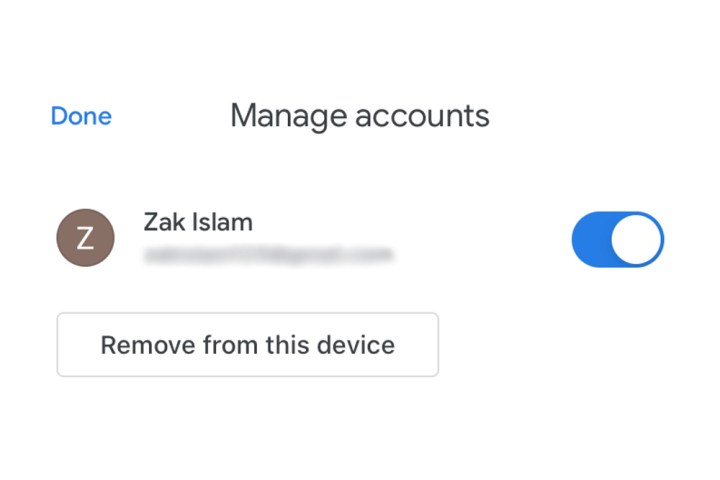
The Remove from this device button for a Gmail account on an iPhone.

Removing access to the Gmail account

If you don’t wish to log out with the method listed above but still want to disable access and notifications from the account, then tap the Blue Switch listed alongside your Gmail accounts. This will simply remove access for that particular account as long as that toggle is grayed out by tapping it. Simply click it again to reconnect your account to the iPhone.

If you’re looking to add multiple accounts to your iPhone’s Gmail app, check out our guide on how to do so. If you’ve yet to set up the app on your iPhone, we have a guide for that as well.

Editors’ Recommendations


Share. Facebook Twitter Pinterest LinkedIn Tumblr Email

Keep Reading

Laser chips promise faster, greener indoor wireless at gigabit speeds

WhatsApp calls are about to get a lot better with noise cancellation

Some of Samsung’s best new Galaxy S26 AI features are headed to the S25

Google’s latest Play Store fix cuts through messy app reviews

iPhone 17 Pro Max shoots stunning photos from a Moon mission

Save $130 on the Samsung Galaxy Watch 8 Classic: rotating bezel, sleep coaching, and running coach for $369

Samsung’s older Galaxy flagships could soon share files with iPhones the easy way

This mini PC is 26% off, and the spec sheet makes most full-size desktops at this price look wasteful

One of the best TV deals available right now: Samsung’s 65-inch QD-OLED S84F at $949 with $1,050 off

Editors Picks

Boots: No7 Good Intent Skincare Range

April 6, 2026

WhatsApp calls are about to get a lot better with noise cancellation

April 6, 2026

Malabar Gold & Diamonds Opens Largest Showroom in Vizag

April 6, 2026

Some of Samsung’s best new Galaxy S26 AI features are headed to the S25

April 6, 2026

Subscribe to News

Get the latest UAE news and updates directly to your inbox.

Latest Posts

KEZAD Group Attracts AED 147 Million in New Projects Across Al Ain and Abu Dhabi

April 6, 2026

Google’s latest Play Store fix cuts through messy app reviews

April 6, 2026

FANOOS BANGALORE — SINCE 1975

April 6, 2026
Facebook X (Twitter) Pinterest TikTok Instagram
© 2026 Daily Guardian UAE. All Rights Reserved.
  • Privacy Policy
  • Terms
  • Advertise
  • Contact

Type above and press Enter to search. Press Esc to cancel.