
Daily Guardian UAEDaily Guardian UAE
  • Home
  • UAE
  • What’s On
  • Business
  • World
  • Entertainment
  • Lifestyle
  • Sports
  • Technology
  • Travel
  • Web Stories
  • More
    • Editor’s Picks
    • Press Release
What's On

Instagram is getting rid of its most secure chatting feature

March 14, 2026

Your PC could soon play old Xbox and Xbox 360 games officially

March 14, 2026

Honda faces first loss in 70 years after killing three EV models

March 14, 2026

Motorola’s latest Edge model adds telephoto zoom and a faster Snapdragon chip

March 14, 2026

Google and Samsung built a tool to boost the gaming experience on your phone

March 14, 2026
Facebook X (Twitter) Instagram
Finance Pro
Facebook X (Twitter) Instagram
Daily Guardian UAE
Subscribe
  • Home
  • UAE
  • What’s On
  • Business
  • World
  • Entertainment
  • Lifestyle
  • Sports
  • Technology
  • Travel
  • Web Stories
  • More
    • Editor’s Picks
    • Press Release
Daily Guardian UAEDaily Guardian UAE
Home » How to log out of a Gmail account on your iPhone
Technology

How to log out of a Gmail account on your iPhone

By dailyguardian.aeJanuary 6, 20242 Mins Read
Share
Facebook Twitter LinkedIn Pinterest Email

If you have a Gmail account, you’ve probably checked it from your phone before. With our emails containing countless personal emails about our health, financial status, and hobbies, it’s good practice to log out sometimes, especially if you frequently let others borrow your phone.

Unfortunately, if you’ve accessed your Gmail account on your iPhone, you may have discovered something odd. It isn’t easy to log out. That’s frustrating, but we’ve got solutions.

Here’s how to log out of a Gmail account on your iPhone.

Removing your Gmail account from your iPhone

Yes, you read that right. The only way to successfully log out of your Gmail account on an iPhone is by removing the account from the device (this won’t delete the Gmail account itself).

Also, when you do remove your Gmail account, that account is removed from all other Google apps on the iPhone. For example, your account will no longer be signed into apps such as YouTube, Google Maps, and Google Drive.

Step 1: Open the Gmail app on your iPhone. Click your account’s Profile Picture located at the top-right of the screen within the search box.

Step 2: In the window that appears, select the Manage Accounts On This Device button at the bottom.

The Manage accounts on this device button for a Gmail account on an iPhone.

Step 3: Choose the account you want to log out of and click the Remove From This Device button. You may be logged into several Gmail accounts, so be sure to select the correct one.
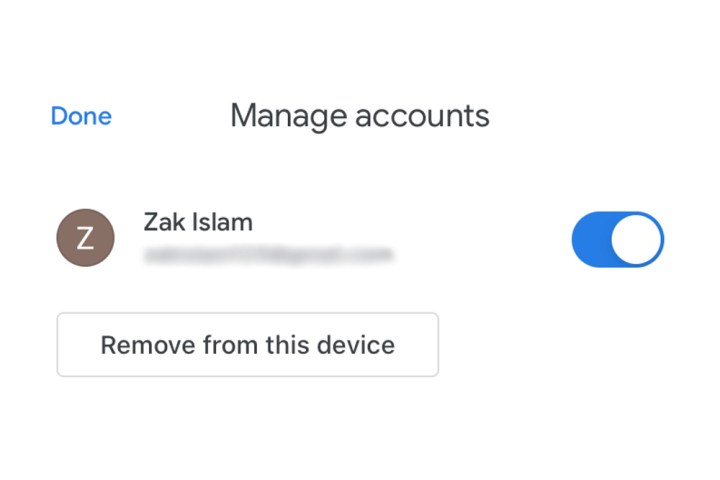
The Remove from this device button for a Gmail account on an iPhone.

Removing access to the Gmail account

If you don’t wish to log out with the method listed above but still want to disable access and notifications from the account, then tap the Blue Switch listed alongside your Gmail accounts. This will simply remove access for that particular account as long as that toggle is grayed out by tapping it. Simply click it again to reconnect your account to the iPhone.

If you’re looking to add multiple accounts to your iPhone’s Gmail app, check out our guide on how to do so. If you’ve yet to set up the app on your iPhone, we have a guide for that as well.

Editors’ Recommendations


Share. Facebook Twitter Pinterest LinkedIn Tumblr Email

Keep Reading

Instagram is getting rid of its most secure chatting feature

Your PC could soon play old Xbox and Xbox 360 games officially

Honda faces first loss in 70 years after killing three EV models

Motorola’s latest Edge model adds telephoto zoom and a faster Snapdragon chip

Google and Samsung built a tool to boost the gaming experience on your phone

Samsung Galaxy phones now show which apps work on a satellite network when you’re off the grid

For the forgetful among us, this robot will find everything you misplace

The LG C5 OLED is a gorgeous, if increasingly niche TV.

Samsung’s new Galaxy Z Flip 8 might be a battery bummer

Editors Picks

Your PC could soon play old Xbox and Xbox 360 games officially

March 14, 2026

Honda faces first loss in 70 years after killing three EV models

March 14, 2026

Motorola’s latest Edge model adds telephoto zoom and a faster Snapdragon chip

March 14, 2026

Google and Samsung built a tool to boost the gaming experience on your phone

March 14, 2026

Subscribe to News

Get the latest UAE news and updates directly to your inbox.

Latest Posts

Samsung Galaxy phones now show which apps work on a satellite network when you’re off the grid

March 14, 2026

For the forgetful among us, this robot will find everything you misplace

March 14, 2026

The LG C5 OLED is a gorgeous, if increasingly niche TV.

March 14, 2026
Facebook X (Twitter) Pinterest TikTok Instagram
© 2026 Daily Guardian UAE. All Rights Reserved.
  • Privacy Policy
  • Terms
  • Advertise
  • Contact

Type above and press Enter to search. Press Esc to cancel.