

Amazon Fire TV devices are among the best streaming devices you can buy. They’re reliable, easy to use, and they offer access to the movies, TV shows, and sports content we love, all with a few button clicks on a slim and trusty Fire TV remote. But every now and then, you might find that you need to reset your Amazon Fire TV remote. Never mind why. It happens (but hopefully not too often). The reason doesn’t matter.
The good news is that it’s simple to reset an Amazon Fire TV remote. So much so that it made our list of the most common Amazon Fire TV stick issues. (And how to fix them.)
But it’s important enough that we’re going to break it out on its own. Here’s how to reset an Amazon Fire TV remote control.
How to reset most Fire TV remotes
There actually are a few versions of Amazon Fire TV remote out in the wild. (You’ll also hear them referred to as Alexa remotes.) This should work for the Alexa Voice Remote Pro, the third-generation Fire TV remote, and the second-generation Alexa Voice Remote Lite.
Step 1: Unplug your Fire TV’s power cable and then wait 1 minute. Count out loud. It’s more fun.
Step 2: Press and hold the Left button, the Menu button (that’s the one with three lines), and the Back button — all at the same time. Hold them for 12 seconds. Again, count out loud.
Step 3: Let go of all three buttons and wait 5 seconds. Count in Spanish this time for a change of pace.
Step 4: Now take the batteries out of the remote.
Step 5: Plug your Fire TV device back in and let it reboot.
Step 6: Once it boots up and complains about not having a remote control connected, put the batteries back in your remote control.
Step 7: Now, press the Home button on your remote. Once you see the light on the remote control blink blue, you should be good to go. If it doesn’t, press and hold the Home button on the remote for 10 seconds. Count to yourself this time.
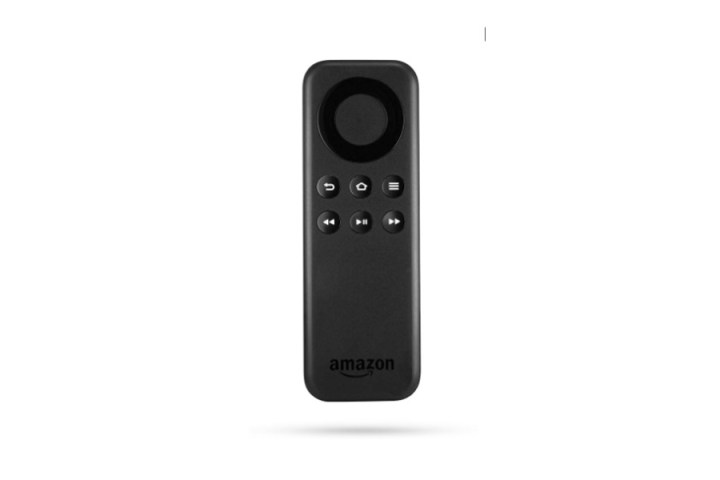
If you have a Basic Edition Remote
This method is basically the same as above, just a little different because the buttons are a little different.
Step 1: Press and hold the Home button. At the same time, press the Menu button (with the three lines on it) three times.
Step 2: Release the Home button.
Step 3: Now press the Menu button nine times. Count out loud as you do so.
Step 4: Take the batteries out of the remote.
Step 5: Unplug your Fire TV device. Wait 60 seconds.
Step 6: Put the batteries back in your remote, and plug your Fire TV device back in.
Step 7: Once the home screen appears, press and hold the Home button for 40 seconds.

If you have a first-generation Alexa Voice Remote
Here’s how to reset a first-generation Alexa Voice Remote.
Step 1: Unplug your Fire TV device and wait 60 seconds.
Step 2: Press the Left button and Menu button at the same time and hold them for 12 seconds.
Step 3: Release the buttons and count to five.
Step 4: Take the batteries out of the remote.
Step 5: Plug your Fire TV device back in.
Step 6: Once it complains about not seeing a remote control, put the batteries back in your remote.
Step 7: Press the Home button. If the remote still isn’t paired, hold down the Home button for 10 seconds.
Frequently asked questions
How do you reset a Fire Stick?
If your trouble comes from an Amazon Fire Stick and not the remote, that’s easy to fix as well. According to our Fire TV Stick resetting guide, you can easily factory reset your Fire Stick from the My Fire TV section of the device’s settings. Be sure to check out the guide for more specific advice.
How do I resync my Fire TV remote?
If you have a desynced Fire TV remote, the easiest way to resync it is to hold the Home button on the remote for 10 seconds while you have the Amazon Fire TV Remotes section of the Fire TV app’s settings open. This section is found under Controllers & Bluetooth Devices.
Which Fire TV device is best?
Fire TV devices come in a variety of forms, from stick and cubes to TVs. The best device for you depends on the quality of your current setup. For example, if you already have one of the best TVs, you won’t want a Fire TV. Check out our consistently updated guide to the best Fire TV devices of each type to get a better idea of what is for you.
Editors’ Recommendations