
Daily Guardian UAEDaily Guardian UAE
  • Home
  • UAE
  • What’s On
  • Business
  • World
  • Entertainment
  • Lifestyle
  • Sports
  • Technology
  • Travel
  • Web Stories
  • More
    • Editor’s Picks
    • Press Release
What's On

Claude is leveling up against Gemini and ChatGPT with powerful free tools

February 13, 2026

Chatbots rated more empathetic than humans in controlled tests

February 13, 2026

GEBO Armaturen Accelerates Global Growth with Strategic MEA Hub and Asia-Pacific Market Entry

February 13, 2026

This could be our first look at Samsung’s upcoming wide foldable phone

February 13, 2026

YUKA Gymkhana Challenge Brings a New Racing Format to Yas Marina Circuit

February 13, 2026
Facebook X (Twitter) Instagram
Finance Pro
Facebook X (Twitter) Instagram
Daily Guardian UAE
Subscribe
  • Home
  • UAE
  • What’s On
  • Business
  • World
  • Entertainment
  • Lifestyle
  • Sports
  • Technology
  • Travel
  • Web Stories
  • More
    • Editor’s Picks
    • Press Release
Daily Guardian UAEDaily Guardian UAE
Home » How to sign up for Apple Intelligence features in iOS 18.1
Technology

How to sign up for Apple Intelligence features in iOS 18.1

By dailyguardian.aeNovember 2, 20242 Mins Read
Share
Facebook Twitter LinkedIn Pinterest Email

One of the biggest features in iOS 18 is Apple Intelligence. However, while the iPhone 16 line launched with iOS 18 out of the box, Apple Intelligence wasn’t ready quite yet. Now, the latest iOS 18.1 update finally brings those AI goodies to your compatible iPhone.

Of course, you may have updated and tried to use those Apple Intelligence features, but can’t seem to get them to work. That’s because you have to sign up for them before they’re available to you.

Here’s how to sign up for Apple Intelligence on your eligible iPhone. Remember, Apple Intelligence is only available on the iPhone 15 Pro, iPhone 15 Pro Max, and the iPhone 16 lineup.

Apple Intelligence & Siri screen on an iPhone 16 Pro

How to join the waitlist for Apple Intelligence on your iPhone

In order to get Apple Intelligence, you need to make sure you update your iPhone to iOS 18.1. Then do the following:

Step 1: Launch Settings on your iPhone.

Step 2: Select Apple Intelligence & Siri.
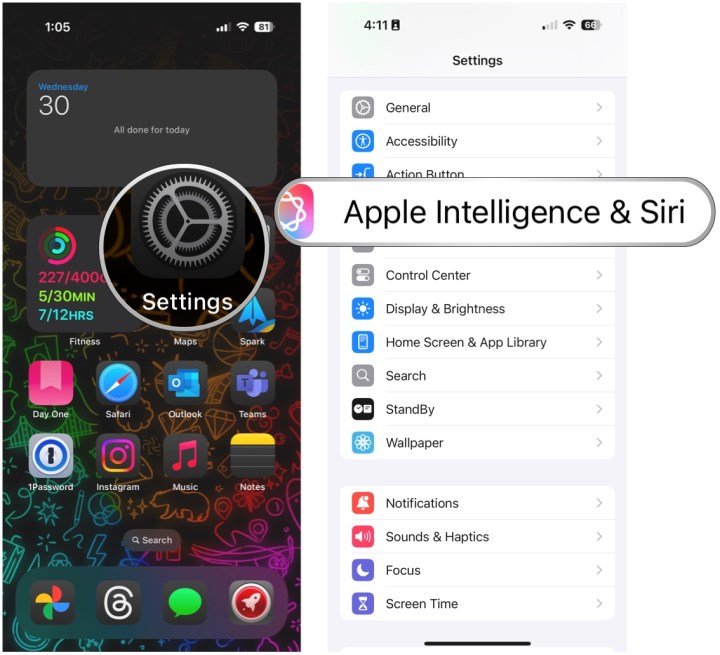
Open Settings, select Apple Intelligence & Siri.

Step 3: Select Join the Apple Intelligence waitlist.

Step 4: Select Join waitlist.

Select Join Apple Intelligence Waitlist, then Join Waitlist.

Step 5: Once you are on the waitlist, you will receive a notification once it’s ready.

Apple Intelligence Summaries on an iPhone 16 Pro

How to turn on Apple Intelligence

Once you are off the waitlist, you still have to manually turn Apple Intelligence on.

Step 1: Launch Settings on your iPhone.

Step 2: Select Apple Intelligence & Siri.

Step 3: Select Turn on Apple Intelligence.

Open Settings, select Apple Intelligence & Siri, select Turn on Apple Intelligence

Step 4: Select Continue.

Step 5: Select Summarize all notification previews if you want, or Not now if you don’t.

Step 6: Select Continue on the Siri screen.

Select Continue, select Summarize All Notifications or Not Now, select Continue.

Step 7: Select Continue again.

Step 8: Select Continue on the Type to Siri screen.

Step 9: Make sure the toggle for Apple Intelligence is set to On. If you change your mind, just turn it off.

Select Continue, select Continue, then make sure the Apple Intelligence toggle is ON. Change it to off if you don't want to use it.


Share. Facebook Twitter Pinterest LinkedIn Tumblr Email

Keep Reading

Claude is leveling up against Gemini and ChatGPT with powerful free tools

Chatbots rated more empathetic than humans in controlled tests

This could be our first look at Samsung’s upcoming wide foldable phone

Meta’s smart glasses could soon identify people in real time

Death Stranding 2 for PC finally has a release date, with new modes at launch

Diesel’s new wired earphones look better suited for denims than your ears

Hackers are using Gemini to target you, Google says

Windows 11 adds a new secure mode that blocks sketchy apps and drivers

The Vision Pro YouTube app is here and it fixes the biggest annoyances

Editors Picks

Chatbots rated more empathetic than humans in controlled tests

February 13, 2026

GEBO Armaturen Accelerates Global Growth with Strategic MEA Hub and Asia-Pacific Market Entry

February 13, 2026

This could be our first look at Samsung’s upcoming wide foldable phone

February 13, 2026

YUKA Gymkhana Challenge Brings a New Racing Format to Yas Marina Circuit

February 13, 2026

Subscribe to News

Get the latest UAE news and updates directly to your inbox.

Latest Posts

Meta’s smart glasses could soon identify people in real time

February 13, 2026

The Future Leaders Challenge 2026 Concludes in Dubai

February 13, 2026

Death Stranding 2 for PC finally has a release date, with new modes at launch

February 13, 2026
Facebook X (Twitter) Pinterest TikTok Instagram
© 2026 Daily Guardian UAE. All Rights Reserved.
  • Privacy Policy
  • Terms
  • Advertise
  • Contact

Type above and press Enter to search. Press Esc to cancel.