
Daily Guardian UAEDaily Guardian UAE
  • Home
  • UAE
  • What’s On
  • Business
  • World
  • Entertainment
  • Lifestyle
  • Sports
  • Technology
  • Travel
  • Web Stories
  • More
    • Editor’s Picks
    • Press Release
What's On

SEHA, part of PureHealth, Partners with Germany’s Schoen Clinic Group to Transform Rehabilitation Care in the UAE and Gulf

February 13, 2026

Windows 11 adds a new secure mode that blocks sketchy apps and drivers

February 13, 2026

MAIR Group Announces Unaudited Preliminary Financial Results for FY 2025

February 13, 2026

The Vision Pro YouTube app is here and it fixes the biggest annoyances

February 13, 2026

God of War trilogy remake is real, and it’s finally happening

February 13, 2026
Facebook X (Twitter) Instagram
Finance Pro
Facebook X (Twitter) Instagram
Daily Guardian UAE
Subscribe
  • Home
  • UAE
  • What’s On
  • Business
  • World
  • Entertainment
  • Lifestyle
  • Sports
  • Technology
  • Travel
  • Web Stories
  • More
    • Editor’s Picks
    • Press Release
Daily Guardian UAEDaily Guardian UAE
Home » How to sign up for Apple Intelligence features in iOS 18.1
Technology

How to sign up for Apple Intelligence features in iOS 18.1

By dailyguardian.aeNovember 2, 20242 Mins Read
Share
Facebook Twitter LinkedIn Pinterest Email

One of the biggest features in iOS 18 is Apple Intelligence. However, while the iPhone 16 line launched with iOS 18 out of the box, Apple Intelligence wasn’t ready quite yet. Now, the latest iOS 18.1 update finally brings those AI goodies to your compatible iPhone.

Of course, you may have updated and tried to use those Apple Intelligence features, but can’t seem to get them to work. That’s because you have to sign up for them before they’re available to you.

Here’s how to sign up for Apple Intelligence on your eligible iPhone. Remember, Apple Intelligence is only available on the iPhone 15 Pro, iPhone 15 Pro Max, and the iPhone 16 lineup.

Apple Intelligence & Siri screen on an iPhone 16 Pro

How to join the waitlist for Apple Intelligence on your iPhone

In order to get Apple Intelligence, you need to make sure you update your iPhone to iOS 18.1. Then do the following:

Step 1: Launch Settings on your iPhone.

Step 2: Select Apple Intelligence & Siri.
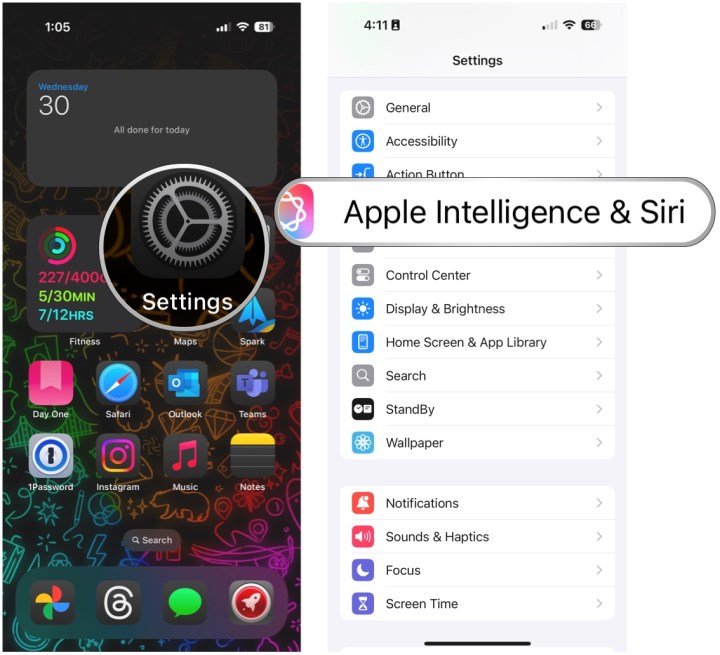
Open Settings, select Apple Intelligence & Siri.

Step 3: Select Join the Apple Intelligence waitlist.

Step 4: Select Join waitlist.

Select Join Apple Intelligence Waitlist, then Join Waitlist.

Step 5: Once you are on the waitlist, you will receive a notification once it’s ready.

Apple Intelligence Summaries on an iPhone 16 Pro

How to turn on Apple Intelligence

Once you are off the waitlist, you still have to manually turn Apple Intelligence on.

Step 1: Launch Settings on your iPhone.

Step 2: Select Apple Intelligence & Siri.

Step 3: Select Turn on Apple Intelligence.

Open Settings, select Apple Intelligence & Siri, select Turn on Apple Intelligence

Step 4: Select Continue.

Step 5: Select Summarize all notification previews if you want, or Not now if you don’t.

Step 6: Select Continue on the Siri screen.

Select Continue, select Summarize All Notifications or Not Now, select Continue.

Step 7: Select Continue again.

Step 8: Select Continue on the Type to Siri screen.

Step 9: Make sure the toggle for Apple Intelligence is set to On. If you change your mind, just turn it off.

Select Continue, select Continue, then make sure the Apple Intelligence toggle is ON. Change it to off if you don't want to use it.


Share. Facebook Twitter Pinterest LinkedIn Tumblr Email

Keep Reading

Windows 11 adds a new secure mode that blocks sketchy apps and drivers

The Vision Pro YouTube app is here and it fixes the biggest annoyances

God of War trilogy remake is real, and it’s finally happening

iPhones might soon get an utterly powerful AI feature

Sony WF-1000XM6 vs Bose QuietComfort Ultra vs AirPods Pro: Which earbuds are right for you?

Microsoft says your AI agent can become a double agent

Watch NASA’s trailer for imminent crewed launch to ISS

This is the “buy it once” video doorbell deal worth considering

A $319 mini PC with a Ryzen PRO chip is a sneaky-good way to upgrade a desk setup

Editors Picks

Windows 11 adds a new secure mode that blocks sketchy apps and drivers

February 13, 2026

MAIR Group Announces Unaudited Preliminary Financial Results for FY 2025

February 13, 2026

The Vision Pro YouTube app is here and it fixes the biggest annoyances

February 13, 2026

God of War trilogy remake is real, and it’s finally happening

February 13, 2026

Subscribe to News

Get the latest UAE news and updates directly to your inbox.

Latest Posts

iPhones might soon get an utterly powerful AI feature

February 13, 2026

Sony WF-1000XM6 vs Bose QuietComfort Ultra vs AirPods Pro: Which earbuds are right for you?

February 13, 2026

Microsoft says your AI agent can become a double agent

February 13, 2026
Facebook X (Twitter) Pinterest TikTok Instagram
© 2026 Daily Guardian UAE. All Rights Reserved.
  • Privacy Policy
  • Terms
  • Advertise
  • Contact

Type above and press Enter to search. Press Esc to cancel.