
Daily Guardian UAEDaily Guardian UAE
  • Home
  • UAE
  • What’s On
  • Business
  • World
  • Entertainment
  • Lifestyle
  • Sports
  • Technology
  • Travel
  • Web Stories
  • More
    • Editor’s Picks
    • Press Release
What's On

Microsoft makes theming your Windows 11 PC as easy as phones, but not as much fun

December 13, 2025

Here’s why an INIU charger is the perfect Christmas gift for a tech-lover

December 13, 2025

Stay warm this winter, spend less: Boldr’s Kelvin Smart Heater is up to 25% off

December 13, 2025

Save 15% on the small but mighty Pocket Rocket, a powerful power bank packed with tech

December 13, 2025

بن غاطي” تبيع أغلى بنتهاوس في الشرق الأوسط بمشروع “بوغاتي ريزيدنسز” بقيمة 550 مليون درهم

December 13, 2025
Facebook X (Twitter) Instagram
Finance Pro
Facebook X (Twitter) Instagram
Daily Guardian UAE
Subscribe
  • Home
  • UAE
  • What’s On
  • Business
  • World
  • Entertainment
  • Lifestyle
  • Sports
  • Technology
  • Travel
  • Web Stories
  • More
    • Editor’s Picks
    • Press Release
Daily Guardian UAEDaily Guardian UAE
Home » How to turn on Eco Mode for AMD CPUs — and why you should
Technology

How to turn on Eco Mode for AMD CPUs — and why you should

By dailyguardian.aeJanuary 14, 20243 Mins Read
Share
Facebook Twitter LinkedIn Pinterest Email

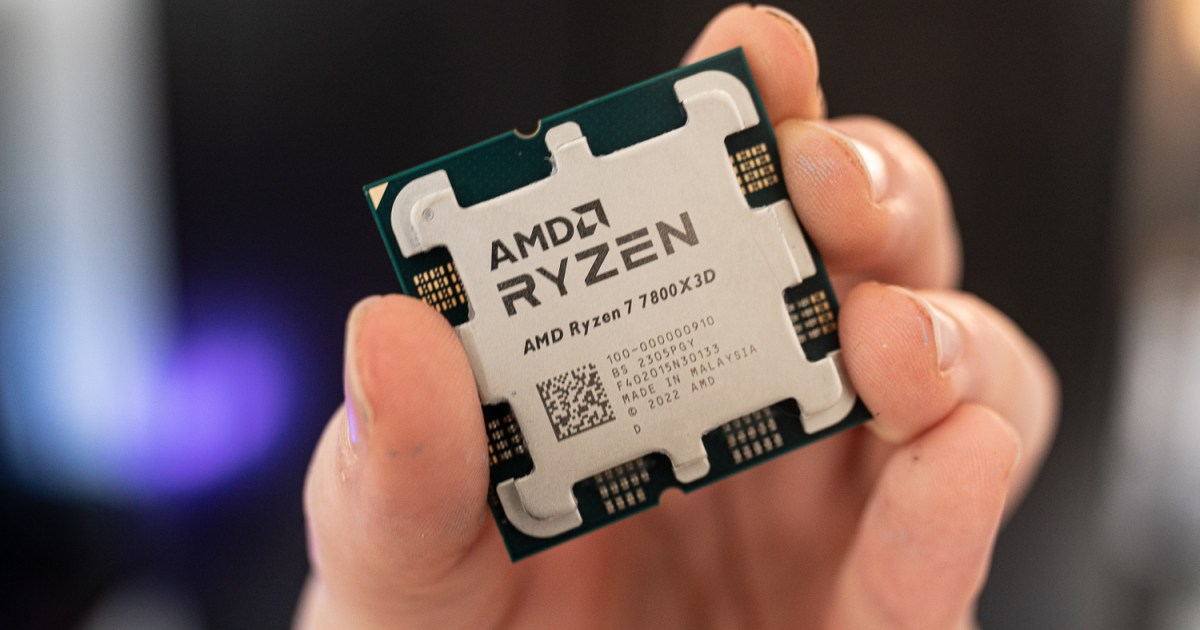
AMD Ryzen 7000 processors are amazing. The 7800X3D and 7950X3D are the best gaming CPUs in the world, and the non-X3D versions offer an amazing mix of gaming performance and productivity. But there’s one feature of these CPUs that’s often overlooked: Eco Mode. This power limiting command does impact performance, but not as much as you think, and it craters the processors’ power draw, making them even more incredibly efficient.

Turning on Eco mode is a great way to reduce temperatures while maintaining the majority of your chip’s performance. Here’s how to enable it.

How to enable Eco mode with Ryzen Master

The easiest way to enable Eco Mode on your Ryzen 7000 CPU is to use AMD’s Ryzen Master overclocking tool.

Step 1: Download the Ryzen Master application from the AMD website, and install it like you would any other application.

Step 2: Open the app and give admin approval if necessary. If the app doesn’t run, for some reason, right-click the launcher and select Run as administrator.

Step 3: Once the app has initialized, look to the options in the upper-right corner, and select Eco.

Step 4: Select the Apply and Test button at the bottom to have Ryzen Master apply Eco Mode, then run a quick stress test to make sure your CPU is still functioning well.

Step 5: You’ll be prompted to restart your PC. Do so immediately, or whenever convenient, but the next time your PC starts up your CPU should be in Eco Mode. You can confirm this by running a system monitoring tool like HWMonitor and tracking the package power draw of your CPU.
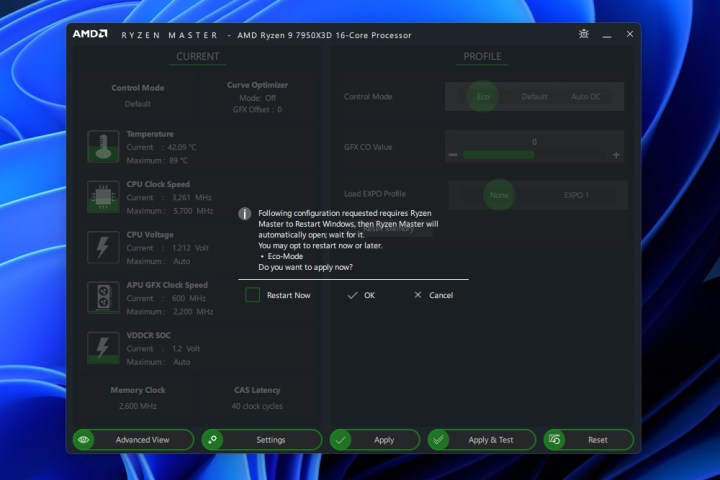
Enabling Eco Mode in Ryzen Master.

How to enable Eco Mode in the BIOS

Some AMD Ryzen owners have reported now being able to see the option to toggle Eco Mode in Ryzen Master. Fortunately, there’s another way to do it: Through the UEFI/BIOS.

Step 1: Reboot your PC or start it up and use your motherboard’s bespoke key to enter the BIOS.

Step 2: Look through your motherboard’s various menus to find the Eco Mode command. This will vary dramatically depending on your motherboard manufacturer, so you may want to consult your manual or the official website to see if any documentation can guide you in the right direction.

In some models, it can be found in AMD CBS > SMU common options > Eco Mode, but that’s not guaranteed. Sometimes it’s in the power options, other times, the overclocking options. Look far and wide if you can’t find it as it should be there.

If you really can’t find it, though, try updating your BIOS to see if that adds the option in.

Step 3: When you find the option, toggle it to On or Enabled depending on your motherboard’s terminology. When you’ve done so, save your settings and exit the BIOS.

Step 4: The next time your PC starts up your CPU should be in Eco Mode. You can confirm this by running a system monitoring tool like HWMonitor and tracking the package power draw of your CPU.

If you’re more interested in taking your processor’s performance and power draw in the other direction, you could always overclock it. Here’s how to overclock your AMD (or Intel) CPU.

Editors’ Recommendations


Share. Facebook Twitter Pinterest LinkedIn Tumblr Email

Keep Reading

Microsoft makes theming your Windows 11 PC as easy as phones, but not as much fun

Here’s why an INIU charger is the perfect Christmas gift for a tech-lover

Stay warm this winter, spend less: Boldr’s Kelvin Smart Heater is up to 25% off

Save 15% on the small but mighty Pocket Rocket, a powerful power bank packed with tech

AI toys are getting scary – but this small red box promises a fix

Running Android apps on your Windows 11 PC is about to feel slightly better

I used Nano Banana Pro to create 20 social media posts, the response they got was shocking

Prime Video’s AI recap feature messed up so badly that Amazon removed it

Insignia 43-inch F50 4K Fire TV drops to $99.99 with $100 off

Editors Picks

Here’s why an INIU charger is the perfect Christmas gift for a tech-lover

December 13, 2025

Stay warm this winter, spend less: Boldr’s Kelvin Smart Heater is up to 25% off

December 13, 2025

Save 15% on the small but mighty Pocket Rocket, a powerful power bank packed with tech

December 13, 2025

بن غاطي” تبيع أغلى بنتهاوس في الشرق الأوسط بمشروع “بوغاتي ريزيدنسز” بقيمة 550 مليون درهم

December 13, 2025

Subscribe to News

Get the latest UAE news and updates directly to your inbox.

Latest Posts

AI toys are getting scary – but this small red box promises a fix

December 13, 2025

The Middle East’s Most Expensive Penthouse at Bugatti Residences by Binghatti Sold for 550M

December 13, 2025

Running Android apps on your Windows 11 PC is about to feel slightly better

December 13, 2025
Facebook X (Twitter) Pinterest TikTok Instagram
© 2025 Daily Guardian UAE. All Rights Reserved.
  • Privacy Policy
  • Terms
  • Advertise
  • Contact

Type above and press Enter to search. Press Esc to cancel.