
Daily Guardian UAEDaily Guardian UAE
  • Home
  • UAE
  • What’s On
  • Business
  • World
  • Entertainment
  • Lifestyle
  • Sports
  • Technology
  • Travel
  • Web Stories
  • More
    • Editor’s Picks
    • Press Release
What's On

You Asked: LG 42-inch OLED TV as a monitor? Plus Samsung TV fixes and TCL QM6K Pro tips

March 15, 2026

Windows 11 bug is rasing hell for users and Samsung laptops are worst hit

March 15, 2026

Expert battling legal cases about AI harms has a grim warning for the future

March 15, 2026

There’s a new global factor for a potentially serious price hike for PCs and mobile

March 15, 2026

Windows 11 is readying support for 1,000+ Hz monitors, assuming you got one

March 15, 2026
Facebook X (Twitter) Instagram
Finance Pro
Facebook X (Twitter) Instagram
Daily Guardian UAE
Subscribe
  • Home
  • UAE
  • What’s On
  • Business
  • World
  • Entertainment
  • Lifestyle
  • Sports
  • Technology
  • Travel
  • Web Stories
  • More
    • Editor’s Picks
    • Press Release
Daily Guardian UAEDaily Guardian UAE
Home » How to use Apple Music’s Favorite Songs playlist in iOS 17
Technology

How to use Apple Music’s Favorite Songs playlist in iOS 17

By dailyguardian.aeDecember 17, 20232 Mins Read
Share
Facebook Twitter LinkedIn Pinterest Email

Apple Music has always been a powerful platform for streaming and discovering new music. With the latest updates of iOS 17.1 and 17.2, Apple has introduced new features that make it even easier to add your favorite songs to your music library. Doing so takes just a few steps.

Before getting started, be sure to install the iOS/iPadOS 17.2 update or later on your iPhone or iPad. Otherwise these steps aren’t possible.

How to add songs to Favorite Songs

You can now favorite songs in Apple Music. Here are the steps to do so.

Step 1: To add a song to your favorites in Apple Music, touch and hold the song title or tap the More button (three dots).

Step 2: Next, tap Favorite.
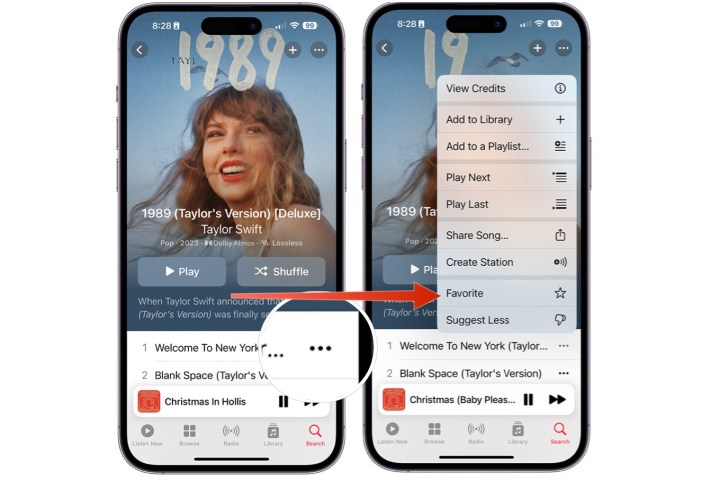
Screenshots showing how to favorite a song in Apple Music on iPhone.

Step 3: Alternatively, you can tap the star icon on the Now Playing screen.
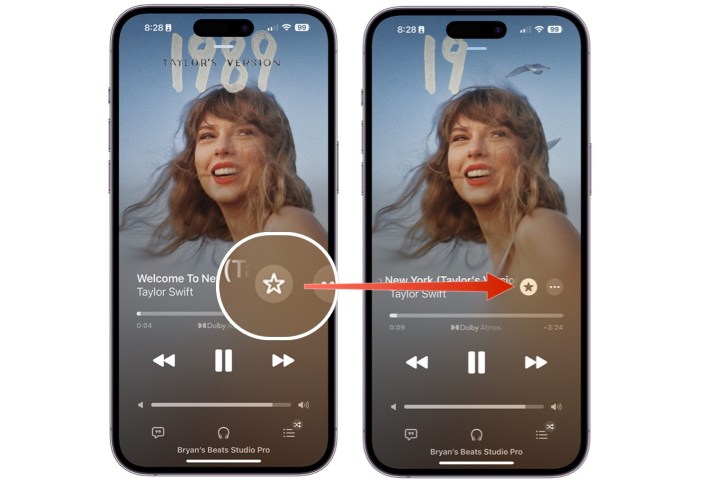
Screenshots showing how to favorite a song on Apple Music from the Now Playing screen.

How to find your Favorite Songs playlist

Your favorited songs in Apple Music are now added to a new Favorite Songs playlist.

Step 1: To find your Favorite Songs playlist, choose Library at the bottom of the Apple Music app.

Step 2: Select Playlists.
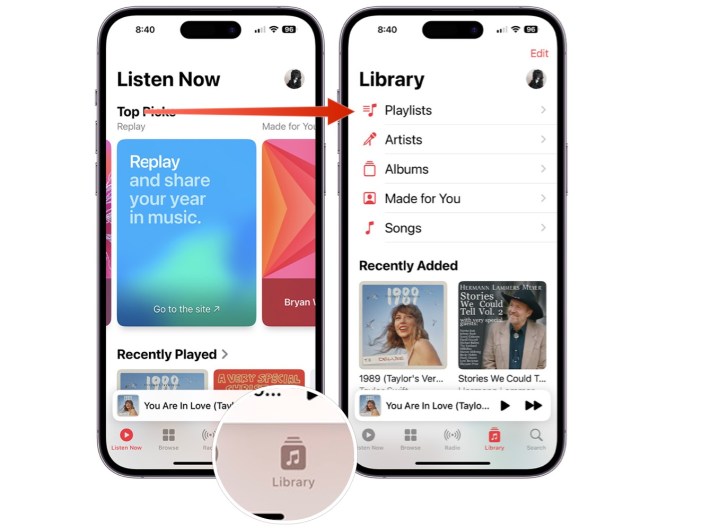
Screenshots showing how to find the Favorite Songs playlist in Apple Music.

Step 3: Scroll down, choose “Favorite Songs*.

Screenshots showing how to find the Favorite Songs playlist in Apple Music.

How to add playlists to your Favorites

Beginning with iOS 17.2, you can also favorite a playlist in Apple Music.

Step 1: To favorite a playlist, choose Library in the Apple Music app.

Step 2: Choose Playlists.

Screenshots showing the steps to favorite a playlist in Apple Music.

Step 3: Select the playlist to favorite.

Step 4: Tap the three dot icon at the top right, then select Favorite.
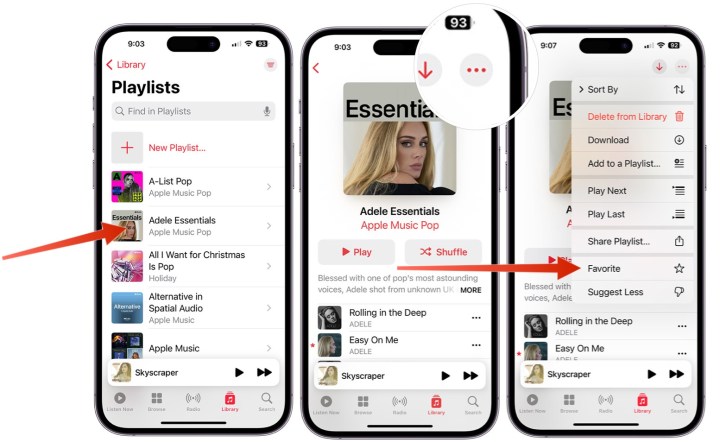
Screenshots showing the steps to favorite a playlist in Apple Music.

How to find all your Favorites

Apple Music offers a location that stores all of your favorite items in your music library.

Step 1: To get started, choose Library in the app.

Step 2: Choose any of the following: Playlists, Artists, Albums, or Songs.
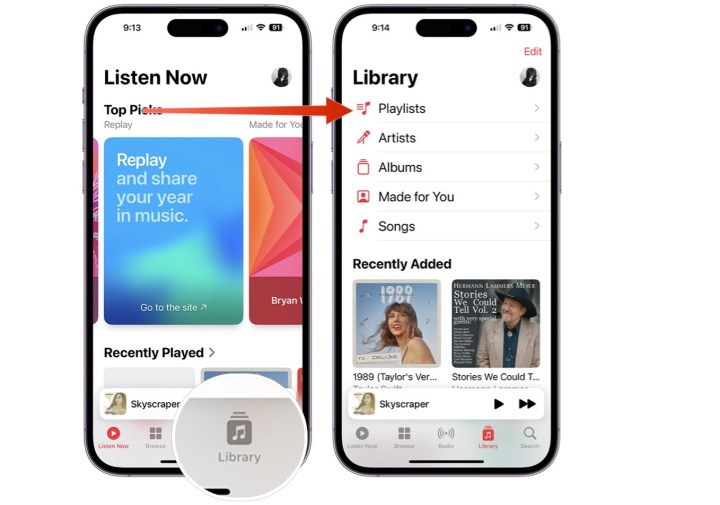
Screenshots showing how to find favorites in the Apple Music app.

Step 3: Select the three-line icon at the top right.

Step 4: Select Favorite. You’ll now see only the favorited items in the category you choose.
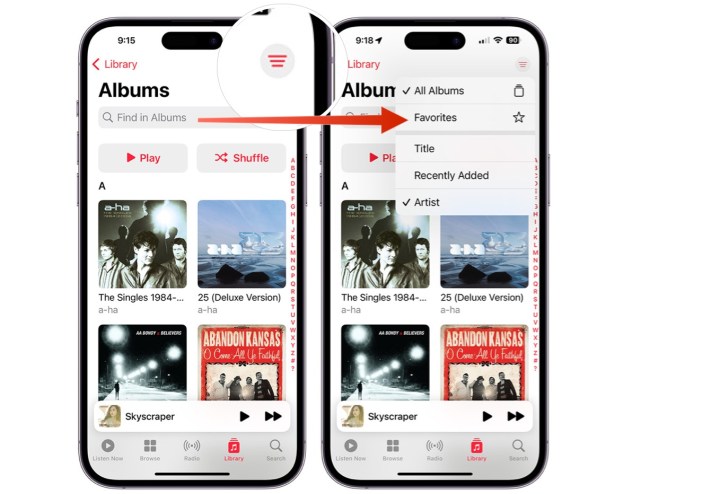
Screenshots showing how to find favorites in the Apple Music app.

How to add Favorites to your library

When you add a song to a playlist or favorite it, it will be automatically added to your Apple Music library. However, starting with iOS 17.2, you can modify these settings.

Step 1: To get started, tap on the Settings app on your iPhone or iPad.

Step 2: Tap Music.

Step 3: Scroll down, then untoggle Add Playlist Songs or untoggle Add Favorite Songs, depending on your preferences.
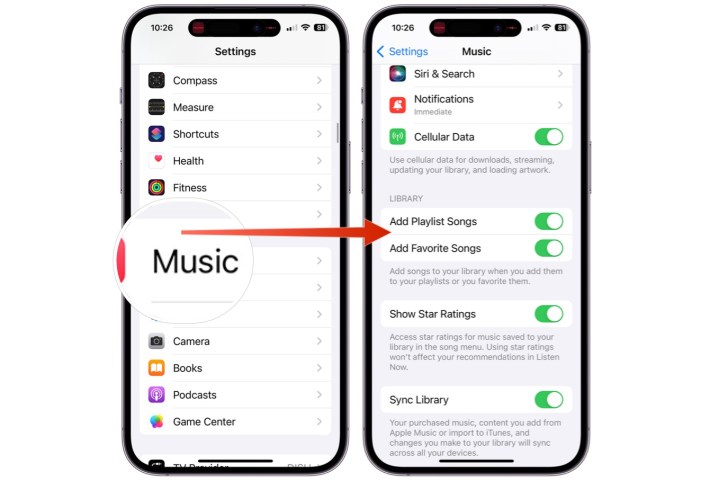
Screenshots showing how to toggle/untoggle the ability to automatically save favorited items in Apple Music.

Editors’ Recommendations


Share. Facebook Twitter Pinterest LinkedIn Tumblr Email

Keep Reading

You Asked: LG 42-inch OLED TV as a monitor? Plus Samsung TV fixes and TCL QM6K Pro tips

Windows 11 bug is rasing hell for users and Samsung laptops are worst hit

Expert battling legal cases about AI harms has a grim warning for the future

There’s a new global factor for a potentially serious price hike for PCs and mobile

Windows 11 is readying support for 1,000+ Hz monitors, assuming you got one

Hollywood’s biggest filmmaker just came out clean about using AI in movies

You might want to double-check before buying laptops from this Chinese brand

Microsoft is bringing an AI helper to Xbox consoles

Instagram is getting rid of its most secure chatting feature

Editors Picks

Windows 11 bug is rasing hell for users and Samsung laptops are worst hit

March 15, 2026

Expert battling legal cases about AI harms has a grim warning for the future

March 15, 2026

There’s a new global factor for a potentially serious price hike for PCs and mobile

March 15, 2026

Windows 11 is readying support for 1,000+ Hz monitors, assuming you got one

March 15, 2026

Subscribe to News

Get the latest UAE news and updates directly to your inbox.

Latest Posts

Hollywood’s biggest filmmaker just came out clean about using AI in movies

March 15, 2026

You might want to double-check before buying laptops from this Chinese brand

March 15, 2026

Microsoft is bringing an AI helper to Xbox consoles

March 14, 2026
Facebook X (Twitter) Pinterest TikTok Instagram
© 2026 Daily Guardian UAE. All Rights Reserved.
  • Privacy Policy
  • Terms
  • Advertise
  • Contact

Type above and press Enter to search. Press Esc to cancel.