
Daily Guardian UAEDaily Guardian UAE
  • Home
  • UAE
  • What’s On
  • Business
  • World
  • Entertainment
  • Lifestyle
  • Sports
  • Technology
  • Travel
  • Web Stories
  • More
    • Editor’s Picks
    • Press Release
What's On

Sharjah and Morocco Partner for Arab Book Industry Growth

April 27, 2026

Adobe Firefly AI is now live publicly, hoping you’ll take to an AI and get work done

April 27, 2026

Adobe Firefly AI is now live publicly, hoping you’ll take to an AI and get work done

April 27, 2026

OGold Secures Investment to Expand Digital Gold Ecosystem

April 27, 2026

Samsung’s upcoming Galaxy Glasses have leaked, and the looks don’t impress

April 27, 2026
Facebook X (Twitter) Instagram
Finance Pro
Facebook X (Twitter) Instagram
Daily Guardian UAE
Subscribe
  • Home
  • UAE
  • What’s On
  • Business
  • World
  • Entertainment
  • Lifestyle
  • Sports
  • Technology
  • Travel
  • Web Stories
  • More
    • Editor’s Picks
    • Press Release
Daily Guardian UAEDaily Guardian UAE
Home » Keep it secret: How to delete your Netflix viewing history
Technology

Keep it secret: How to delete your Netflix viewing history

By dailyguardian.aeFebruary 26, 20243 Mins Read
Share
Facebook Twitter LinkedIn Pinterest Email

Sharing a Netflix account with friends or family and don’t want them to know the extent of your anime obsession? College roommate binge-watching so many Netflix shows you can’t find the Continue Watching button for any of your shows? Netflix’s menu does a nice job of serving up a ton of content options, but when you’re sharing with others, all those options can get a little overwhelming. Fortunately, it’s easy to delete your viewing history — whether you’re just embarrassed or just want a cleaner menu. Here’s how to delete your Netflix viewing history.

How to delete your Netflix history

There are plenty of reasons you might want to clear your Netflix viewing history. Thankfully, the process for doing so is incredibly simple — even if it’s not immediately apparent. Everybody has streaming skeletons in their closets, so go ahead and clear yours out.

Step 1: First, log in to your Netflix account on your computer. Because your viewing history is specific to your profile, you’ll need to make sure you choose the right one if there are multiple users under your login. If you accidentally select the wrong profile, don’t worry. You can choose a different one using the drop-down menu in the upper-right corner.

Step 2: Next, head to the aforementioned drop-down menu in the right corner and select the button labeled Account.


Step 3: Once there, scroll down to the Profile & Parental Controls section, and click the blue link labeled View next to Viewing Activity. This will take you to a page showing everything you’ve watched.
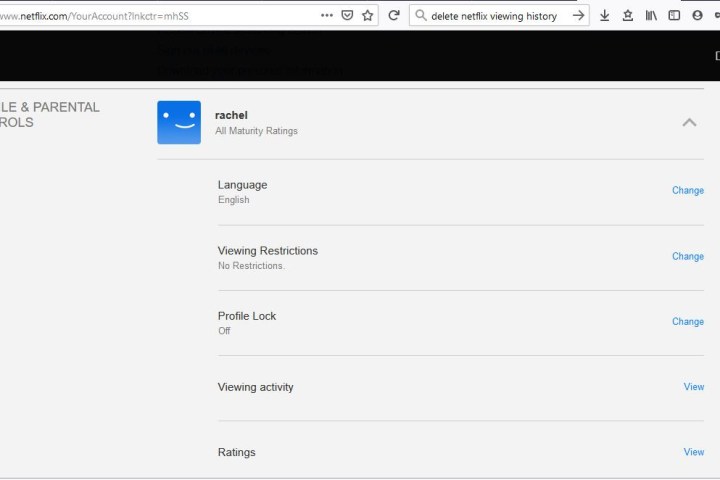
how to delete your netflix viewing history profile  parental controls section

Step 4: To the far right of each entry will be a cancel sign. Hover over the symbol, and you’ll see the text Hide From Viewing History.

Clicking this will remove the entry from your history (and, thus, eliminate any impact it may have had on your personalized recommendations). It may take up to 24 hours for the change to take effect, though.

Something to keep in mind: For television shows, each episode is listed individually, labeled by season and episode title. Clicking the Circle-Backslash icon on a single title will remove only that specific episode. But you don’t have to do this tedious task for every episode because a prompt will pop up asking if you want to delete the entire series from your history, which you can do with one click.

how to delete your netflix viewing history hide from button

Step 5: If you want to delete your entire viewing history in one fell swoop, now you can. If you scroll to the end of your viewing history, there will be an option to Hide All. Click that, then choose Yes, Hide All My Viewing Activity on Netflix’s confirmation pop-up. After 24 hours, Netflix will erase your history.

how to delete your netflix viewing history hide all button

And that’s all there is to it. Your viewing history, or just your guilty pleasure shows, will be deleted from your account.

Editors’ Recommendations


Share. Facebook Twitter Pinterest LinkedIn Tumblr Email

Keep Reading

Adobe Firefly AI is now live publicly, hoping you’ll take to an AI and get work done

Adobe Firefly AI is now live publicly, hoping you’ll take to an AI and get work done

Samsung’s upcoming Galaxy Glasses have leaked, and the looks don’t impress

Meta’s latest outrageous deal is getting solar power beamed even at night from satellites

Samsung’s wallet gets a cool trip planning tool that will make you want a Galaxy phone

Spotify wants to be your fitness coach with guided workout sessions

Apple’s foldable iPad could meet the same fate as Microsoft’s doomed Surface Neo

This Chrome tool lets a chubby ginger cat take over your screen until you take a break

Smartphone and PC prices just got another reason to deliver a hike jab

Editors Picks

Adobe Firefly AI is now live publicly, hoping you’ll take to an AI and get work done

April 27, 2026

Adobe Firefly AI is now live publicly, hoping you’ll take to an AI and get work done

April 27, 2026

OGold Secures Investment to Expand Digital Gold Ecosystem

April 27, 2026

Samsung’s upcoming Galaxy Glasses have leaked, and the looks don’t impress

April 27, 2026

Subscribe to News

Get the latest UAE news and updates directly to your inbox.

Latest Posts

Five business functions already powered by AI workforce

April 27, 2026

Meta’s latest outrageous deal is getting solar power beamed even at night from satellites

April 27, 2026

HONOR 600 Series – A Flagship Experience, Reimagined

April 27, 2026
Facebook X (Twitter) Pinterest TikTok Instagram
© 2026 Daily Guardian UAE. All Rights Reserved.
  • Privacy Policy
  • Terms
  • Advertise
  • Contact

Type above and press Enter to search. Press Esc to cancel.