

PC gamers are more than familiar with the WASD keyboard layout. The WASD configuration will typically route a game’s directional commands (up, down, left, and right) to the W, A, S, and D keys on a QWERTY keyboard. This arrangement allows the right hand to focus on mouse movement, while the left does all the navigating.
Once in a blue moon though, your keyboard’s WASD and arrow keys can get swapped. Fortunately, the process of switching things back to normal is easy as can be. Let’s take a look at how to fix this little layout problem, as well as what causes the swap to happen in the first place.
However, sometimes the WASD and arrow keys can switch accidentally, or become permanently swapped on a keyboard. That’s not ideal, especially when it comes to normal typing projects — and it can be frustrating for gamers if they can’t switch to the directional option again, or if the keys suddenly switch in-game and need to be switched back. Let’s look at how to fix WASD keys that have suddenly become arrow keys, and why this swap happens.
How to switch WASD and arrow keys back
Step 1: If you can, unplug your keyboard and plug it back in again, preferably into a different port. This is a quick fix that usually resets any alternative arrow key modes and will get the WASD keys functioning as they normally would.
Step 2: Look for the Fn key on your keyboard. Not all keyboards have one, but most do, and it’s typically located in the lower-left portion of the keyboard. It often has a small indicator light showing if the key has been enabled. The Fn key enables a variety of keyboard functions, and in this case it can be in charge of WASD swapping.
To unswap WASD, press the Fn + W keys once.
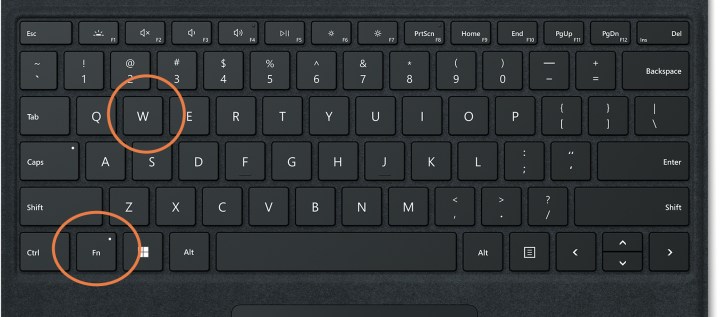
Step 3: If the Fn + W trick didn’t work, your keyboard may have a different configuration, and you’ll have to experiment a little. Different Fn combinations may work. Try these out and see if any of them swap the keys back:
Step 4: Remap your keys manually. If none of the keyboard shortcuts seem to be working, you may want to remap the keys manually. Many gaming keyboards include software that allows you to remap any key, not just hot keys made for special purposes. But if you don’t have this kind of software on your keyboard, you can still download third-party apps that do the same thing. The Sharpkeys app is a good pick for key customization.

Step 5: Additionally, if you have gaming keyboard profiles set up, you may have accidentally switched to a profile with the WASD keys as directional keys. If you know that your keyboard has gaming profiles set up on it, you may want to review how to switch between profiles, and make sure you didn’t accidentally switch to a profile that includes the key swap.

Step 6: Check your game and app settings. Some programs may swap the keys automatically when you start using them. Their menu settings may have options to switch to a traditional keyboard setup if that’s the case. If you game in a web browser, check to see if you have any extensions enabled that are swapping the keys when you don’t want them to be.

How do the arrow keys get swapped?
Many times, people accidentally trigger an alternate mode with keys have swapped. The Fn shortcuts we mentioned above may have been pressed without knowledge, especially if you recently moved your keyboard or carried it to a different location (or have a cat).
The swap may also happen when a keyboard is plugged into a USB port it’s not used to, like moving from USB 2.0 to USB 3.0. And, as we mentioned above, some profiles and programs may enable alternate keyboard setups so switching to them can cause problems.
Why is this an option?
Gamers often prefer using WASD as directional keys because it’s more comfortable than using the arrow keys while also using a mouse, and keeps their fingers in close proximity to other important keys they may need for different options. Keyboards, especially gaming keyboards, are designed with the expectation that the WASD keys may be used in this way.
How do I keep this from happening again?
Keep an eye on the shortcuts we mentioned, and note if the Fn key has been accidentally used. Check if your keyboard has switched to a different profile (often shown by indicator lights), and if necessary disable that profile or know how to quickly switch back. Disable any software settings that automatically swap the WASD keys, too.
Considering a new keyboard with different capabilities? Here’s why compact gaming keyboards may work better for you!
Editors’ Recommendations