
Daily Guardian UAEDaily Guardian UAE
  • Home
  • UAE
  • What’s On
  • Business
  • World
  • Entertainment
  • Lifestyle
  • Sports
  • Technology
  • Travel
  • Web Stories
  • More
    • Editor’s Picks
    • Press Release
What's On

Emirates Perfumes & Oud Exhibition Opens at Expo Centre Sharjah

October 12, 2026

GFH and Forbes Middle East Partner to Create a Global Business Hub at Davos 2027

October 12, 2026

It’s Halloween Month at Lala Little Wonders – A Spooky Streak of Play, Shows, Workshops and More

October 12, 2026

TCL Expands Display Ecosystem into UAE with Launch of Premium 2026 Gaming and Productivity Monitor Lineup

October 9, 2026

DGR and Chinese Consulate explore cultural institute and cooperation in future-focused sectors

October 9, 2026
Facebook X (Twitter) Instagram
Finance Pro
Facebook X (Twitter) Instagram
Daily Guardian UAE
Subscribe
  • Home
  • UAE
  • What’s On
  • Business
  • World
  • Entertainment
  • Lifestyle
  • Sports
  • Technology
  • Travel
  • Web Stories
  • More
    • Editor’s Picks
    • Press Release
Daily Guardian UAEDaily Guardian UAE
Home » WhatsApp finally fixes one of its biggest storage headaches with this new cleanup tool
Technology

WhatsApp finally fixes one of its biggest storage headaches with this new cleanup tool

By dailyguardian.aeJuly 31, 20263 Mins Read
Share
Facebook Twitter LinkedIn Pinterest Email

If your phone’s storage keeps mysteriously shrinking, WhatsApp channels might be part of the reason. Photos, videos, voice notes, and other media shared by channels can pile up in the background, and until now, cleaning them out hasn’t exactly been a pleasant experience. That’s finally changing.

WhatsApp is rolling out a new storage cleanup tool for channel media, giving Android beta users a much simpler way to free up space without digging through endless files one by one. The feature was first spotted in development a couple of months ago, and it’s now beginning to reach select beta testers through the latest WhatsApp beta for Android update.

No more digging through endless channel files

Previously, users could manage channel media from WhatsApp’s storage settings, but the process was fairly tedious. Every file had to be reviewed and selected manually, making cleanup feel more like a chore than a quick maintenance task. The new tool streamlines that experience with two dedicated ways to manage downloaded channel media.

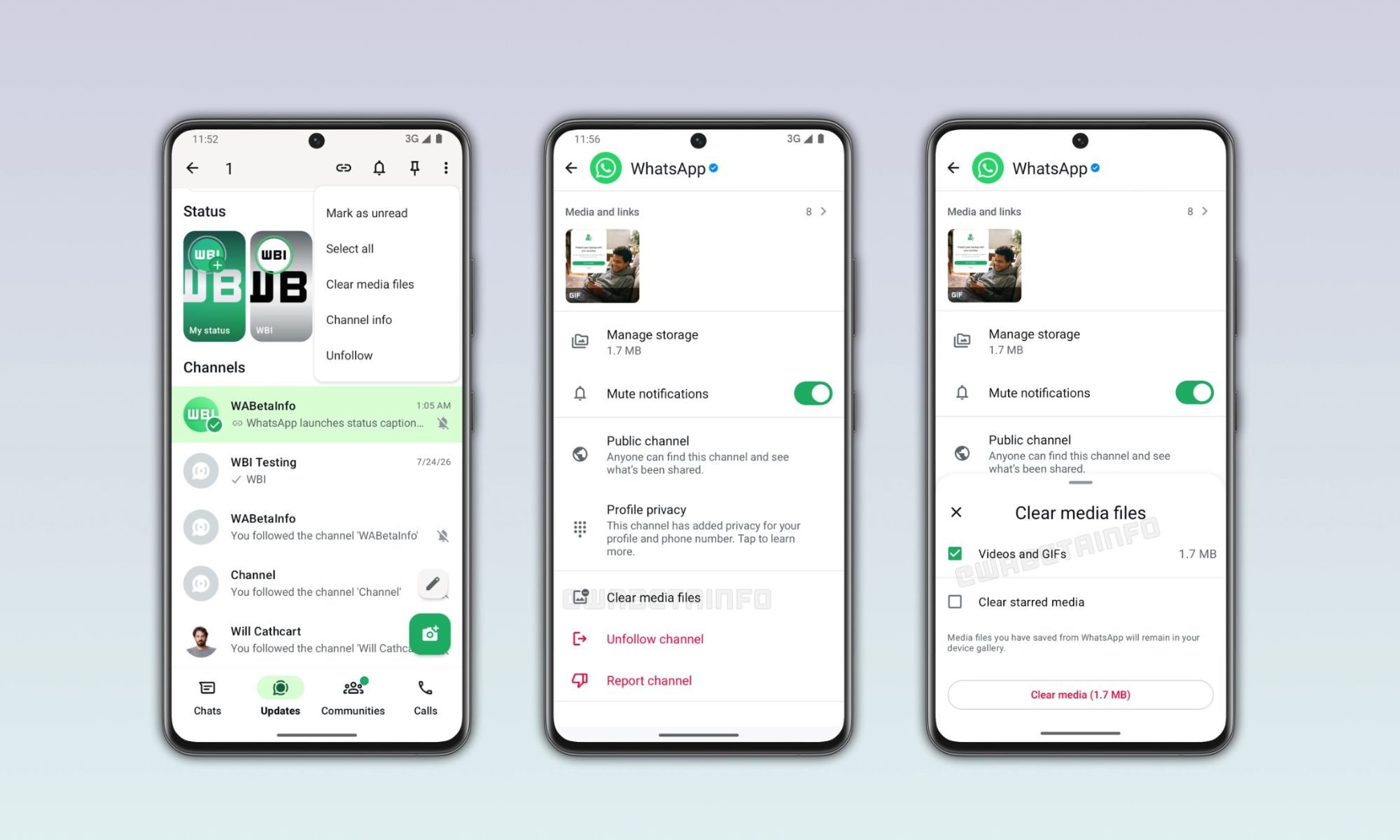
The first appears directly inside a channel’s information page. From there, users can review everything that particular channel has stored on their device and filter files by category before deleting them. Instead of scrolling through a mixed collection of media, it’s now possible to target only photos, videos, stickers, or voice notes, depending on what’s taking up the most space. Better yet, WhatsApp won’t automatically remove starred updates during the cleanup process. Important posts you’ve intentionally saved can remain on your phone while everything else is cleared away, reducing the risk of accidentally deleting something worth keeping.

The junk drawer inside your phone

WhatsApp is also adding a second shortcut that could prove even more useful for people who follow dozens of channels. Inside the Updates tab, users can now long-press one or more channels and choose a new Clear media files option from the menu. Rather than opening each channel individually, this lets you remove stored media from multiple channels in one go. It’s a small change, but one that addresses a growing problem. Many channels post photos and videos every day, and those downloads can consume gigabytes of storage over time. Since the files are often forgotten after they’re viewed, many users don’t realize how much space they’ve lost until their phone starts warning them about low storage.
Electronics, Phone, Mobile Phone

For now, the feature is only available to a limited number of Android beta testers running the latest WhatsApp beta from the Google Play Store. As with many WhatsApp features, the rollout is happening gradually, so it may take a few weeks before more users see it. The company also hasn’t confirmed when the storage cleanup tool will make its way to the stable version of the app. Still, if you subscribe to a lot of WhatsApp channels, this could end up being one of the app’s most practical quality-of-life upgrades in quite some time.

Share. Facebook Twitter Pinterest LinkedIn Tumblr Email

Keep Reading

Lenovo AeroBlade imagines a laptop as thin as a foldable phone, thanks to solid-state cooling

Lenovo puts Nvidia RTX Spark into its new Yoga Pro laptops for local AI at IFA 2026

Motorola’s new Edge 70 Plus packs a 200MP camera and a massive battery

We got GTA VI limited-edition DualSense controllers before GTA VI

Anker unveils smarter chargers and power banks built to fight heat and battery degradation

Anker’s new Soundcore Sleep earbuds can mask snoring and even track your heart rate

TCL P80 series finally marries eye-friendly NXTPAPER tech with an AMOLED panel

Anker’s new MindBase wants to be the brain of your entire home security system

I found 5 cleaning deals worth sweeping up this Labor Day

Editors Picks

GFH and Forbes Middle East Partner to Create a Global Business Hub at Davos 2027

October 12, 2026

It’s Halloween Month at Lala Little Wonders – A Spooky Streak of Play, Shows, Workshops and More

October 12, 2026

TCL Expands Display Ecosystem into UAE with Launch of Premium 2026 Gaming and Productivity Monitor Lineup

October 9, 2026

DGR and Chinese Consulate explore cultural institute and cooperation in future-focused sectors

October 9, 2026

Subscribe to News

Get the latest UAE news and updates directly to your inbox.

Latest Posts

Future 100 Expands UAE Startup Network with Three Strategic MoUs

October 9, 2026

How UAE E-Cheques and Digital Currency Will Redefine Payments

October 9, 2026

From Dreams to Pages: 15-Year-Old Zahra Ahmed Unveils The Journey So Far at Dubai’s Iconic Mohammed Bin Rashid Library.

October 9, 2026
Facebook X (Twitter) Pinterest TikTok Instagram
© 2026 Daily Guardian UAE. All Rights Reserved.
  • Privacy Policy
  • Terms
  • Advertise
  • Contact

Type above and press Enter to search. Press Esc to cancel.