
Daily Guardian UAEDaily Guardian UAE
  • Home
  • UAE
  • What’s On
  • Business
  • World
  • Entertainment
  • Lifestyle
  • Sports
  • Technology
  • Travel
  • Web Stories
  • More
    • Editor’s Picks
    • Press Release
What's On

Meta’s AI smart glasses have a creepy reputation, but they are finding a good purpose too

April 3, 2026

Samsung’s 2026 OLED TVs get a metal makeover with brightness and anti-glare upgrades

April 3, 2026

If you love indie games, there’s now a subscription service for these gems

April 3, 2026

Samsung is bring long overdue Google Cast support to its older TVs

April 2, 2026

The best Google Pixel deals of 2026: big savings on Google’s AI phones

April 2, 2026
Facebook X (Twitter) Instagram
Finance Pro
Facebook X (Twitter) Instagram
Daily Guardian UAE
Subscribe
  • Home
  • UAE
  • What’s On
  • Business
  • World
  • Entertainment
  • Lifestyle
  • Sports
  • Technology
  • Travel
  • Web Stories
  • More
    • Editor’s Picks
    • Press Release
Daily Guardian UAEDaily Guardian UAE
Home » How to use spatial video recording in iOS 17.2 (and why it’s a big deal)
Technology

How to use spatial video recording in iOS 17.2 (and why it’s a big deal)

By dailyguardian.aeDecember 15, 20232 Mins Read
Share
Facebook Twitter LinkedIn Pinterest Email

If you happen to have an iPhone 15 Pro or iPhone 15 Pro Max, you can now access a new feature in iOS 17.2. This feature is called Spatial Video, which is a brand new video recording format that works with Apple’s upcoming Vision Pro headset. Although the headset is not yet available, you can start recording videos in this format on your iPhone right now, thanks to the iOS update. Here’s how to activate it.

The release of the much-awaited Vision Pro headset is expected in the first quarter of 2024. In the meantime, you can use your supported iPhone to record videos in a new format called Spatial Video.

How to turn on Spatial Video recording on your iPhone

Here’s how to activate Spatial Video on your iPhone 15 Pro or iPhone 15 Pro Max.

Step 1: On your device with iOS 17.2 installed, open the Settings app.

Step 2: Scroll down, choose Camera, then select Formats.

Step 3: Scroll down, then toggle on Spatial Video for Apple Vision Pro.
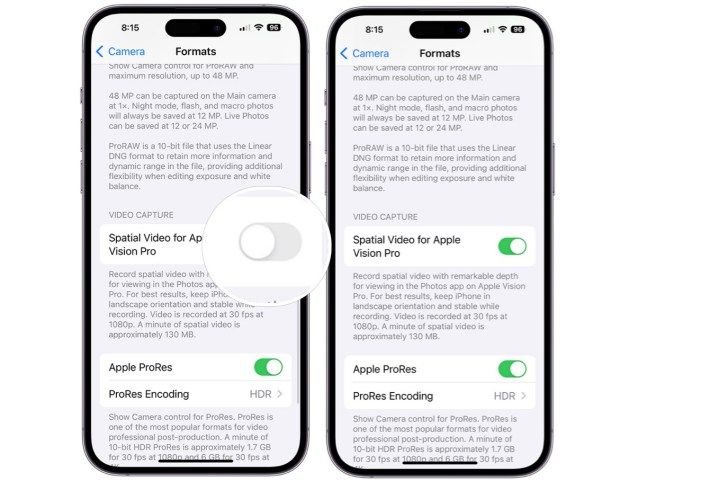
Steps showing the activation of Spatial Video on an iPhone 15 Pro or iPhone 15 Pro Max with iOS 17.2 installed.

Step 4: And that’s it! With just a couple of taps, you’ve officially enabled Spatial Video recording on your iPhone. But what exactly does that mean?

Why you should care about Spatial Video recording

When you enable Spatial Video, it only affects the videos viewed on Apple Vision Pro headsets. These devices offer an immersive viewing experience that appears to be three-dimensional. The video files are recorded at 1080p and 30 frames per second. You would need about 130MB of storage space to store every minute of video.

For the best results, Apple recommends recording in landscape format. It will be interesting to see where Spatial Video goes from here, and it’s reassuring to know that recording in this format does not affect existing devices.

But it all comes back to the Vision Pro headset. If you plan on buying one, and you want to watch your recorded videos on it, it’s a good idea to enable this setting. But if you have no intention on purchasing a Vision Pro when it becomes available in 2024, you’re fine to ignore this setting. It’s a big deal for Vision Pro enthusiasts, but for everyone else, it’s just another iPhone setting you don’t have to worry about.

Editors’ Recommendations


Share. Facebook Twitter Pinterest LinkedIn Tumblr Email

Keep Reading

Meta’s AI smart glasses have a creepy reputation, but they are finding a good purpose too

Samsung’s 2026 OLED TVs get a metal makeover with brightness and anti-glare upgrades

If you love indie games, there’s now a subscription service for these gems

Samsung is bring long overdue Google Cast support to its older TVs

The best Google Pixel deals of 2026: big savings on Google’s AI phones

Prime Video expands sign language support to 18 more movies and here’s the complete list

Google Vids gets a big AI push to ease video generation with some cool new tricks

Anker Solix E10 Whole-Home Backup System Review:  Power That Actually Fits Your Life

Steam survey shows Linux hitting an all-time high with gamers

Editors Picks

Samsung’s 2026 OLED TVs get a metal makeover with brightness and anti-glare upgrades

April 3, 2026

If you love indie games, there’s now a subscription service for these gems

April 3, 2026

Samsung is bring long overdue Google Cast support to its older TVs

April 2, 2026

The best Google Pixel deals of 2026: big savings on Google’s AI phones

April 2, 2026

Subscribe to News

Get the latest UAE news and updates directly to your inbox.

Latest Posts

Presight Expands AI Partnerships in Africa

April 2, 2026

Prime Video expands sign language support to 18 more movies and here’s the complete list

April 2, 2026

MBRIF Invests AED7.2M in UAE’s Fragrance Technology

April 2, 2026
Facebook X (Twitter) Pinterest TikTok Instagram
© 2026 Daily Guardian UAE. All Rights Reserved.
  • Privacy Policy
  • Terms
  • Advertise
  • Contact

Type above and press Enter to search. Press Esc to cancel.