
Daily Guardian UAEDaily Guardian UAE
  • Home
  • UAE
  • What’s On
  • Business
  • World
  • Entertainment
  • Lifestyle
  • Sports
  • Technology
  • Travel
  • Web Stories
  • More
    • Editor’s Picks
    • Press Release
What's On

ACCA warns of fragile global growth outlook as Middle East businesses navigate heightened uncertainty

February 2, 2026

The “rapid trigger” revolution: why mechanical switches are dead

February 2, 2026

Falconbridge Advisors Establishes Doha Operations Supporting Qatar’s Growth Agenda

February 2, 2026

Sony leak shows a new look for upcoming WF-1000XM6 earbuds and a big audio upgrade

February 2, 2026

Dayne Turbitt Joins Snowflake to Lead EMEA Business to Continued Success

February 2, 2026
Facebook X (Twitter) Instagram
Finance Pro
Facebook X (Twitter) Instagram
Daily Guardian UAE
Subscribe
  • Home
  • UAE
  • What’s On
  • Business
  • World
  • Entertainment
  • Lifestyle
  • Sports
  • Technology
  • Travel
  • Web Stories
  • More
    • Editor’s Picks
    • Press Release
Daily Guardian UAEDaily Guardian UAE
Home » How to factory reset the Meta Quest 3
Technology

How to factory reset the Meta Quest 3

By dailyguardian.aeFebruary 7, 20242 Mins Read
Share
Facebook Twitter LinkedIn Pinterest Email

As with consoles, PCs, and other tech devices, you may occasionally find a reason to factory reset your Meta Quest 3. Whether you’re selling your headset or simply wanting to get a fresh start, you’ll want to be sure your data is fully cleared from its memory. In this guide, we’ll explain two methods you can use to factory reset your Quest 3

Note: Performing a factory reset on your Quest 3 won’t delete the games you’ve purchased or make any changes to your Meta account. It will, however, erase all of the games you have downloaded on the headset itself, meaning you’ll also lose access to any save data that isn’t stored in a cloud. Proceed with caution and be certain you’re ready to wipe the headset before continuing.

How to factory reset Quest 3 using the headset 

The simplest way to reset your Quest 3 headset is to do it on the device itself. It doesn’t require a mobile device or navigating through any complicated settings.

Step 1: Make sure your Quest 3 is turned off before beginning.

Step 2: Hold down the power and volume (-) button on your headset at the same time until you notice the boot screen lhas loaded.
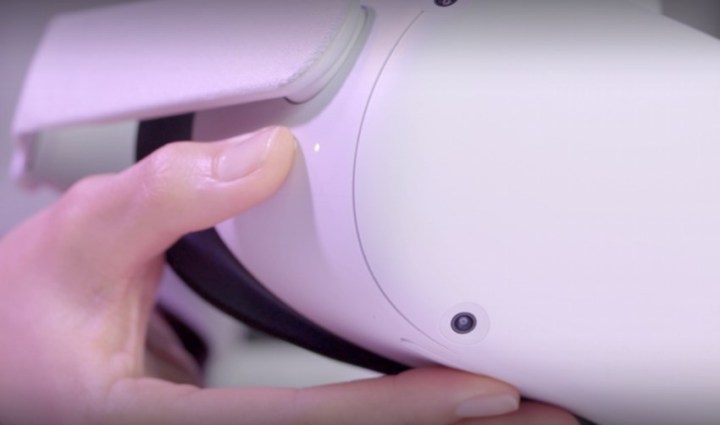
Hands pressing the volume and power button to reset the Quest 3.

Step 3: Using the volume buttons on your headset, navigate to Factory Reset, then press the power button.

Step 4: Using the volume buttons on your headset, navigate to Yes  and press the power button once more to begin the factory reset.
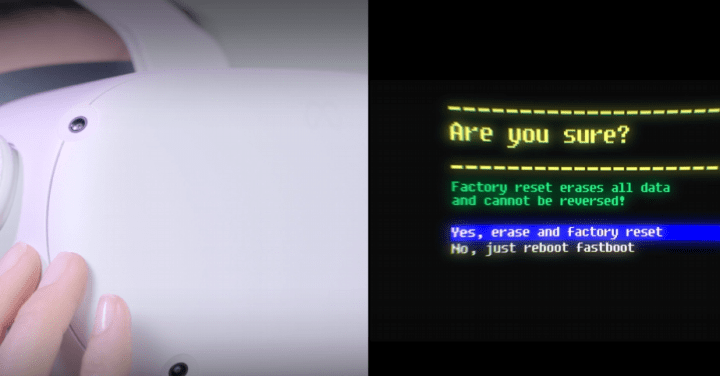
The factory reset prompt next to someone pushing the volume and power buttons.

How to factory reset Quest 3 using a phone

Step 1: Enter the Meta Quest app using your mobile device.

Step 2: Tap on Menu, then select Devices.

Step 3: Select your headset from the listed devices.

Step 4: Choose Headset Settings, then tap on Advanced Settings.
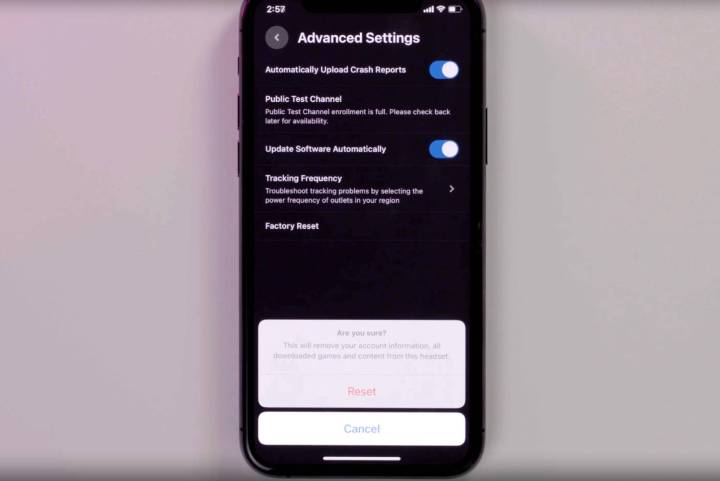
The factory reset settings on a phone screen for the Quest 3.

Step 5: Select Factory Reset, then choose *Reset *to begin the factory reset.

Editors’ Recommendations


Share. Facebook Twitter Pinterest LinkedIn Tumblr Email

Keep Reading

The “rapid trigger” revolution: why mechanical switches are dead

Sony leak shows a new look for upcoming WF-1000XM6 earbuds and a big audio upgrade

Chrome may soon use Gemini antiscam protection to flag scams, but it won’t watch every site you visit

Nothing’s cheaper Headphone (a) could be launching soon, and here’s what you can expect

Honda just tested an AI system that lets your car automatically report potholes and damaged signs

Sony’s wild PlayStation controller patent gives you buttons anywhere you want

Your wait for a refreshed Apple Studio Display may be nearly over

You might finally see CarPlay Ultra beyond a $200,000 Aston Martin

If Apple drops 128GB again, your iPhone 18 Pro gets pricy fast

Editors Picks

The “rapid trigger” revolution: why mechanical switches are dead

February 2, 2026

Falconbridge Advisors Establishes Doha Operations Supporting Qatar’s Growth Agenda

February 2, 2026

Sony leak shows a new look for upcoming WF-1000XM6 earbuds and a big audio upgrade

February 2, 2026

Dayne Turbitt Joins Snowflake to Lead EMEA Business to Continued Success

February 2, 2026

Subscribe to News

Get the latest UAE news and updates directly to your inbox.

Latest Posts

Chrome may soon use Gemini antiscam protection to flag scams, but it won’t watch every site you visit

February 2, 2026

LINQ Modular and SIBS Join Forces to Scale Industrialised Construction in Middle East

February 2, 2026

Nothing’s cheaper Headphone (a) could be launching soon, and here’s what you can expect

February 2, 2026
Facebook X (Twitter) Pinterest TikTok Instagram
© 2026 Daily Guardian UAE. All Rights Reserved.
  • Privacy Policy
  • Terms
  • Advertise
  • Contact

Type above and press Enter to search. Press Esc to cancel.