
Daily Guardian UAEDaily Guardian UAE
  • Home
  • UAE
  • What’s On
  • Business
  • World
  • Entertainment
  • Lifestyle
  • Sports
  • Technology
  • Travel
  • Web Stories
  • More
    • Editor’s Picks
    • Press Release
What's On

Top Upcoming Events at DWTC in September 2026

August 31, 2026

NASA’s new telescope can see 100 times more sky than Hubble in a single shot

August 31, 2026

Empowering Women in Customs: Abu Dhabi’s Etihad Rail Initiative

August 31, 2026

Middle East Energy 2026: A Landmark Event for the Energy Sector

August 31, 2026

Windows 11 is finally rolling out the option to kick Bing out of Search

August 31, 2026
Facebook X (Twitter) Instagram
Finance Pro
Facebook X (Twitter) Instagram
Daily Guardian UAE
Subscribe
  • Home
  • UAE
  • What’s On
  • Business
  • World
  • Entertainment
  • Lifestyle
  • Sports
  • Technology
  • Travel
  • Web Stories
  • More
    • Editor’s Picks
    • Press Release
Daily Guardian UAEDaily Guardian UAE
Home » How to create folders in Gmail
Technology

How to create folders in Gmail

By dailyguardian.aeApril 14, 20243 Mins Read
Share
Facebook Twitter LinkedIn Pinterest Email

Keeping your emails organized is essential to finding the ones you need when you need them. One easy way to do this is by creating folders and moving your messages to them.

If you use Gmail, you’ll see default folders, those already created for you, in the menu on the left side. When you set up your own, they’ll fall in line in that same spot, giving you a quick and easy way to organize your inbox. Here’s how to create folders in Gmail and move emails to them.

Create a folder in Gmail

Before we begin, it’s important to note that Gmail doesn’t refer to folders as “folders.” They’re called “labels,” but function the same way as folders.

To make a label on desktop, just click the plus sign next to the word “Labels” in the menu on the left. Then enter a name for the label and, optionally, another label to nest it under.

Oddly enough, you cannot make a label on Android phones. If you own an iOS device, however, you can find a “Create New” button in the menu that pops up after tapping the three horizontal lines icon in the top left.

Move an email to a folder

You have a few different ways to move emails to folders in Gmail. Probably the simplest way is to use the Move to option in the toolbar.

Step 1: Select the email you want to move in your inbox by ticking its corresponding checkbox.

Step 2: Pick the Move to option in the toolbar at the top. The Move to icon looks like a file with an arrow in the middle.

Step 3: From the menu that appears, choose the folder where you want to place the email.

When you do this, it removes the email from your Inbox and places it in the chosen folder. This is a great way to keep your inbox neat and tidy.
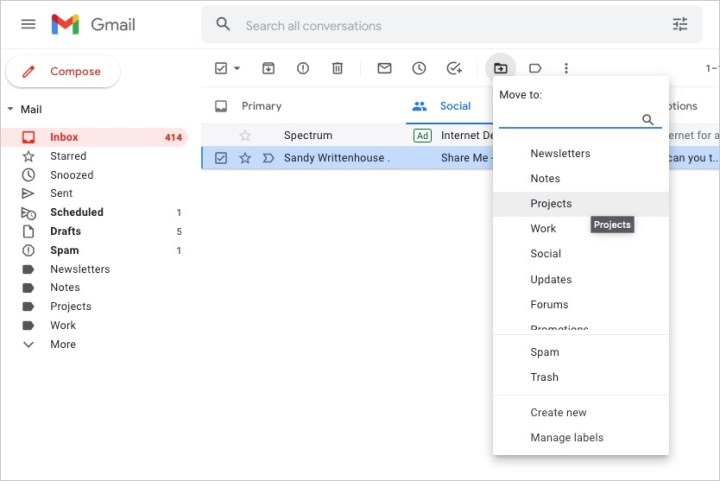
Label list for moving an email in Gmail.

Step 4: You can also move an email to the folder by doing one of the following:

  • Drag the email from your inbox to the folder in the left-hand menu.
  • Right-click the email, hover your cursor over Move to, and choose the folder.
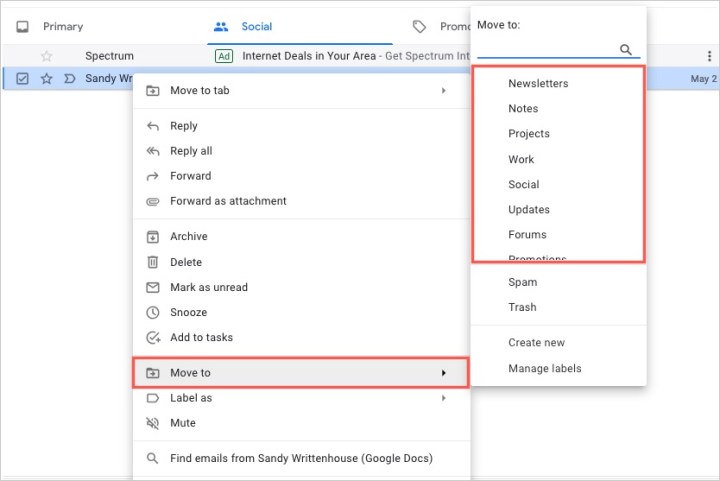
Right-click menu to move an email in Gmail.

By creating folders (or labels) in Gmail, you can keep your messages organized for work, school, your personal life, or whatever you find most helpful.

For more, take a look at Gmail keyboard shortcuts you should know or how to find archived emails in Gmail.

Editors’ Recommendations


Share. Facebook Twitter Pinterest LinkedIn Tumblr Email

Keep Reading

NASA’s new telescope can see 100 times more sky than Hubble in a single shot

Windows 11 is finally rolling out the option to kick Bing out of Search

Some Galaxy S26 Ultra owners are still facing the red tint issue after installing the recent fix

Huawei’s new Galaxy Z TriFold rival folds twice, packs 2TB, and looks stunning in purple

UK health advocates warn AI transcription tools could put patients at risk

Google Maps has another “America” on the map, and Canadians aren’t amused

A solar ambulance has successfully tackled 500 miles of difficult terrain

Anthropic just showed an early version of self-improving AI

You worry about AI taking your job because you know too much about AI, research finds

Editors Picks

NASA’s new telescope can see 100 times more sky than Hubble in a single shot

August 31, 2026

Empowering Women in Customs: Abu Dhabi’s Etihad Rail Initiative

August 31, 2026

Middle East Energy 2026: A Landmark Event for the Energy Sector

August 31, 2026

Windows 11 is finally rolling out the option to kick Bing out of Search

August 31, 2026

Subscribe to News

Get the latest UAE news and updates directly to your inbox.

Latest Posts

National Bonds Launches “Emirati Flex Friday” as a Strategic Initiative to Empower UAE National Female Talent

August 31, 2026

Some Galaxy S26 Ultra owners are still facing the red tint issue after installing the recent fix

August 31, 2026

Dealing.com’s 24,343 Tokenised Stocks: Why Scale Changes the Investment Access Story

August 31, 2026
Facebook X (Twitter) Pinterest TikTok Instagram
© 2026 Daily Guardian UAE. All Rights Reserved.
  • Privacy Policy
  • Terms
  • Advertise
  • Contact

Type above and press Enter to search. Press Esc to cancel.