
Moving from an iPhone to an Android phone has never been an easy process, but Google is trying to change that. With Android 17, the company has introduced a rebuilt Android Switch that can move far more of your data than any past version ever could.
Google worked with Apple to create the new transfer system from the ground up, allowing far more information to move wirelessly than before. The upgraded experience is already rolling out to eligible Pixel devices and is also available on Samsung’s new Galaxy Z Fold 8 and Galaxy Z Flip 8 through Smart Switch.
What makes Android 17’s new transfer process different?
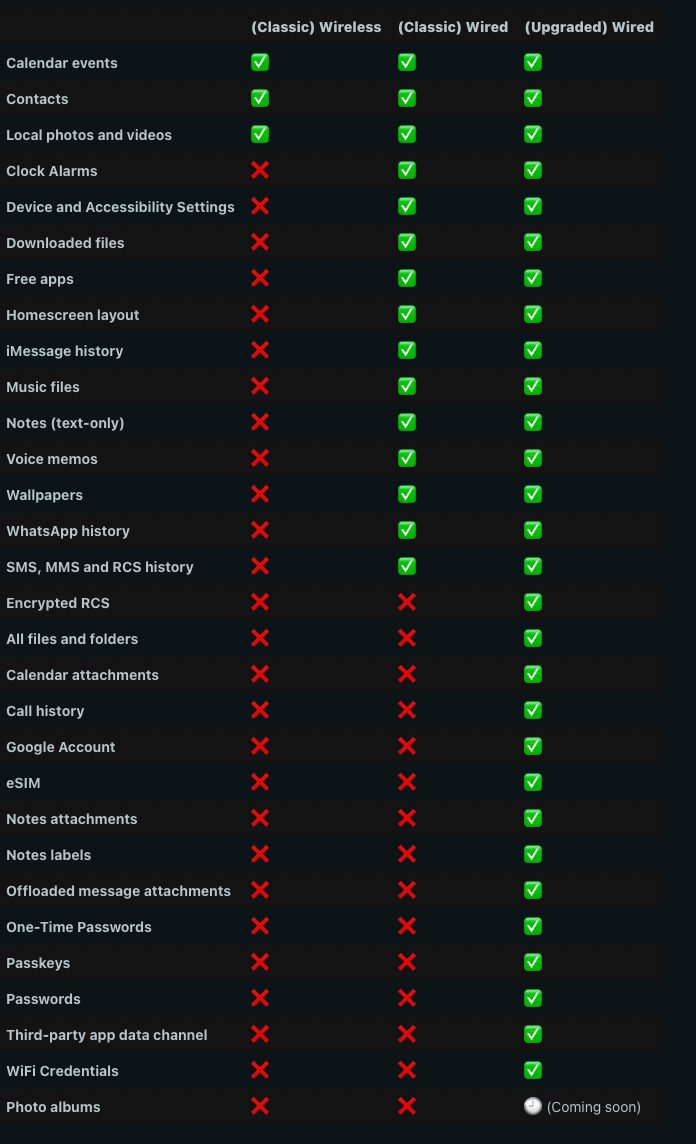
The previous iPhone to Android transfers had one major drawback. While you could copy data wirelessly, iOS restrictions meant many important items stayed behind unless you used a cable. Even then, some information simply could not be transferred, forcing users to spend extra time setting up their new device manually.
You can now move your favorite apps, passwords, passkeys, messages, files, your homescreen layout, and even your eSIM profile. Earlier versions couldn’t touch alarms, call history, or downloaded files, which meant a lot of manual setup after switching. However, Photo albums specifically are still listed as coming soon.
Which phones get the new Android Switch experience?
The upgraded migration tool is part of Android 17 and has already begun rolling out to Pixel 8 and newer devices. Samsung’s brand new Galaxy Z Fold 8 and Galaxy Z Flip 8 series get the same upgraded experience through Smart Switch, right out of the box.
If your device qualifies, you’ll see a QR code pop up the moment you choose to copy data from an iPhone during setup. Google says more Android devices will get access soon, though it hasn’t shared a full timeline yet.