

Bitcoin is increasingly seen as a strong store of value, and a there are a range of different ways you can take advantage of its big swings in price to generate some profit for yourself, or create a digital nest egg for the future. But futures and ETFs aside, if you want to own your own Bitcoin, and follow the mantra of “Not your keys, not your coins,” then you’ll need to buy Bitcoin directly.
Fortunately, buying Bitcoin today is more straightforward than ever before, with a wide range of methods for doing so. Here’s our favorite.
Sign up to an exchange
The safest, most straightforward way to buy Bitcoin is to do it through an exchange. These platforms will let you directly trade a range of currencies for a range of cryptocurrencies, but you will need to complete Know Your Customer checks to confirm your identity.
There are a wide range of Bitcoin and cryptocurrency trading exchanges, but for the benefit of this article, we’ll be using Coinbase, which is arguably the most popular and beginner-friendly of the exchanges. It has had some issues with outages during peak trading times, but it is a well established company that’s been trading for close to 12 years, and it is headquartered in the U.S., so it does have some real oversight.
Alternatives for more experienced traders include Kraken for its low fees, or Gemini, for its improved security.
Step 1: Navigate to the Coinbase sign up page and follow the on-screen prompts to create an account. You’ll need to use your Google account for login information, or input details like a username, password, first name, email address, and what country and/or state you reside in.
Note: You can also complete this process within the Coinbase app. The process is much the same, just with a different interface.
Step 2: Verify your email using the link Coinbase sends you, then sign back in to the website using your login information.
Step 3: When prompted, select the country you live in and add a phone number. Complete phone number verification when prompted.
Step 4: Add your personal information, like first and last name, date of birth, and address. These should match those on your government ID that you’ll be using to verify your identity shortly.
When prompted, answer the respective security and KYC questions.
Step 5: Complete identity registration. This is different depending on the country you live in, but typically for U.S. customers involves comparing a photo of yourself with a government issued ID, like a driver’s license, passport, or green card.
Step 6: You’re now set up to use Coinbase! You may also want to add a two-step-verification app to further protect your account, if you wish. You can do that through the settings menu.
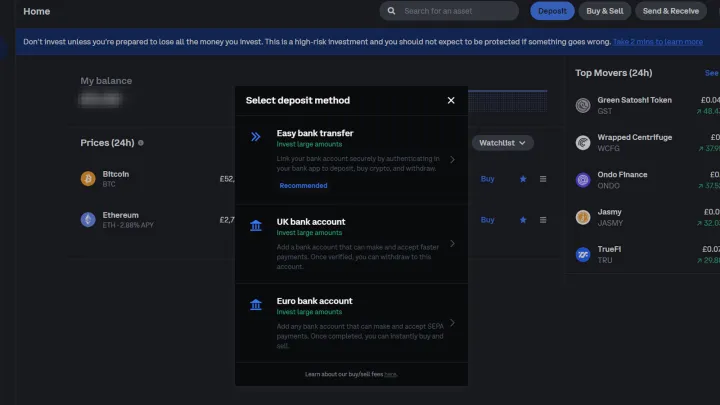
Deposit currency in your Coinbase account
Before you can buy Bitcoin, you need to add some funds to your account to purchase with. You need fiat.
Step 1: Login to Coinbase and select the blue Deposit button at the top of the page, or within the app.
Step 2: Select a deposit payment method. These will be different for you, depending on your country of origin.
Step 3: The most straightforward step, is “Easy Bank Transfer.” Select that, and then use the on-screen buttons and prompts to add a bank of your choice, or select an existing bank if you’ve already added one.
Step 4: Select how much money you want to deposit, then select Continue.
Step 5: Check the figures, then confirm the transaction by selecting Continue again. Follow the on-screen prompts to transfer the money from your other account. If required, login to your other bank and approve the transaction.
Step 6: The money will then begin transferring. It’s usually fairly instant, but can take up to 24 hours depending on you, your account, your bank, and a range of other factors. If it doesn’t arrive after 24 hours, contact Coinbase support.
How to buy Bitcoin
Now that you have some funds in your account, you can use them to buy Bitcoin. Here’s how.
Step 1: Select Buy & Sell from the top of the screen, or from within the Coinbase app.
Step 2: Use the drop down to select the cryptocurrency you want to buy; In this case, Bitcoin. Then select the current wallet you want to pay with in the same manner.
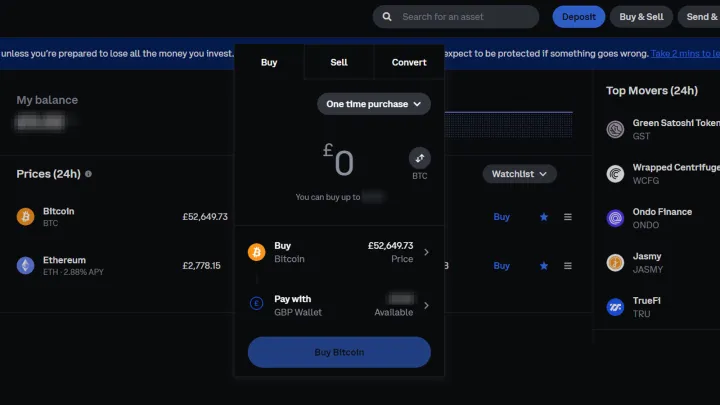
Step 3: Select how much you want to buy in either your fiat currency, or in Bitcoin. You can toggle this by selecting the little up and down arrow button labelled with “BTC.”
Step 4: When you’re ready, select the Buy Bitcoin button to complete the transaction.
Step 5: Wait a minute or so and you should have the Bitcoin in your account.
Storing your Bitcoin? Get it off the exchange
If you plan to store your Bitcoin long term — a practice known as “hodling” (from hold on for dear life) — it’s a good idea to get it off the exchange so you have complete control over it. If the exchange has an outage, or gets hacked, you know your coins are safe. The best way to do this is with a personal wallet. Software options like Exodus are excellent, but the most secure method is using a hardware wallet like a Trezor.
The various options and the method for doing this go beyond the scope of this article, but if you control access to your Bitcoin, then you can make sure it’s secure.
Editors’ Recommendations