

There are many reasons to factory reset your PS5, from wanting to resell it to trying to fix issues that have arisen over time. Luckily, this process is somewhat simpler than learning how to reset a PS4, but still has some issues. Plus, you will want to make sure you have all of your current data secured. Here, we take a look at all of the steps and options so you know how to factory reset a PS5 to your satisfaction.
We’ve split up our instructions into two parts: Step-by-step and in-depth. The step-by-step instructions will get your PS5 reset as fast as possible, but if you want a few more options or if you want to be extra careful during your reset, we recommend reading our in-depth instructions instead. Before you reset your PS5, you might want to back up your game date and user settings. Check out our guide on how to use an external drive on your PS5.
How to reset a PS5 step-by-step
There are a few different reset options on PS5 that we’ll cover in detail below. If you just want to wipe your PS5 entirely, you can follow the steps in this section. Note that this is a hard reset of your PS5 and will erase everything on your console, including user data and saves. If you want to back up your saves first, continue on to our in-depth guide below.
Step 1: Navigate to the Settings menu (gear icon).
Step 2: Select System.
Step 3: Select System software.
Step 4: Select Reset options.
Step 5: Select Reset your console.
Step 6: Select Reset.
After a few minutes, your PS5 will automatically reset itself and boot into the standard setup screen. If you’re selling or trading in your console, you can stop here. If you’re resetting for troubleshooting or anything else, proceed through the setup as normal.
How to reset a PS5 in-depth
Resetting your PS5 to its factory defaults is simple enough, but there are a few reset options that the console doesn’t explain. We’ve detailed the three reset options below, along with an in-depth look at how to find them.
Step 1: Navigate to System Software.
To get started, boot up your PS5 and sign in to your account. Then, go to the Settings menu from the home screen. If you’re in a game, you can find go back to the home screen by pressing and holding the PS button in the center of the DualSense controller.
In the top right corner of the home screen, you’ll see a cog. Navigate there to open the Settings menu, then follow System > System software. You’ll find the PS5 reset options here, but don’t select them yet.
Step 2: (Optional): Back up your data
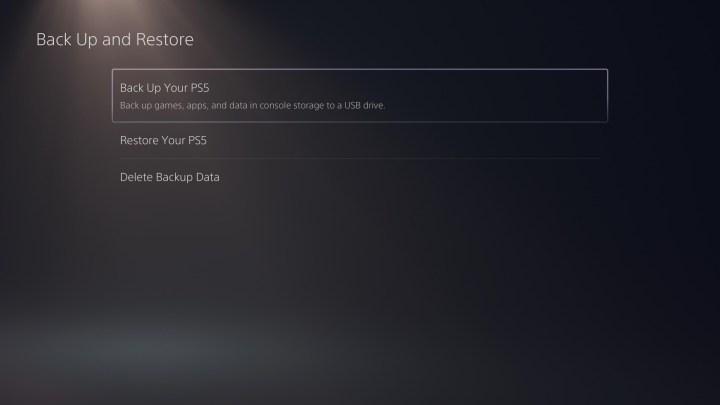
Before selecting Reset Options, select* Back Up and Restore*. In this menu, you can back up your games, apps, and other data to a USB device before performing the reset. This is especially important if you’re not a PlayStation Plus subscriber, as all of your saves are stored locally on the console.
Even if you are a PlayStation Plus subscriber, it’s a good idea to perform this step anyway. Not only is it a safety net in case your saves haven’t synced, but it will also allow you to automatically restore your games and apps to a PS5 in the future.
To offload your data, you’ll need a USB 3.0 storage device. Our guide to the best external hard drives can help you out there.
Step 3: Choose your reset option.
After you’ve finished backing up your data, go back to System software and select Reset Options. The PS5 has three reset options, and short of the Reset Your Console option, the names are nebulous. Here’s what each of the settings does:
Clear learning dictionary: Removes all of the terms you have entered into your PS5. The PS5 uses terms you’ve entered to predict what you might be looking for. This setting resets the console’s stored terms. It does not affect save data, games, apps, or user data.
Restore default settings: Restores all of the console’s settings to default. This option does not affect save data, games, apps, or user data.
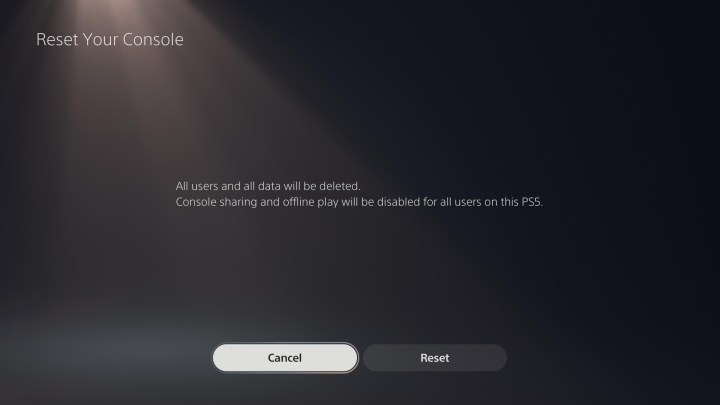
Reset your console: Removes everything from your PS5 and fully resets it. Only use this option if you’re selling or trading in your PS5, or if you want to start from scratch.
Select the option that best suits your needs, and you’re set. If you want to perform a factory reset, choose Reset your console. Once again, we recommend backing up your data before proceeding with a factory reset, even if you’re a PlayStation Plus subscriber.
Frequently asked questions
How do I soft reset my PS5?
A soft reset of your PS5, unlike a factory reset, simply turns your PS5 off and then on again. In fact, this is a highly recommended first step for troubleshooting. To do so, tap the Playstation button on your PS5 controller, then select the power symbol button in the bottom right of your screen and select ‘Restart PS5.
Can I get my data back after factory resetting a PS5?
You can get your data back after factor resetting your PS5 if you have a backup, such as through the cloud or on an external drive. Consider getting a large PS5 SSD to store your games on before you even consider learning how to factory reset a PS5.
How to reset a PS5 controller?
You can also reset your PS5’s DualSense controller. To do so, locate the small hole on the backside of your controller. Carefully insert unfurled paperclip or toothpick inside until you push a button. Your DualSense controller’s front light will turn on. Keep the button held down until the light turns off to reset your PS5 controller.
Editors’ Recommendations