
Daily Guardian UAEDaily Guardian UAE
  • Home
  • UAE
  • What’s On
  • Business
  • World
  • Entertainment
  • Lifestyle
  • Sports
  • Technology
  • Travel
  • Web Stories
  • More
    • Editor’s Picks
    • Press Release
What's On

A Tribute to National Pride: UAE Flags Soar at Al Khail Square’s Evening Horse Show

April 21, 2026

Hyundai’s Ioniq 3 has the range, the looks, and the space to win you over

April 21, 2026

Meta wants you to pay for WhatsApp now, and it’s already testing the waters

April 21, 2026

Tim Cook steps down as Apple CEO, handing over role to hardware chief Ternus

April 21, 2026

Assassin’s Creed Black Flag Resynced finally gets a showcase date

April 21, 2026
Facebook X (Twitter) Instagram
Finance Pro
Facebook X (Twitter) Instagram
Daily Guardian UAE
Subscribe
  • Home
  • UAE
  • What’s On
  • Business
  • World
  • Entertainment
  • Lifestyle
  • Sports
  • Technology
  • Travel
  • Web Stories
  • More
    • Editor’s Picks
    • Press Release
Daily Guardian UAEDaily Guardian UAE
Home » How to factory reset the Meta Quest 3
Technology

How to factory reset the Meta Quest 3

By dailyguardian.aeFebruary 7, 20242 Mins Read
Share
Facebook Twitter LinkedIn Pinterest Email

As with consoles, PCs, and other tech devices, you may occasionally find a reason to factory reset your Meta Quest 3. Whether you’re selling your headset or simply wanting to get a fresh start, you’ll want to be sure your data is fully cleared from its memory. In this guide, we’ll explain two methods you can use to factory reset your Quest 3

Note: Performing a factory reset on your Quest 3 won’t delete the games you’ve purchased or make any changes to your Meta account. It will, however, erase all of the games you have downloaded on the headset itself, meaning you’ll also lose access to any save data that isn’t stored in a cloud. Proceed with caution and be certain you’re ready to wipe the headset before continuing.

How to factory reset Quest 3 using the headset 

The simplest way to reset your Quest 3 headset is to do it on the device itself. It doesn’t require a mobile device or navigating through any complicated settings.

Step 1: Make sure your Quest 3 is turned off before beginning.

Step 2: Hold down the power and volume (-) button on your headset at the same time until you notice the boot screen lhas loaded.
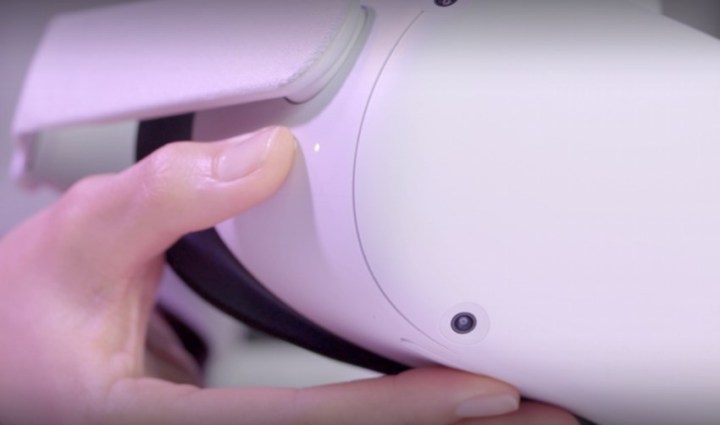
Hands pressing the volume and power button to reset the Quest 3.

Step 3: Using the volume buttons on your headset, navigate to Factory Reset, then press the power button.

Step 4: Using the volume buttons on your headset, navigate to Yes  and press the power button once more to begin the factory reset.
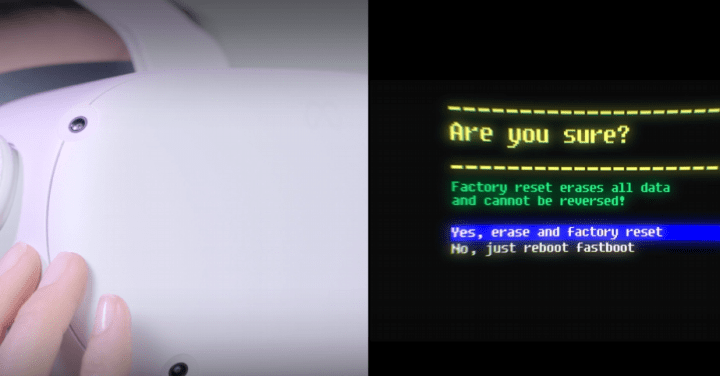
The factory reset prompt next to someone pushing the volume and power buttons.

How to factory reset Quest 3 using a phone

Step 1: Enter the Meta Quest app using your mobile device.

Step 2: Tap on Menu, then select Devices.

Step 3: Select your headset from the listed devices.

Step 4: Choose Headset Settings, then tap on Advanced Settings.
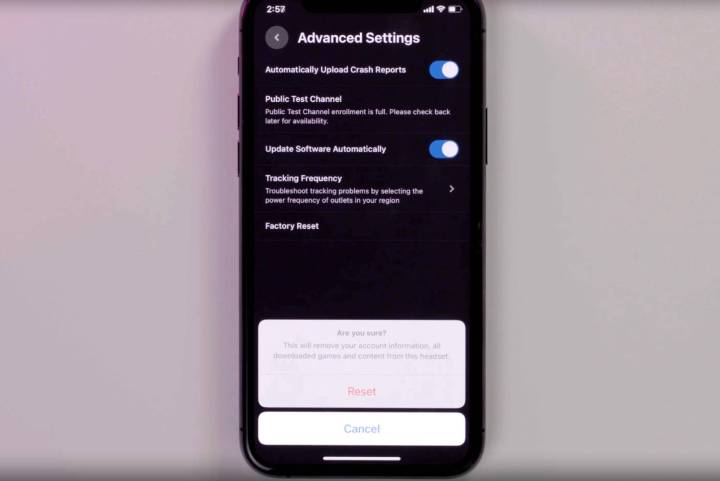
The factory reset settings on a phone screen for the Quest 3.

Step 5: Select Factory Reset, then choose *Reset *to begin the factory reset.

Editors’ Recommendations


Share. Facebook Twitter Pinterest LinkedIn Tumblr Email

Keep Reading

Hyundai’s Ioniq 3 has the range, the looks, and the space to win you over

Meta wants you to pay for WhatsApp now, and it’s already testing the waters

Tim Cook steps down as Apple CEO, handing over role to hardware chief Ternus

Assassin’s Creed Black Flag Resynced finally gets a showcase date

Deezer says AI-generated songs now make up 44% of daily uploads

iPhone 18 Pro color leaks reveal four new finish options

Motorola sets the launch date for a fresh slate of Razr foldable phones  

Google Photos gets new editing tools that are all about subtle touch-ups

Samsung shows off cute new tabletop robot, and we hope it sees the light of day

Editors Picks

Hyundai’s Ioniq 3 has the range, the looks, and the space to win you over

April 21, 2026

Meta wants you to pay for WhatsApp now, and it’s already testing the waters

April 21, 2026

Tim Cook steps down as Apple CEO, handing over role to hardware chief Ternus

April 21, 2026

Assassin’s Creed Black Flag Resynced finally gets a showcase date

April 21, 2026

Subscribe to News

Get the latest UAE news and updates directly to your inbox.

Latest Posts

Deezer says AI-generated songs now make up 44% of daily uploads

April 21, 2026

iPhone 18 Pro color leaks reveal four new finish options

April 21, 2026

Motorola sets the launch date for a fresh slate of Razr foldable phones  

April 21, 2026
Facebook X (Twitter) Pinterest TikTok Instagram
© 2026 Daily Guardian UAE. All Rights Reserved.
  • Privacy Policy
  • Terms
  • Advertise
  • Contact

Type above and press Enter to search. Press Esc to cancel.