
Daily Guardian UAEDaily Guardian UAE
  • Home
  • UAE
  • What’s On
  • Business
  • World
  • Entertainment
  • Lifestyle
  • Sports
  • Technology
  • Travel
  • Web Stories
  • More
    • Editor’s Picks
    • Press Release
What's On

Cyber Threats in EEMEA: Trends from Mastercard’s Report

June 10, 2026

iOS 27 offers the clearest sign that a foldable iPhone is right around the corner

June 10, 2026

UAE’s Space42 Expands Satellite Capabilities for Global Earth Monitoring

June 10, 2026

I went to BenQ’s lighting lab, and now my desk setup feels wrong

June 10, 2026

A humanoid robot climbed a volcano, with some very human help

June 10, 2026
Facebook X (Twitter) Instagram
Finance Pro
Facebook X (Twitter) Instagram
Daily Guardian UAE
Subscribe
  • Home
  • UAE
  • What’s On
  • Business
  • World
  • Entertainment
  • Lifestyle
  • Sports
  • Technology
  • Travel
  • Web Stories
  • More
    • Editor’s Picks
    • Press Release
Daily Guardian UAEDaily Guardian UAE
Home » How to find and use transcripts in Apple Podcasts
Technology

How to find and use transcripts in Apple Podcasts

By dailyguardian.aeMarch 10, 20243 Mins Read
Share
Facebook Twitter LinkedIn Pinterest Email

Apple has rolled out iOS 17.4 to iPhones, including the iPhone 15 lineup, and this one has some nice new features that you should notice — like support for third-party app stores in select regions. There’s also new emoji, improvements to Apple Music, and more.

Additionally, if you enjoy listening to podcasts in Apple’s Podcasts app, there is now support for transcripts. With these new transcripts, you can read along while listening to your favorite podcasts. But how do you find and enable this feature? We’re going to show you how.

How to find transcripts in Apple Podcasts

Transcripts provide a full-text display for each episode that users can read along with, and even navigate through the podcast episode with.

There is also support for searching for a keyword or phrase within the transcript, and you can tap on transcript text to jump to that point in the episode. As the episode plays, each word is highlighted to make it easy to follow along.

But how do you find the transcripts in the first place?

Step 1: Open the Podcasts app on your iPhone.

Step 2: Find an episode of a podcast and start playing it.
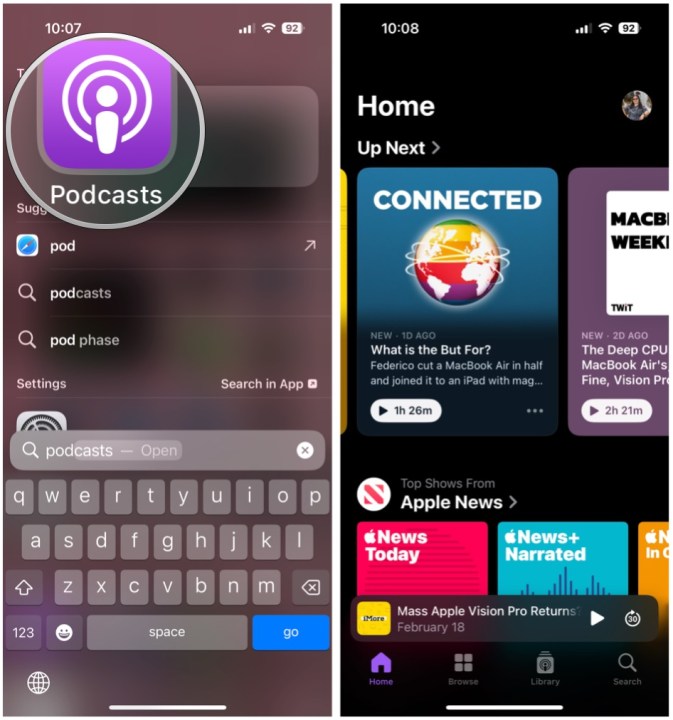
Open Podcasts, select an episode.

Step 3: Expand the Now Playing screen by swiping up from the bottom or select the audio player.

Step 4: Select the Transcript button at the bottom left corner. It looks like speech bubble with quotation marks inside.
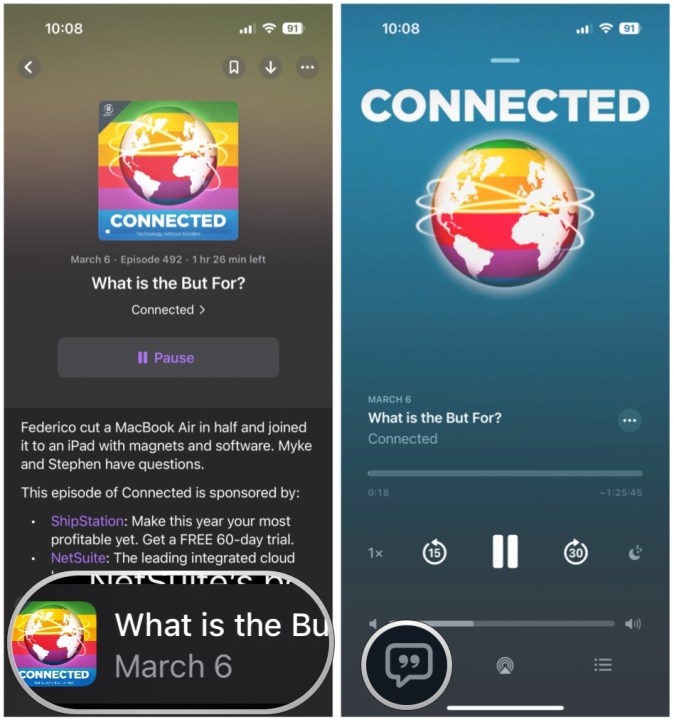
Once it's playing, select the Now Playing bar, then select the Transcript button.

Step 5: As the episode plays, the transcript text is highlighted. Tap the text to jump to that point in the episode.

Step 6: Swipe down to hide the player controls (or allow it to hide naturally a few seconds). This brings up the Search option. Select Search if you want to look for a specific word or phrase.

Select text in transcript to jump to that point, or select Search at the bottom to look for specific words or phrases.

Step 7: Type in the word or phrase that you are looking for.

Step 8: The number of results will pop up in real-time, and you can select the arrows to jump to those points in the transcript.

What podcasts are transcripts available for?

The new Transcripts feature will begin working immediately if you have updated your iPhone to iOS 17.4.

Apple has said that the transcripts are automatically available for new episodes shortly after they are published. While the audio is still available normally, the transcript has to be generated and processed, so there is a short delay. Thankfully, it doesn’t take too long.

If portions of the podcast audio is changed with dynamically inserted audio, the transcript does not show the segments of audio that have changed since the original transcript. Music lyrics aren’t displayed in transcripts either. Furthermore, the backlog of older, existing episodes will be transcribed over time.

While the transcript feature works for all podcasts, creators who want to provide their own transcripts are able to do so. For this to work, it has to be provided through RSS tags or submitted through Apple Podcasts Connect for subscriber episodes.

An iPhone 15 Pro showing the Podcasts Transcripts feature.

What languages are supported?

Transcripts are available in the following languages: English, French, Spanish, and German language podcasts. Unfortunately, are not translations from one language to another.

The Transcripts feature available in over 170 countries and regions.

Editors’ Recommendations


Share. Facebook Twitter Pinterest LinkedIn Tumblr Email

Keep Reading

iOS 27 offers the clearest sign that a foldable iPhone is right around the corner

I went to BenQ’s lighting lab, and now my desk setup feels wrong

A humanoid robot climbed a volcano, with some very human help

This bionic-kneading neck massager with heat is the Father’s Day gift that actually gets used

Rivian R2 SUV deliveries have begun, just not for the version most buyers may want

Rivian R2 first drive

A guide to Sony’s 2026 TVs and home theater lineup

Valve’s Steam Machine could arrive by June 29 if this fan theory is right

Sony’s new 135-inch display is basically boardroom excess in its finest form

Editors Picks

iOS 27 offers the clearest sign that a foldable iPhone is right around the corner

June 10, 2026

UAE’s Space42 Expands Satellite Capabilities for Global Earth Monitoring

June 10, 2026

I went to BenQ’s lighting lab, and now my desk setup feels wrong

June 10, 2026

A humanoid robot climbed a volcano, with some very human help

June 10, 2026

Subscribe to News

Get the latest UAE news and updates directly to your inbox.

Latest Posts

This bionic-kneading neck massager with heat is the Father’s Day gift that actually gets used

June 10, 2026

Link Between Oral Health and Pregnancy Outcomes

June 10, 2026

Rivian R2 SUV deliveries have begun, just not for the version most buyers may want

June 10, 2026
Facebook X (Twitter) Pinterest TikTok Instagram
© 2026 Daily Guardian UAE. All Rights Reserved.
  • Privacy Policy
  • Terms
  • Advertise
  • Contact

Type above and press Enter to search. Press Esc to cancel.