

If you’re here, you’ve likely just had this experience; needing to enter your digits for an account of some sort, you realize you don’t remember your own phone number. As you don’t call your own phone number very often, this isn’t an extremely uncommon scenario. And it gets even worse if you frequently use a second phone number alongside your main one. It’s still embarrassing enough, however, to not want to ask your partner or buddy, “Hey, what’s my phone number?”
Luckily, the ability to locate phone number data comes directly on your phone, so checking your friend’s address book won’t be necessary. Whether you’re using an iOS or Android device, you can quickly locate your own number — as well as your IMEI number — on your phone if you know where to look. Just grab your phone, find the appropriate section below, and we’ll show you how to do it.
How to find your phone number on iPhone
Looking up your phone number on an iOS device is easy and convenient because most iOS users are running the same version. There are two ways you can easily locate your phone number: The Contacts app or in the settings.
- Contacts: Open the Phone app, tap Contacts, and your number will be the first listed.
- Settings: Go to Settings > Phone and My Number will be the first field on the list. You can of course change, or edit, this if you wish by tapping on the number.
How to find your phone number on Android
Do not be surprised to discover some variations in the steps you need to take for finding your own mobile number on an Android device. That’s because Android users may be running different versions of the operating system and because of variations in how the operating system is implemented across device brands. So there are bound to be different interfaces depending on which device you use and which version of the OS you run. Generally, however, all roads begin from the settings.
The example below is on an LG V40 ThinQ running Android 10, but the process remains the same in Android 11, Android 12, and Android 13.
- Go to settings and search for My phone number in the search bar.
- The result will give you the path: System > About phone > Status.
- Alternately, launch the Contacts app and you’ll see your own contact info right at the top.
The screenshots below show an older Samsung Galaxy S6 that runs Android 6.0 Marshmallow.
If you’re running stock Android, or something very close — for example, the Google Pixel or Nexus, or the Lenovo Moto G, X, or Z smartphones — pull up the Contacts app. You’ll see an entry titled My Info or Me; your phone number is listed in that contact information at the top of the list.
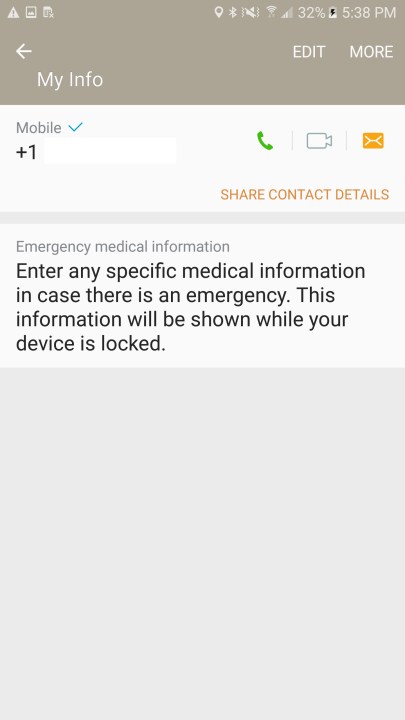
For every Android phone, regardless of manufacturer, you’ll be able to find your phone number if you go to Settings > About Phone or About Device > Status > My phone number. Some Android phones will have SIM or SIM card status listed within Status. For example, you may need it for verification at some casinos, at wolf winner casino this procedure is particularly important. If this is the case with your phone, then your number will be listed there. If you don’t want to go through these many different menus, you can pull up the search bar and type in My Phone Number to directly pull up the relevant information.
Note: If your SIM card is faulty or installed incorrectly, you may see a “Phone number not found” warning as you try to complete this process.
It’s not hard to find your phone number once you know how to look for it, so you can help others find their numbers with just a few steps.
Getting a call from your own number?
Now that you’ve found or memorized your phone number, it might come as a shock to see if pop-up on your screen as an incoming call. The FTC has warned that some robocallers and scammers have taken number spoofing to the next level and will use your own number in hopes you answer. They have also taken to this method to get around number block, because after all, who blocks their own number? If you see an incoming call with your number on it, no it’s not you from an alternate timeline, it’s a scam so don’t pick up.
Editor’s Note: Article was checked on January 2, 2024, to ensure that all of the information is accurate.
Editors’ Recommendations