

Shark has a number of handy cordless vacuums designed with rechargeable batteries, including slim stick vacuums and the Ion line of robot vacuums. Many robot vacs have the ability to go back to their charging stations automatically when necessary.
While you can expect rechargeable batteries to lose a little juice over time, if your Shark robovac or similar vacuum is relatively new but just not charging, then there’s certainly something wrong. While you could always buy a replacement, or get a bargain via a robot vacuum deal, its always best to try to resolve the problem on your own. Going over these steps can help you find the problem and fix it fast.
Why is my Shark vacuum not charging?
Charging problems, especially with a newer Shark vacuum, are usually caused by positioning or power issues. Thankfully these are not permanent issues. There are often simple fixes to try if you know what to look for — and that’s where we’re going to help out!
What do you do if your Shark robot vacuum won’t charge?
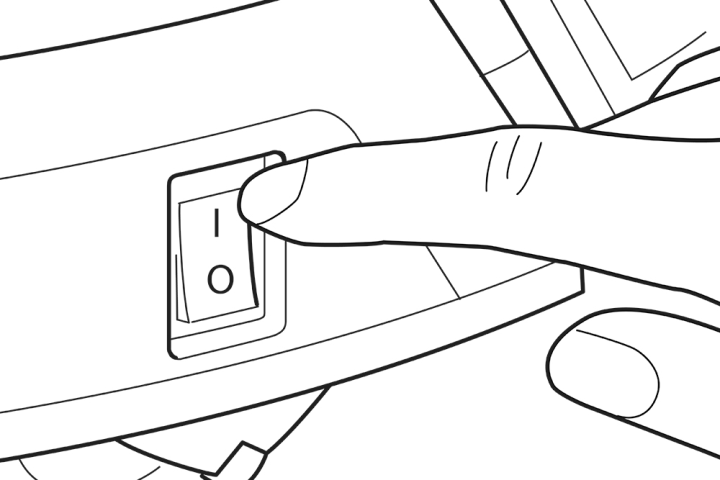
Step 1: Look at your on/off switch.
Shark robot vacuums have a manual on/off switch located on the robovac itself. Switching the bot off can help you save on power if you don’t want to use the battery or don’t plan on scheduling a vacuum session for a few days. However, sometimes this switch gets flipped to the off position when the robot bumps into furniture. Users find the robot unresponsive and try putting the bot in its charger to give the battery a boost, but when the robot vacuum is off, it won’t always charge.
Check the manual switch, and make sure it’s in the on position. Sometimes, this easy fix is all you need.
Step 2: Check if you need to manually place the vac.
Your Shark robot vac should have blue LED indicator lights on the top of the unit to show battery strength. As long as at least one of these indicator lights is on, then your bot probably has enough remaining battery life to go back to its charger automatically. There are other Shark vacuum indicator light colors that signify other problems.
If all the lights on the vacuum are off, then the battery is probably too empty to fuel a trip back to the dock. In these cases, your vacuum needs a little help: Carry it back to the dock and put it in place so that it starts charging.
This is also good advice for using your robot vacuum for the first time: It usually needs to be charged in the dock before it’s ready for action.
Step 3: Clean all charging contacts.
The Shark vacuum should have two metal contact points designed to fit against two metal plates on the charging dock. When these two pieces make proper contact, the battery can charge. However, sometimes the contacts can’t connect. Clean the contacts on both the bot and the charging dock to see if this fixes the problem. The battery indicator lights on your vacuum will start blinking when the robot is charging, which is an easy way to see if it’s working.
Step 4: Check the dock for power and proper operation.
While not as common, something might have happened to the charging dock to prevent it from working properly. When the dock is turned on and ready to charge, it should have a green light illuminated on the side. If your dock doesn’t, make sure it’s plugged in, and try another outlet to see if it can get power elsewhere.
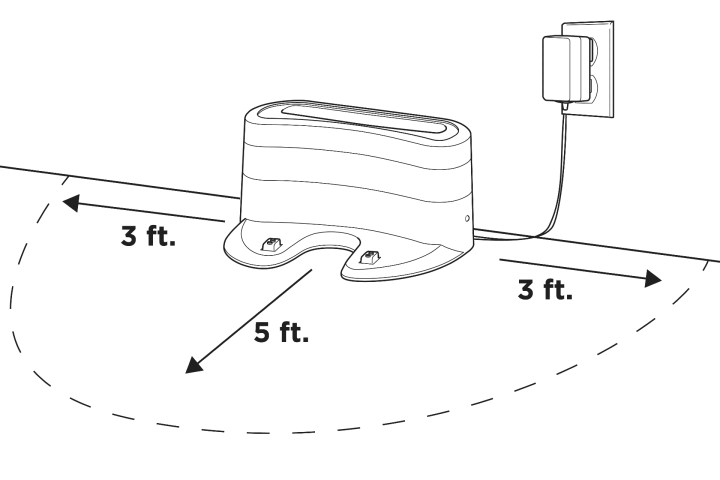
You should always place the dock in an area that’s free of obstructions. It should have three feet of space on either side and five feet of space in front of it. If there isn’t enough room, the robovac may not be able to make it back properly.
Step 5: Inspect and replace the battery.
If nothing else works, it’s time to open up the battery case and take a look. Sometimes the battery may have gotten dirty or slipped away from its contacts inside the Shark robot vacuum. Cleaning and repositioning it may fix your problem. But if it’s an old battery or there are clear signs of damage, you should order a replacement battery that matches your model.
If none of these troubleshooting tips work, it might be time for a new model. Check out our list of the best Shark vacuums to see which model might be right for you.
Editors’ Recommendations