
Daily Guardian UAEDaily Guardian UAE
  • Home
  • UAE
  • What’s On
  • Business
  • World
  • Entertainment
  • Lifestyle
  • Sports
  • Technology
  • Travel
  • Web Stories
  • More
    • Editor’s Picks
    • Press Release
What's On

Amazon’s Echo Hub just became the control freak your smart home needed

June 12, 2026

Windows 11 adds a neat upgrade that enables simultaneous streaming for two audio devices

June 12, 2026

DIFC Announces Consultation on amended DIFC Arbitration Law

June 12, 2026

iOS 27 hands-on: the iPhone update I have been waiting for

June 12, 2026

Neurovia AI Shines at UAE Data Center Summit 2026

June 12, 2026
Facebook X (Twitter) Instagram
Finance Pro
Facebook X (Twitter) Instagram
Daily Guardian UAE
Subscribe
  • Home
  • UAE
  • What’s On
  • Business
  • World
  • Entertainment
  • Lifestyle
  • Sports
  • Technology
  • Travel
  • Web Stories
  • More
    • Editor’s Picks
    • Press Release
Daily Guardian UAEDaily Guardian UAE
Home » How to get verified on Instagram Threads
Technology

How to get verified on Instagram Threads

By dailyguardian.aeMarch 8, 20243 Mins Read
Share
Facebook Twitter LinkedIn Pinterest Email

Like Twitter and Instagram, Instagram Threads allows users to become verified to confirm their identities and access some exclusive features. Similar to Twitter’s verification process, you’ll need to pay a monthly fee to be verified on Threads, so keep that price in mind as you get your verified Threads account set up.

So, without further ado, here’s how to get verified on Instagram Threads in a few straightforward steps.

How to get verified on Instagram Threads

Here’s how to get verified on Threads in a few simple steps.

Step 1: Needless to say, in order to be verified on Threads, you’ll need to first make sure you have an account. With your account made, you won’t actually be able to get verified via the Threads app. Instead, you’ll need to open the Instagram app and navigate to your profile.

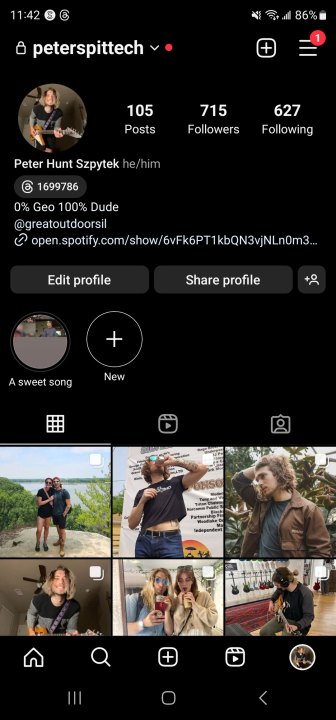
Step 2: Once you’ve made it to your profile, select the icon in the top right corner (the three horizontal lines) to pull up a menu.
how to get verified on instagram threads verified1

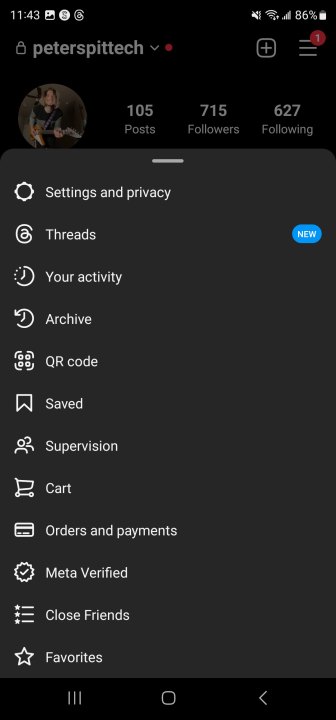
Step 3: In the menu, select Meta Verified.
how to get verified on instagram threads verified2

Step 4: Once you’ve selected it, you should be taken to the Meta Verified menu in the Meta Accounts Center, but if you aren’t automatically taken there, select Meta Verified once more at the bottom of the screen. On the Meta Verified menu, you’ll be able to see all of the features that come with being verified. Select Subscribe.

how to get verified on instagram threads verified3

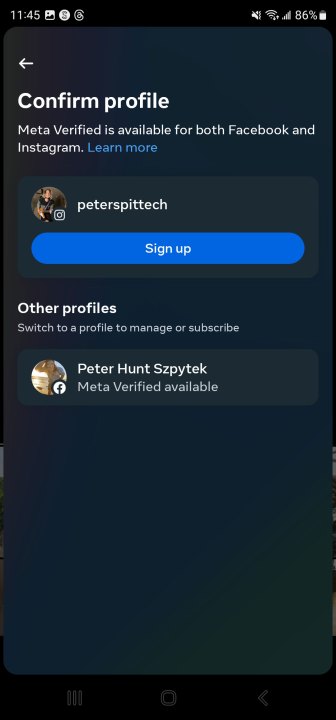
Step 5: On the next page, confirm that the profile listed is the profile you want to sign up for the Meta verification process. Once you have, select Sign up.
how to get verified on instagram threads verified4

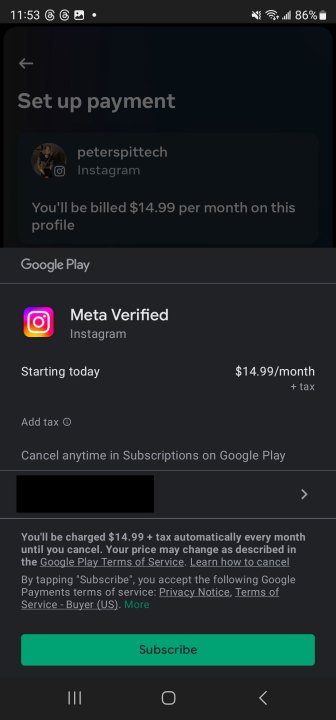
Step 6: Review the payment information on the new page. To subscribe to Meta Verified, you’ll pay $15 per month, which will be billed to the card on file. If you’re okay with paying that, select Pay now and then select the card you want to pay with that’s associated with your app store of choice. If you don’t have a card on file, you’ll be prompted to enter one. Once you’ve found your card, select Subscribe.
how to get verified on instagram threads verified5

Step 7: Once you’ve subscribed, it will take Meta up to 48 hours to review your profile to make sure that you qualify for its verification process. Take note that in order for Meta to verify you, you need to have your full name on your profile, have a profile picture that clearly shows your face, and have 2FA enabled. If, for some reason, Meta does not accept your verification request, you will be refunded.

As soon as your verification application is accepted, you’ll be verified on your Meta accounts, meaning you’ll get the blue checkmark on Instagram and Threads. Take note that this will not verify you on Facebook.

Frequently Asked Questions

How much does it cost to get verified on Threads?

It costs $14.99 a month to get verified on Threads. If you’ve already paid for an ad on Instagram, your card may already be on file for use on Threads. If not, you’ll be prompted for one when you sign up to get verified.

What is the blue badge on Threads?

The blue badge on a Threads profile denotes that it’s been verified, meaning that there’s a real person or organization behind it. You too can get verified on your Threads account for $14.99 a month.

Editors’ Recommendations


Share. Facebook Twitter Pinterest LinkedIn Tumblr Email

Keep Reading

Amazon’s Echo Hub just became the control freak your smart home needed

Windows 11 adds a neat upgrade that enables simultaneous streaming for two audio devices

iOS 27 hands-on: the iPhone update I have been waiting for

Telegram quietly returns to wearOS smartwatches and its looks pretty sleek

The social media scrolling habit is more harmful than you think, especially for teens

Apple comes out clear on Siri AI acting as your romantic partner. It’s a No

Microsoft Edge is about to get more frequent updates, but don’t expect more features

Instagram’s new voice message effects let you sound like a pirate, a grandma, or a World Cup fan

Tesla FSD update adds a new dialog that previews your car’s parking plan

Editors Picks

Windows 11 adds a neat upgrade that enables simultaneous streaming for two audio devices

June 12, 2026

DIFC Announces Consultation on amended DIFC Arbitration Law

June 12, 2026

iOS 27 hands-on: the iPhone update I have been waiting for

June 12, 2026

Neurovia AI Shines at UAE Data Center Summit 2026

June 12, 2026

Subscribe to News

Get the latest UAE news and updates directly to your inbox.

Latest Posts

Telegram quietly returns to wearOS smartwatches and its looks pretty sleek

June 12, 2026

The $40.9 Billion Impact of the World Cup on Economies

June 12, 2026

The social media scrolling habit is more harmful than you think, especially for teens

June 12, 2026
Facebook X (Twitter) Pinterest TikTok Instagram
© 2026 Daily Guardian UAE. All Rights Reserved.
  • Privacy Policy
  • Terms
  • Advertise
  • Contact

Type above and press Enter to search. Press Esc to cancel.