

Macros can be a great way to automate mundane functions in your favorite games, or give you a slight speed advantage in high actions-per-minute games, like real-time strategy and MOBA games. While there are some gaming keyboards that come with prerecorded macros for you to use, you still need to apply them, and for most gaming keyboards, you’ll need to record them yourself.
But how do you actually do that? Fortunately, most keyboard manufacturers have their own backend software that makes the process very straightforward. Here’s how to map macros on your gaming keyboard.
How to map macros on Logitech keyboards
Logitech make some great gaming keyboards and mice, and collects all of them for button remapping and lighting management under the Logitech G-Hub application.
For more details, here’s our guide on how to use Logitech G-Hub.
Step 1: Download and install the Logitech G Hub from the official website.
Step 2: Open the app and it should automatically detect any Logitech devices you have connected to your PC, including the keyboard. Select it.
Step 3: Select Macros from the left-hand menu.
Step 4: Select Create new macro. Give it a name, then choose what type of macro you want it to be (toggle, repeat, sequence).
Step 5: Select any further relevant options, then select Start now. You can create a macro that performs a range of functions, so select one from the options presented. If you want it to handle a number of sequenced keypresses, select Record keystrokes, then press the keys you want to record.
When you’re done, select Stop Recording.
Step 6: Save the macro ,then return to the main keyboard page. Select the key on your keyboard that you want to apply the macro to, then drag and drop the chosen macro on to it.

How to map macros on Razer keyboards
Razer also has a robust backend system for remapping keys and recording macros.
Step 1: Download and install the Razer Synapse software from the main website.
Step 2: Open the application and select the Macro icon in the top menu.
Step 3: Select the + icon in the top left and give the new macro a name.
Step 4: Select that macro name from the left-hand list, then select to record or insert inputs.
For recorded inputs, you can simply press Start and begin recording your macro. Select Stop when finished.
For insert, you can use the mouse to select keyboard inputs manually one at a time.
Step 5: Choose any additional parameters like delay functions between keypresses
Step 6: Go back to the main keyboard menu and select the key that you want to apply the macro to.
Step 7: Select Macro from the left-hand menu, then from the drop-down menu under “Assign Macro,” select the one you want to apply.
Step 8: If you want to, adjust Playaback option to add repetition, or toggle on and off.
How to map macros on Corsair keyboards
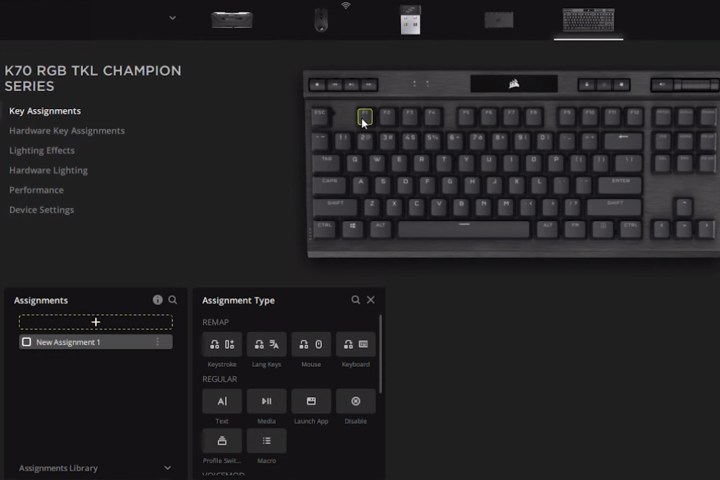
Corsair’s iCUE software might be one of the best apps out there for managing your component’s RGB lighting, but it’s also great for managing keyboard remapping, including recording macros.
Step 1: Download and install the Corsair iCUE application from the official website.
Step 2: Open the application and select your keyboard from the list of available Corsair components and peripherals.
Step 3: Select Key assignments from the left-hand menu.
Step 4: In the bottom-left “Assignments” box, select the + icon followed by Macro.
Step 5: Input your sequence of keystrokes and set the additional parameters like looping or toggle on/off.
Step 6: Select which key you want to apply the macro to, then select the menu button to save it to your keyboard.
Now that you’ve remapped your keyboard and added your favorite macros, why not try adjusting your keyboard’s RGB lighting?
Editors’ Recommendations