

Did you lose your TV or cable box remote? Fear not, friends! If you’ve misplaced the controller for your set-top box, your cable provider will likely replace it for you (sometimes for a fee). Losing your TV remote can be a little more challenging of a replacement though, but only because most TV manufacturers won’t just send you a new remote for free.
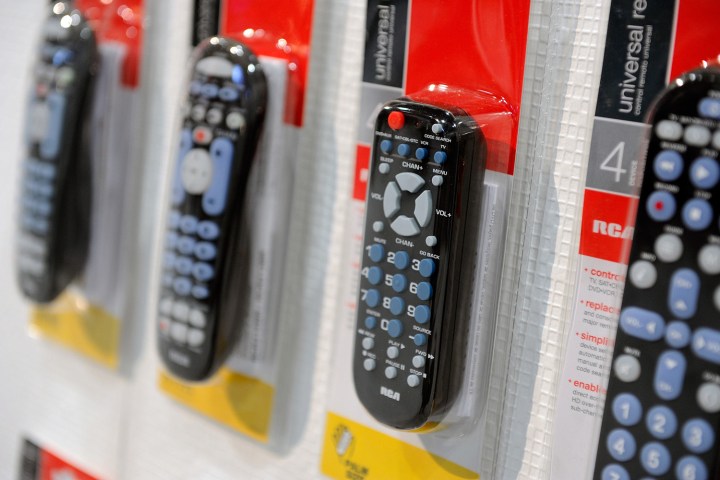
Fortunately, you can purchase an RCA universal remote instead. Similar to how you’d program your cable box remote to control TV power and volume, a universal RCA remote requires a quick setup process to link it to your TV. Once it’s paired though, the handshake should last for the life of the remote and/or your TV.
RCA remotes can also be used to control cable boxes, certain Blu-ray and DVD players, and even some audio systems. If you’ve never used one before, here’s a guide on how to set one up!
Before you get started
The first thing you’re going to want to do is to make sure your universal remote has fresh batteries in it and that the components and devices you want to sync are properly hooked up.
All set? Now it’s time to link your RCA universal remote control to the hardware. There’s more than one way to do that, and we’ve covered the easiest methods below.
The auto-program method
The easiest and fastest way to begin syncing your devices with your universal remote control is with the auto program method.
Step 1: Turn on the component or device you want to set up, such as your TV, Blu-ray player, streaming device, etc.
In this example, we’ll go with the TV.
Step 2: Press and release the TV button. The RCA universal remote’s On/Off button will light up and should remain lit.
Step 3: Now, simultaneously press and hold the TV button and the On/Off button. The illuminated On/Off button will turn off. After a moment, however, it should turn back on.
Step 4: Release both buttons after the On/Off button relights. It should remain on.
Step 5: Now, press and release the Play button on your RCA remote. If the TV (or component that you are programming) does not turn off after five seconds, continue to hit the Play button every five seconds until the TV turns off. The remote is searching through possible codes for your TV.
Step 6: When the TV turns off, your remote has found the right code. Next, press and release the Reverse button. Wait to see if the TV turns back on, and press it every three seconds until it does.
Step 7: Press and release the Stop button once more to save the programming for the device in your remote’s memory.
Step 8: Repeat steps 1 through 7 for each additional device you wish to pair with your remote. Some RCA universal remotes can accommodate up to eight devices.
Be aware that you might cause issues with the syncing mechanism if you press incorrect buttons. There’s certainly a learning curve that involves some trial and error to set up your remote successfully. If you come to a point where you need to start over, all you’ll need to do is restart the hardware, take out the remote batteries, put them back in, and go through the steps once more.
Finding RCA universal remote codes
Your RCA remote will come with a special codebook that can help you input various codes for countless devices manually. If you’ve lost the booklet or thrown it away, you can follow the next steps to find your RCA universal remote codes.
Step 1: Go to the RCA Accessories website.
Step 2: Open up the battery panel on the back of your universal remote.
Step 3: Find the paper sticker on the back of the battery panel. Enter the given revision number in the box on the RCA website.
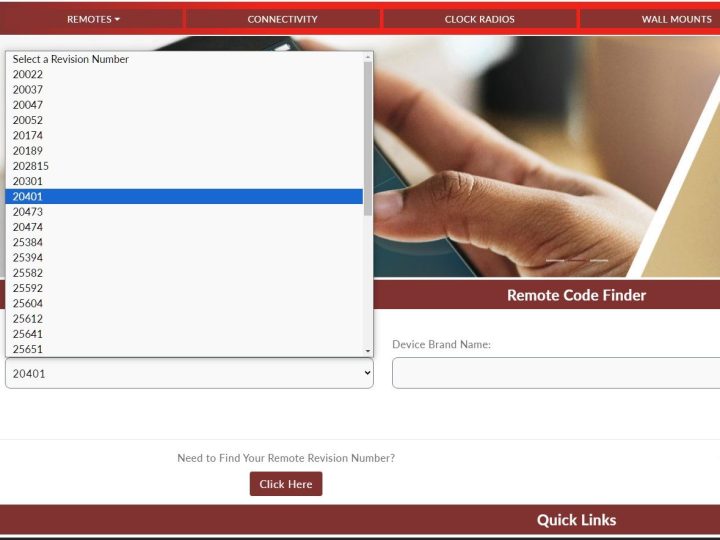
Step 4: Then put in the device brand and type in the adjacent drop-down menus.
Step 5: Your device codes will display below. It is normal to have multiple. We will guide you in how to use them in the next section.
How to connect an RCA remote to a TV with a code
Now that you have your code(s), let’s discuss how to program a current TV to your new RCA universal remote. Again, these steps apply if you’re setting up the remote with another device.
Step 1: Go to the TV section of the codebook, find your TV brand, and circle all the available codes. Or, use the codes you found in the section above. You’ll likely have multiple codes.
Step 2: Power on your TV.
Step 3: Hold down the TV button on your universal remote until you see the power button light up.
Step 4: Keep holding the TV button while you input the first code. (Note that the codes will be four to five digits long, depending on the remote’s model.) One of the codes for a Samsung TV, for example, is 10812.
Step 5: Once you’ve entered the device code, keep holding the TV button. If the power button is still illuminated, that indicates you’ve entered the correct code correctly. Let go of the TV button and start testing device commands. If everything is working properly, commands for power, volume, and the menu should now control your TV.
Step 6: If the power button blinks four times, that signals that the device code you entered was incorrect. Go back through steps 2 to 4 for the next available code.
If after all this, the RCA universal remote just isn’t doing it for you, there are several other universal remotes on the market you can try, such as the GE 33709, which is a great bare-bones option that is compatible with many AV devices.
Editors’ Recommendations