
Daily Guardian UAEDaily Guardian UAE
  • Home
  • UAE
  • What’s On
  • Business
  • World
  • Entertainment
  • Lifestyle
  • Sports
  • Technology
  • Travel
  • Web Stories
  • More
    • Editor’s Picks
    • Press Release
What's On

How to install iOS 27 public beta on your iPhone?

July 14, 2026

Google Home Speaker (2026) review: Smarter and punchier, with a subscription pinch

July 14, 2026

How to install macOS 27 Golden Gate public beta on your Mac?

July 14, 2026

Microsoft is finally fixing the worst thing about Windows Search, but you can’t try it just yet

July 14, 2026

Joyalukkas Strengthens US Footprint with 8th Showroom in Iselin, New Jersey.

July 14, 2026
Facebook X (Twitter) Instagram
Finance Pro
Facebook X (Twitter) Instagram
Daily Guardian UAE
Subscribe
  • Home
  • UAE
  • What’s On
  • Business
  • World
  • Entertainment
  • Lifestyle
  • Sports
  • Technology
  • Travel
  • Web Stories
  • More
    • Editor’s Picks
    • Press Release
Daily Guardian UAEDaily Guardian UAE
Home » How to reset Philips Hue bulbs and light strips
Technology

How to reset Philips Hue bulbs and light strips

By dailyguardian.aeMarch 26, 20243 Mins Read
Share
Facebook Twitter LinkedIn Pinterest Email

The Philips Hue smart light bulbs are some of the best on the market, offering reliable performance and dozens of customization options. But like all electronics, they’re susceptible to various glitches and errors. Thankfully, running into a problem with your Hue light bulb doesn’t mean it’s time to replace it – you might just need to perform a reset.

Alternatively, a reset is a great option if you’re looking to sell your Hue lights, ensuring none of your data or settings carries over to the new owner.

Resetting the Philips Hue bulbs takes less than 10 minutes and is a great way to get it working like new. Here’s a look at how to reset Philips Hue bulbs, including tips for resetting the bulb itself or through a Bridge.

Still having issues? Consider checking out our list of the best smart bulbs for alternatives.

How to reset a Philips Hue bulb

Remember that Philips Hue is different than Philips Wiz, and that these instructions are for Hue only. Here’s what you need to do to reset your Philips Hue bulb.

Step 1: Open the Philips Hue app on your mobile device.

Step 2: Select the Settings tab at the bottom of the screen.

Step 3: Select the Lights menu.

Step 4: Select the bulb you want to reset.
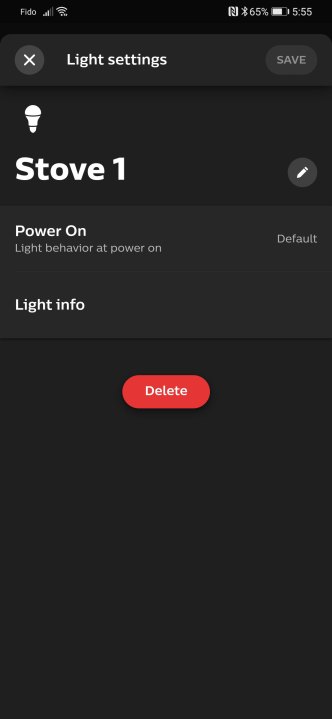
Philips Hue Android app open on light settings screen.

Step 5: Select Delete at the bottom of the page, then confirm by selecting Delete light. The light is now unpaired and can be readded wherever it needs to be.

Step 6: Select the “+” button in the top-right corner.

Step 7: Select Search to find the recently removed bulb. This step may take a moment. If it can find the bulb, you may need to get the serial number printed on the side of the bulb and type it into the app.

Step 8: Once found, identify the bulb with a name and icon. Tap Done.
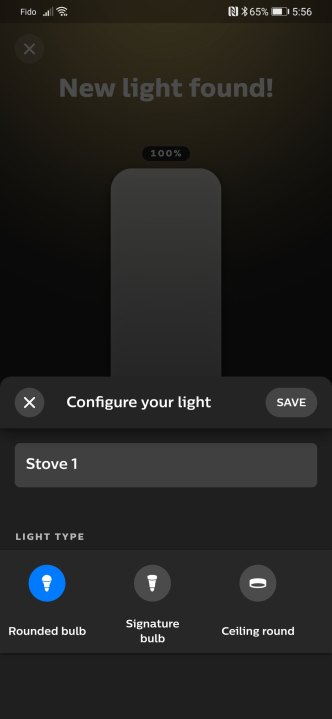
how to reset philips hue bulbs screen6

Step 9: Drag the icon for the new light to the room you want it to be with, then select Done.

How to reset Philips Hue bulb without Bridge

Philips Hue bulbs communicate via a Bridge accessory. If your Bridge is broken or missing for whatever reason, it’s still possible to reset the bulbs on their own. Most Hue bulbs have Bluetooth built-in and can use that to connect to a mobile device. Here’s how to reset your bulb without a Bridge.

Step 1: Turn the power supply to the bulb off and on five times. This activity should return it to a pairing mode.

Step 2: Download the Hue Bluetooth app.

Step 3: Follow the pairing process.

Step 4: If cutting the power to the bulb doesn’t flip it to pairing mode, you may need to buy a Hue Dimmer Switch. With it, you can reset a bulb by bringing the switch close to it.

Bring the Dimmer Switch within 10 centimeters of the light bulb.

Step 5: Press and hold I and O buttons simultaneously for 10 seconds.

Step 6: The LED should blink on the dimmer switch, and the bulb should blink as well to indicate it has been reset. You can now continue to add the bulb to your system starting at step 6 above.

For more guidance on setting up your Philips Hue bulbs, be sure to check out our complete installation guide and how to use Philips Hue lights with geofencing.

Editors’ Recommendations


Share. Facebook Twitter Pinterest LinkedIn Tumblr Email

Keep Reading

How to install iOS 27 public beta on your iPhone?

Google Home Speaker (2026) review: Smarter and punchier, with a subscription pinch

How to install macOS 27 Golden Gate public beta on your Mac?

Microsoft is finally fixing the worst thing about Windows Search, but you can’t try it just yet

iOS 27’s public beta is finally here, and you don’t need a developer account to get in

The Pixel 11 may finally ditch Samsung’s modem for better battery life and connectivity

New Pixel 11 leak reveals colors, specs, and a surprise accessory ahead of launch

The best phones in 2026: our 14 favorite smartphones right now

Razer dressed its gaming earbuds for PS5 and Xbox, then priced them surprisingly well

Editors Picks

Google Home Speaker (2026) review: Smarter and punchier, with a subscription pinch

July 14, 2026

How to install macOS 27 Golden Gate public beta on your Mac?

July 14, 2026

Microsoft is finally fixing the worst thing about Windows Search, but you can’t try it just yet

July 14, 2026

Joyalukkas Strengthens US Footprint with 8th Showroom in Iselin, New Jersey.

July 14, 2026

Subscribe to News

Get the latest UAE news and updates directly to your inbox.

Latest Posts

iOS 27’s public beta is finally here, and you don’t need a developer account to get in

July 14, 2026

The Pixel 11 may finally ditch Samsung’s modem for better battery life and connectivity

July 14, 2026

New Pixel 11 leak reveals colors, specs, and a surprise accessory ahead of launch

July 13, 2026
Facebook X (Twitter) Pinterest TikTok Instagram
© 2026 Daily Guardian UAE. All Rights Reserved.
  • Privacy Policy
  • Terms
  • Advertise
  • Contact

Type above and press Enter to search. Press Esc to cancel.