
Daily Guardian UAEDaily Guardian UAE
  • Home
  • UAE
  • What’s On
  • Business
  • World
  • Entertainment
  • Lifestyle
  • Sports
  • Technology
  • Travel
  • Web Stories
  • More
    • Editor’s Picks
    • Press Release
What's On

Meta AI will assist with account issues on Instagram and Facebook. Let’s hope it works.

March 21, 2026

Adobe put an AI coworker for your edits in Photoshop, Express, and even Acrobat reader

March 21, 2026

Erling Haaland invests in Norway Chess to launch the new Total Chess World Championship Tour

March 21, 2026

AI mental health risks exposed as chatbots sometimes enable harm

March 21, 2026

Pixel Watch update issues could be skewing your daily activity data

March 21, 2026
Facebook X (Twitter) Instagram
Finance Pro
Facebook X (Twitter) Instagram
Daily Guardian UAE
Subscribe
  • Home
  • UAE
  • What’s On
  • Business
  • World
  • Entertainment
  • Lifestyle
  • Sports
  • Technology
  • Travel
  • Web Stories
  • More
    • Editor’s Picks
    • Press Release
Daily Guardian UAEDaily Guardian UAE
Home » How to turn on Bluetooth in Windows and connect your devices
Technology

How to turn on Bluetooth in Windows and connect your devices

By dailyguardian.aeNovember 17, 20242 Mins Read
Share
Facebook Twitter LinkedIn Pinterest Email

Bluetooth is one of the best ways to connect a range of devices to your PC or laptop, from game controllers to wireless speakers and headphones. While most PCs will have Bluetooth enabled by default, though, some may require you to enable it yourself. That goes for both Windows 11 and Windows 10, and though the methods are very similar, they’re not identical.

Here’s how to turn on Bluetooth in Windows.

How to enable Bluetooth in Windows 11

You can enable Bluetooth in Windows 11 in just a few clicks using the Settings menu. Here’s how.

Step 1: Launch the Windows Settings menu by pressing Windows key + I. Alternatively, search for Settings in the Windows search bar and select the corresponding result.

Step 2: Select Bluetooth and devices from the left-hand menu.

Windows 11 settings menu.

Step 3: Select the Bluetooth toggle on the right-hand side so that it’s set to On to turn Bluetooth on.

Windows 11 bluetooth settings menu.

Step 4: To connect a new Bluetooth device to your PC, select Add a device on the Bluetooth settings page. Then select the type of device you want to add, and follow the on-screen instructions to connect it.

How to enable Bluetooth in Windows 10

The process for turning Bluetooth on in Windows 10 is much the same, but it looks a little different.

Step 1: Open the Action Center (it looks like a comment bubble on the right end of the Windows 10 taskbar).

Step 2: Select the the All Settings button. Then, select Devices and select Bluetooth & Other Devices on the left-hand side.

Step 3: Within the Settings menu’s Bluetooth section, toggle Bluetooth to the On position. Once you’ve turned Bluetooth on, you can select Add Bluetooth or Other Device. After the *Add a Device *window pops up, select Bluetooth, and Windows 10 will start searching for Bluetooth wireless devices.

Note: Make sure to set your Bluetooth device to pairing mode to connect it.
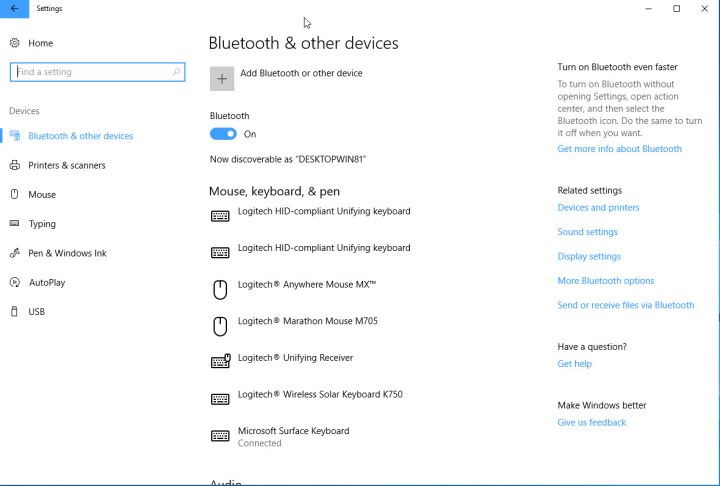
Windows 10 settings menu.

Want to learn some more Windows tips and tricks? Here are our top secrets to get to grips with it.


Share. Facebook Twitter Pinterest LinkedIn Tumblr Email

Keep Reading

Meta AI will assist with account issues on Instagram and Facebook. Let’s hope it works.

Adobe put an AI coworker for your edits in Photoshop, Express, and even Acrobat reader

AI mental health risks exposed as chatbots sometimes enable harm

Pixel Watch update issues could be skewing your daily activity data

I just watched Project Hail Mary, here’s why it’s one of the best movies of the year

Android Canary update brings big changes, but nothing is guaranteed

Google experiments with AI-generated headlines in search results

Google will still let you sideload apps, but there’s a catch now

Xiaomi SU7 EV makes Tesla look bad with sheer style and substance

Editors Picks

Adobe put an AI coworker for your edits in Photoshop, Express, and even Acrobat reader

March 21, 2026

Erling Haaland invests in Norway Chess to launch the new Total Chess World Championship Tour

March 21, 2026

AI mental health risks exposed as chatbots sometimes enable harm

March 21, 2026

Pixel Watch update issues could be skewing your daily activity data

March 21, 2026

Subscribe to News

Get the latest UAE news and updates directly to your inbox.

Latest Posts

I just watched Project Hail Mary, here’s why it’s one of the best movies of the year

March 21, 2026

Android Canary update brings big changes, but nothing is guaranteed

March 21, 2026

Google experiments with AI-generated headlines in search results

March 21, 2026
Facebook X (Twitter) Pinterest TikTok Instagram
© 2026 Daily Guardian UAE. All Rights Reserved.
  • Privacy Policy
  • Terms
  • Advertise
  • Contact

Type above and press Enter to search. Press Esc to cancel.