
Daily Guardian UAEDaily Guardian UAE
  • Home
  • UAE
  • What’s On
  • Business
  • World
  • Entertainment
  • Lifestyle
  • Sports
  • Technology
  • Travel
  • Web Stories
  • More
    • Editor’s Picks
    • Press Release
What's On

iPhone 18 Pro images are already floating on the dark web with a whole bunch of other Apple secrets

June 30, 2026

I tried a hidden video trick in iOS 27, and it saved me a ton of frustration

June 30, 2026

Sony’s next PlayStation could break free of the living room and I think it’s worth the risk

June 30, 2026

GEME Terra 2 review: Can an indoor composter actually reduce kitchen waste?

June 30, 2026

How to reserve your WhatsApp username

June 30, 2026
Facebook X (Twitter) Instagram
Finance Pro
Facebook X (Twitter) Instagram
Daily Guardian UAE
Subscribe
  • Home
  • UAE
  • What’s On
  • Business
  • World
  • Entertainment
  • Lifestyle
  • Sports
  • Technology
  • Travel
  • Web Stories
  • More
    • Editor’s Picks
    • Press Release
Daily Guardian UAEDaily Guardian UAE
Home » I tried a hidden video trick in iOS 27, and it saved me a ton of frustration
Technology

I tried a hidden video trick in iOS 27, and it saved me a ton of frustration

By dailyguardian.aeJune 30, 20263 Mins Read
Share
Facebook Twitter LinkedIn Pinterest Email

If you’ve ever been on vacation and chose to record video instead of taking photos only to avoid missing the fun moments, thinking you’d pause and take screenshots later, you might have ended up questioning your decision later. 

You see, the process involves multiple steps, starting from hunting for the right frame, pausing, and taking a screenshot. If it doesn’t look good, you go back to the video, pause somewhere else, and try taking another screenshot. You see where I’m going with this?

It’s a specific little misery that iOS 27 has now quietly fixed, and I genuinely can’t believe it took this long.

How does the new “Save video frame as photo” feature work?

The new “Save Video Frame as Photo” option in the Photos app does exactly what it sounds like. You can save a single frame from a video directly to the gallery as a photo, without the hassle of capturing screenshots. You can use it in two ways.

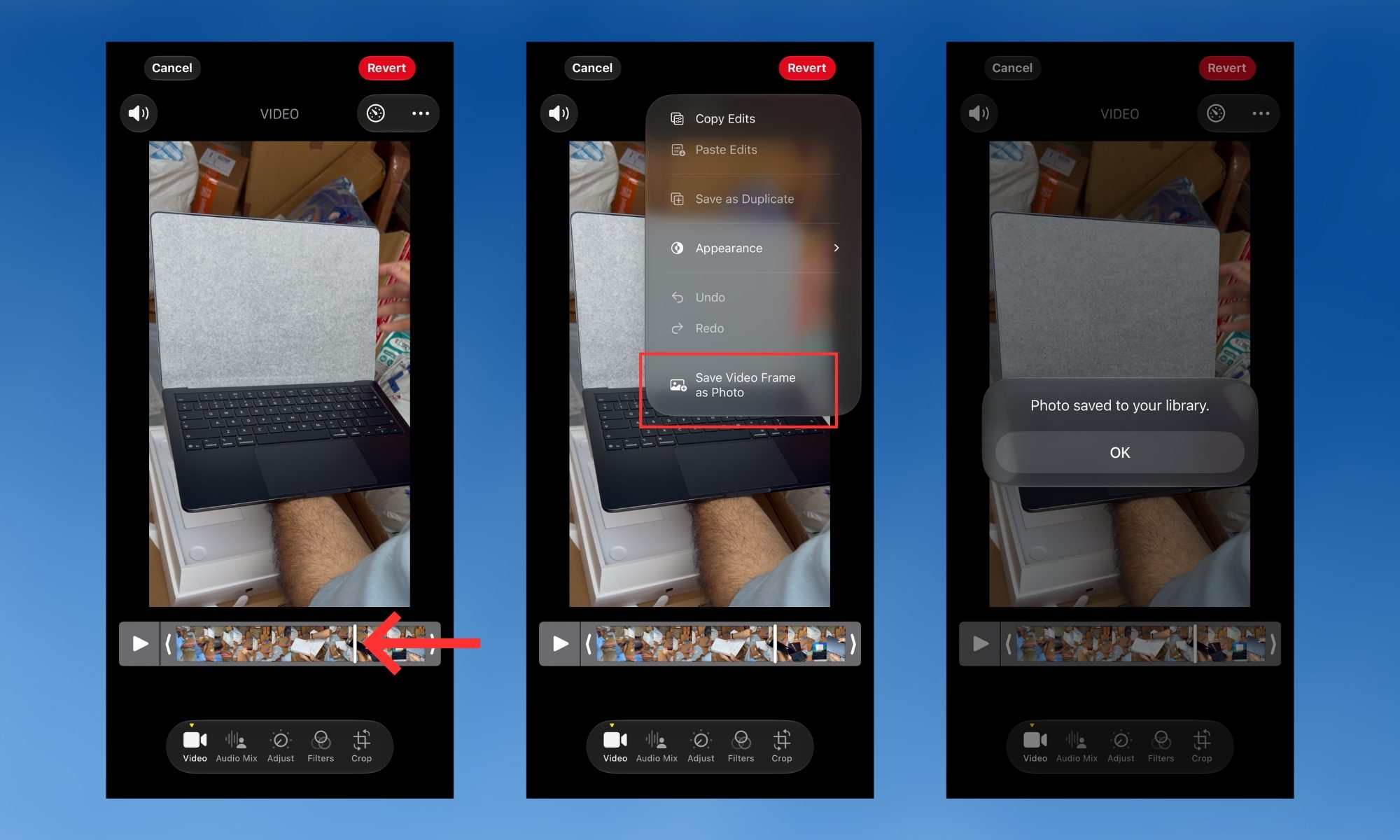
The first one lets you use the feature quickly and save a video frame as a photo in as little time as possible. Open the video in the Photos app, scrub to the moment you want, pause, tap the three-dot menu at the top right of the screen, then tap the “Save Video Frame as Photo” button. 

You should see a “Saved Video Frame” dialogue box pop up at the bottom of the screen. The saved frame shows up in your library, right next to the video you’ve extracted it from.
Electronics, Phone, Mobile Phone

However, if you need frame-by-frame flexibility, open a video, then tap the hamburger menu at the bottom to enter the edit menu. Use the timeline at the bottom of the screen to scrub through the video one frame at a time. 

Once you find the exact moment, tap the three-dot menu again and tap “Save Video Frame as Photo.” You should see a “Photo saved to your library” message on the screen. Tap the “OK” button below it, and you’re good to go.
Electronics, Person, Computer

The feature is genuinely better than capturing screenshots

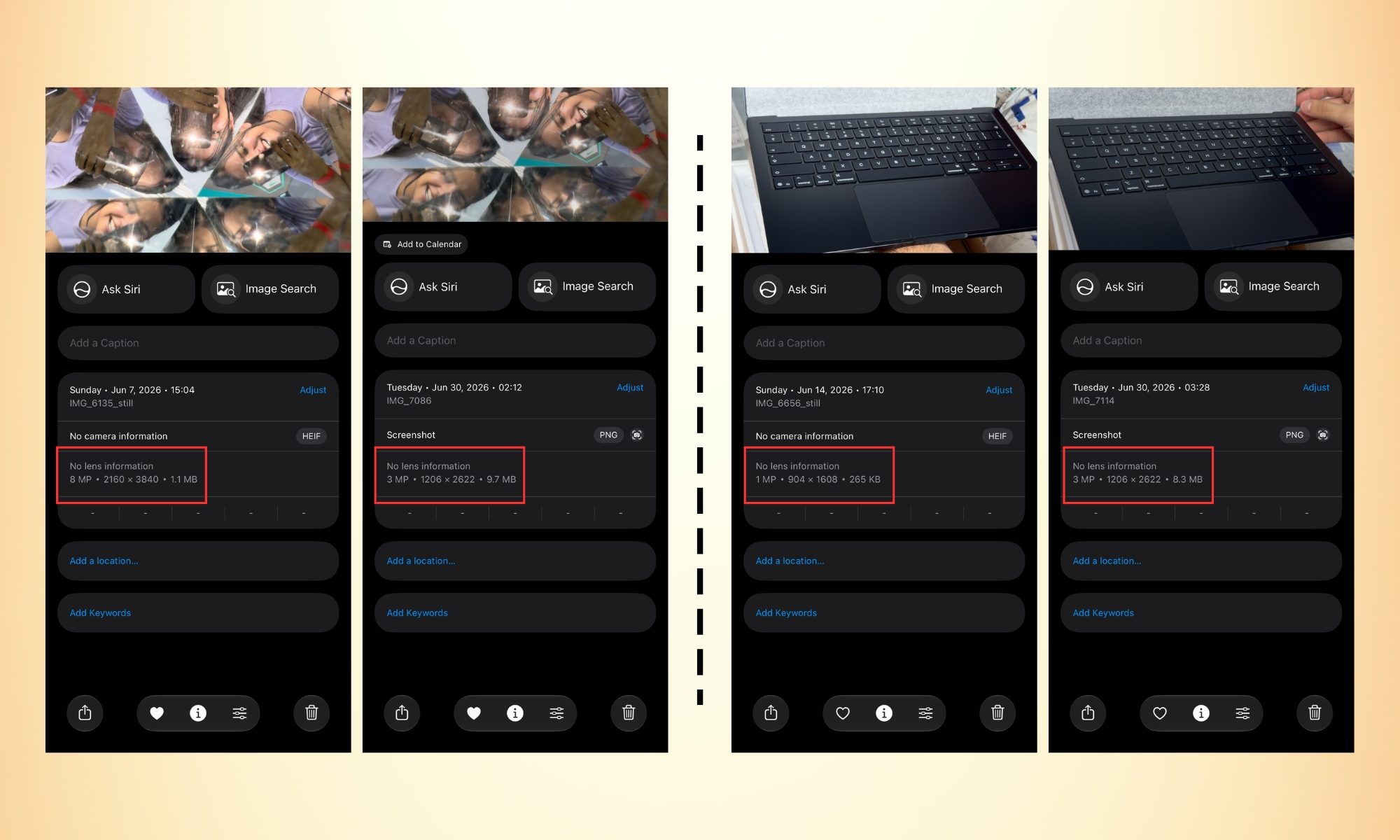
The difference in quality here is worth understanding. Saving a video frame as a picture is the same as taking a picture when you’re recording a 4K video at 60 fps; the saved frame comes out as an 8 MP photo (in Apple’s HEIF format). 

Screenshots, on the other hand, save as PNG files that are lower in resolution but larger in file size. In a nutshell, the frame-extracted picture has both a smaller file size and a higher resolution than screenshots. 

Furthermore, it doesn’t capture unwanted visual elements, such as the video progress bar at the bottom or a notification pop-up that shows up at the exact moment (I hate those).  

It’s one of those iOS 27 features Apple didn’t announce onstage, and yet once you know it exists, you’ll wonder how you ever managed without it.

Share. Facebook Twitter Pinterest LinkedIn Tumblr Email

Keep Reading

iPhone 18 Pro images are already floating on the dark web with a whole bunch of other Apple secrets

Sony’s next PlayStation could break free of the living room and I think it’s worth the risk

GEME Terra 2 review: Can an indoor composter actually reduce kitchen waste?

How to reserve your WhatsApp username

XChat finally lands on Android, bringing encrypted messaging beyond X

Why Faster Software Is Creating Slower Problems 

Infinix x Digital Trends

In the era of absurdly pricey phones, Samsung Galaxy M47 lands as a pocket-friendly antidote

Comcast’s breakup is the bluntest warning yet that the cable bundle is losing its grip

Editors Picks

I tried a hidden video trick in iOS 27, and it saved me a ton of frustration

June 30, 2026

Sony’s next PlayStation could break free of the living room and I think it’s worth the risk

June 30, 2026

GEME Terra 2 review: Can an indoor composter actually reduce kitchen waste?

June 30, 2026

How to reserve your WhatsApp username

June 30, 2026

Subscribe to News

Get the latest UAE news and updates directly to your inbox.

Latest Posts

XChat finally lands on Android, bringing encrypted messaging beyond X

June 29, 2026

Why Faster Software Is Creating Slower Problems 

June 29, 2026

Infinix x Digital Trends

June 29, 2026
Facebook X (Twitter) Pinterest TikTok Instagram
© 2026 Daily Guardian UAE. All Rights Reserved.
  • Privacy Policy
  • Terms
  • Advertise
  • Contact

Type above and press Enter to search. Press Esc to cancel.