
Daily Guardian UAEDaily Guardian UAE
  • Home
  • UAE
  • What’s On
  • Business
  • World
  • Entertainment
  • Lifestyle
  • Sports
  • Technology
  • Travel
  • Web Stories
  • More
    • Editor’s Picks
    • Press Release
What's On

Reportage, Sabah Investment Unveil Sea Breeze Projects in Baku

October 16, 2026

Dell Study: How UAE Organizations Are Building AI-Ready, Secure IT

October 16, 2026

KASCO Developments launches FALA by KASCO: A home that flows with life

October 16, 2026

Al Sharqi Shipping inaugurates AED 70 million multi-temperature integrated logistics and distribution hub at Dubai Industrial City

October 16, 2026

AI slashes content production costs by 95%, but audience loyalty remains the real competitive advantage, SIF 2026 hears

October 16, 2026
Facebook X (Twitter) Instagram
Finance Pro
Facebook X (Twitter) Instagram
Daily Guardian UAE
Subscribe
  • Home
  • UAE
  • What’s On
  • Business
  • World
  • Entertainment
  • Lifestyle
  • Sports
  • Technology
  • Travel
  • Web Stories
  • More
    • Editor’s Picks
    • Press Release
Daily Guardian UAEDaily Guardian UAE
Home » I tried a hidden video trick in iOS 27, and it saved me a ton of frustration
Technology

I tried a hidden video trick in iOS 27, and it saved me a ton of frustration

By dailyguardian.aeJune 30, 20263 Mins Read
Share
Facebook Twitter LinkedIn Pinterest Email

If you’ve ever been on vacation and chose to record video instead of taking photos only to avoid missing the fun moments, thinking you’d pause and take screenshots later, you might have ended up questioning your decision later. 

You see, the process involves multiple steps, starting from hunting for the right frame, pausing, and taking a screenshot. If it doesn’t look good, you go back to the video, pause somewhere else, and try taking another screenshot. You see where I’m going with this?

It’s a specific little misery that iOS 27 has now quietly fixed, and I genuinely can’t believe it took this long.

How does the new “Save video frame as photo” feature work?

The new “Save Video Frame as Photo” option in the Photos app does exactly what it sounds like. You can save a single frame from a video directly to the gallery as a photo, without the hassle of capturing screenshots. You can use it in two ways.

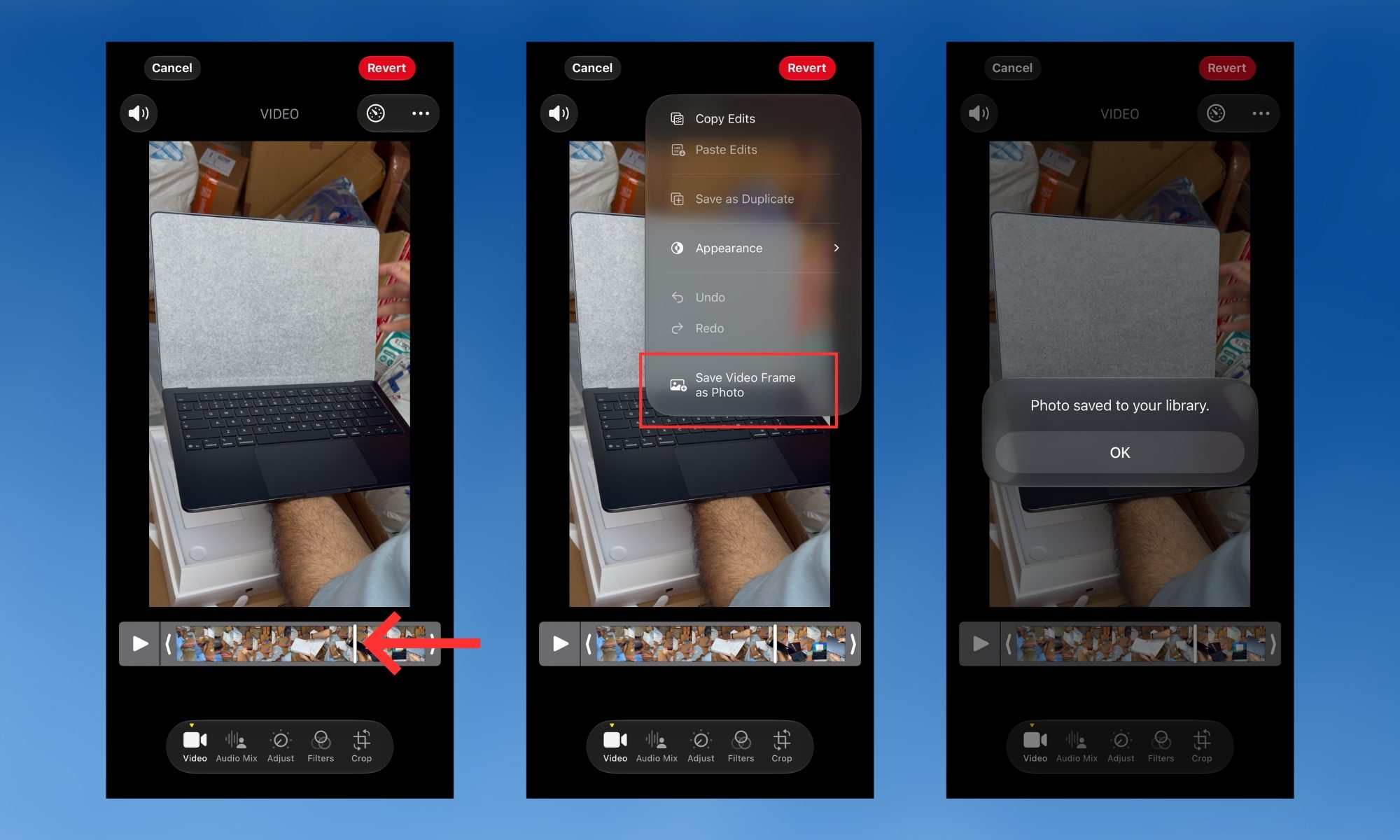
The first one lets you use the feature quickly and save a video frame as a photo in as little time as possible. Open the video in the Photos app, scrub to the moment you want, pause, tap the three-dot menu at the top right of the screen, then tap the “Save Video Frame as Photo” button. 

You should see a “Saved Video Frame” dialogue box pop up at the bottom of the screen. The saved frame shows up in your library, right next to the video you’ve extracted it from.
Electronics, Phone, Mobile Phone

However, if you need frame-by-frame flexibility, open a video, then tap the hamburger menu at the bottom to enter the edit menu. Use the timeline at the bottom of the screen to scrub through the video one frame at a time. 

Once you find the exact moment, tap the three-dot menu again and tap “Save Video Frame as Photo.” You should see a “Photo saved to your library” message on the screen. Tap the “OK” button below it, and you’re good to go.
Electronics, Person, Computer

The feature is genuinely better than capturing screenshots

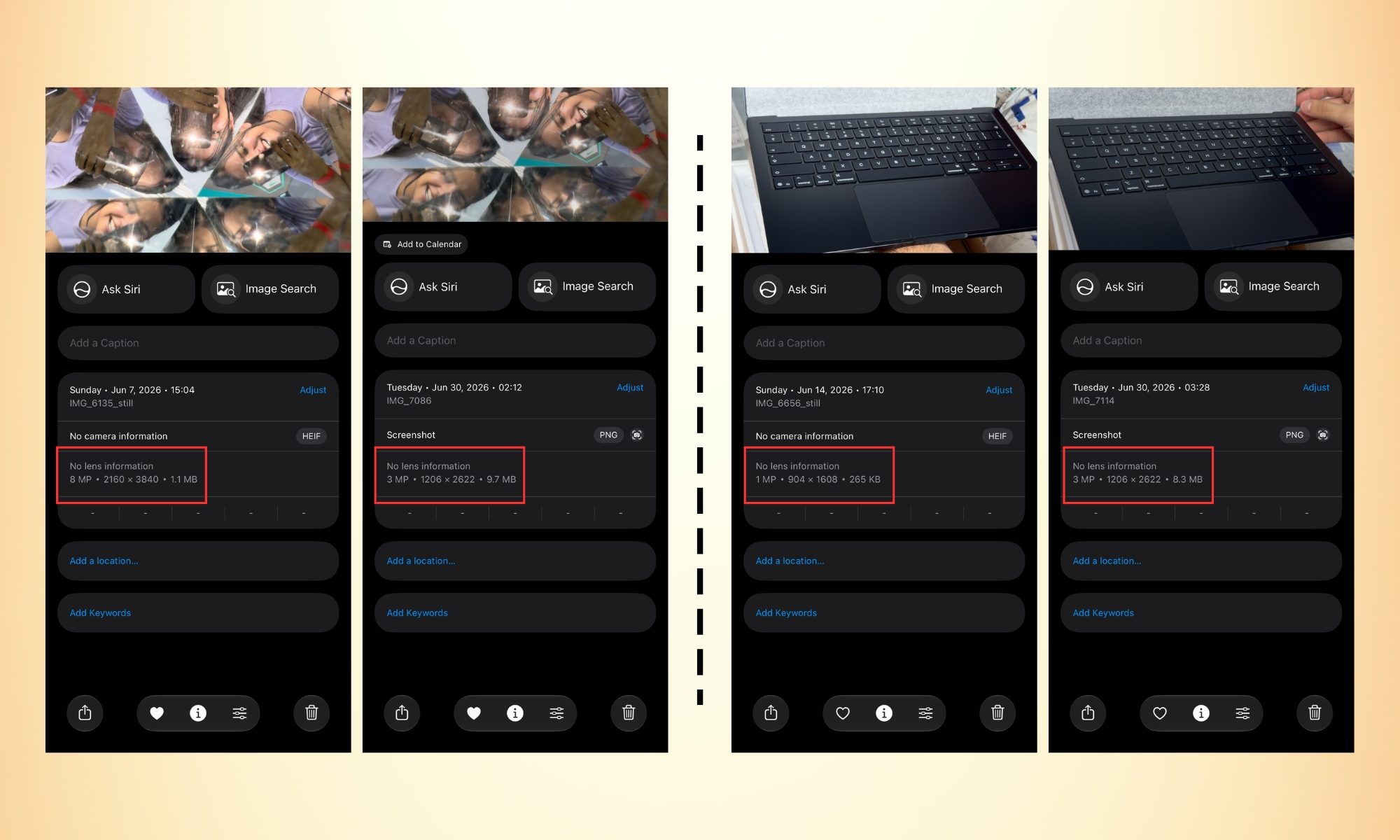
The difference in quality here is worth understanding. Saving a video frame as a picture is the same as taking a picture when you’re recording a 4K video at 60 fps; the saved frame comes out as an 8 MP photo (in Apple’s HEIF format). 

Screenshots, on the other hand, save as PNG files that are lower in resolution but larger in file size. In a nutshell, the frame-extracted picture has both a smaller file size and a higher resolution than screenshots. 

Furthermore, it doesn’t capture unwanted visual elements, such as the video progress bar at the bottom or a notification pop-up that shows up at the exact moment (I hate those).  

It’s one of those iOS 27 features Apple didn’t announce onstage, and yet once you know it exists, you’ll wonder how you ever managed without it.

Share. Facebook Twitter Pinterest LinkedIn Tumblr Email

Keep Reading

Lenovo AeroBlade imagines a laptop as thin as a foldable phone, thanks to solid-state cooling

Lenovo puts Nvidia RTX Spark into its new Yoga Pro laptops for local AI at IFA 2026

Motorola’s new Edge 70 Plus packs a 200MP camera and a massive battery

We got GTA VI limited-edition DualSense controllers before GTA VI

Anker unveils smarter chargers and power banks built to fight heat and battery degradation

Anker’s new Soundcore Sleep earbuds can mask snoring and even track your heart rate

TCL P80 series finally marries eye-friendly NXTPAPER tech with an AMOLED panel

Anker’s new MindBase wants to be the brain of your entire home security system

I found 5 cleaning deals worth sweeping up this Labor Day

Editors Picks

Dell Study: How UAE Organizations Are Building AI-Ready, Secure IT

October 16, 2026

KASCO Developments launches FALA by KASCO: A home that flows with life

October 16, 2026

Al Sharqi Shipping inaugurates AED 70 million multi-temperature integrated logistics and distribution hub at Dubai Industrial City

October 16, 2026

AI slashes content production costs by 95%, but audience loyalty remains the real competitive advantage, SIF 2026 hears

October 16, 2026

Subscribe to News

Get the latest UAE news and updates directly to your inbox.

Latest Posts

IREIS 2026 returns to ADNEC from Nov. 10–12 as Abu Dhabi real estate transaction value exceeds Dh175 billion in 9 months of 2026

October 16, 2026

“We are stronger than ever”: Mohamed Alabbar cites Emaar’s 98% collections as proof of UAE resilience at SIF 2026

October 15, 2026

UAE targets 50% local crop production as Sharjah achieves 93% landfill waste diversion rate, local officials share at SIF 2026

October 15, 2026
Facebook X (Twitter) Pinterest TikTok Instagram
© 2026 Daily Guardian UAE. All Rights Reserved.
  • Privacy Policy
  • Terms
  • Advertise
  • Contact

Type above and press Enter to search. Press Esc to cancel.