
Daily Guardian UAEDaily Guardian UAE
  • Home
  • UAE
  • What’s On
  • Business
  • World
  • Entertainment
  • Lifestyle
  • Sports
  • Technology
  • Travel
  • Web Stories
  • More
    • Editor’s Picks
    • Press Release
What's On

Friends of Cancer Patients brings together 300 patients and families for Ramadan Iftar in Sharjah

March 12, 2026

Google Play adds free game trials and a dedicated PC hub for gamers

March 12, 2026

The Sennheiser HD 650 hits its lowest price in years at $314, and it’s still one of the best headphones you can buy

March 12, 2026

Asus chief says the MacBook Neo shock will push PC brands to level up their game

March 12, 2026

OnePlus’ next flagship may combine Snapdragon power with a 200MP zoom lens

March 12, 2026
Facebook X (Twitter) Instagram
Finance Pro
Facebook X (Twitter) Instagram
Daily Guardian UAE
Subscribe
  • Home
  • UAE
  • What’s On
  • Business
  • World
  • Entertainment
  • Lifestyle
  • Sports
  • Technology
  • Travel
  • Web Stories
  • More
    • Editor’s Picks
    • Press Release
Daily Guardian UAEDaily Guardian UAE
Home » iOS 17: how to change your iPhone’s default notification sound
Technology

iOS 17: how to change your iPhone’s default notification sound

By dailyguardian.aeDecember 17, 20232 Mins Read
Share
Facebook Twitter LinkedIn Pinterest Email

Apple made a change to the default notification sound when it launched iOS 17, replacing “Tri-tone” with “Rebound.”Users have been unable to switch back to the original sound or select a different one as the default, and not everyone is a fan of the new tune. As you’d imagine, that’s left some folks rather annoyed.

But there’s good news! This issue has been resolved with the release of the iOS 17.2 update. If you’re looking to make changes to your iPhone’s default notification sound, here’s how to do it.

How to change the default notification sound on your iPhone

With these simple steps, you can restore the default notification sound to “Tri-Tone” or select another one from the list of options.

Step 1: To get started, slect the Settings app on your iPhone.

Step 2: Scroll down, then select Sounds & Haptics.
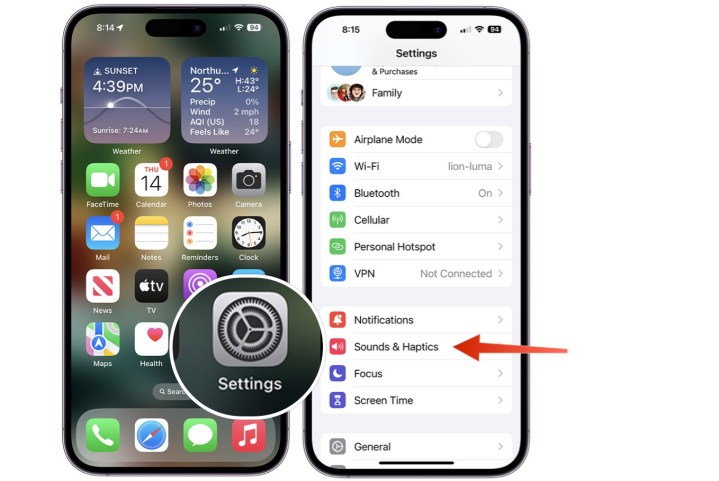
Screenshot showing how to change the default notification sound on iPhone.

Step 3: Choose the new Default Alerts option.

Step 4: Choose the alert tone you want to set as default from the list.
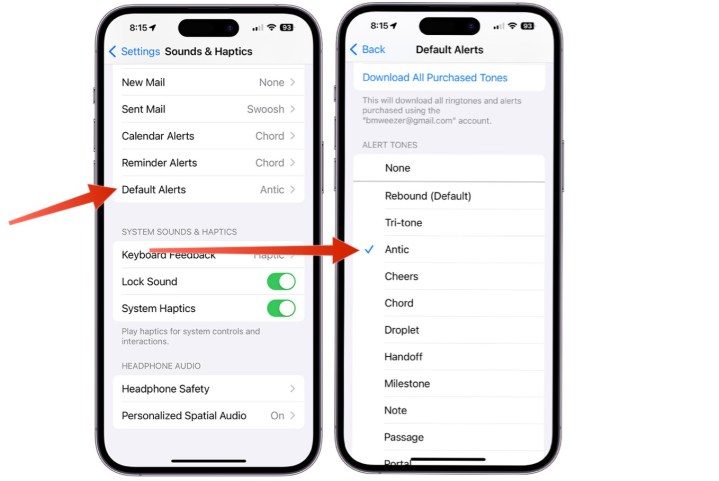
Screenshot showing how to change the default notification sound on iPhone.

You can follow these steps on any iPhone with iOS 17.2 or later installed. You’re also free to change your default iPhone notification sound as often as you wish, so feel free to play around with different sounds until you find the perfect one.

Editors’ Recommendations


Share. Facebook Twitter Pinterest LinkedIn Tumblr Email

Keep Reading

Google Play adds free game trials and a dedicated PC hub for gamers

The Sennheiser HD 650 hits its lowest price in years at $314, and it’s still one of the best headphones you can buy

Asus chief says the MacBook Neo shock will push PC brands to level up their game

OnePlus’ next flagship may combine Snapdragon power with a 200MP zoom lens

The Witcher 4 will bring a massive visual boost thanks to Nvidia RTX Mega Geometry

Intel reveals Core Ultra 200S Plus duo as its fastest desktop gaming processors ever

Microsoft finally shares details of the Xbox Project Helix console and its AMD heart

Google is adjusting the very core of Android OS to speed up your phone

Perplexity’s Personal Computer: What is it, what can it do, and what does it cost?

Editors Picks

Google Play adds free game trials and a dedicated PC hub for gamers

March 12, 2026

The Sennheiser HD 650 hits its lowest price in years at $314, and it’s still one of the best headphones you can buy

March 12, 2026

Asus chief says the MacBook Neo shock will push PC brands to level up their game

March 12, 2026

OnePlus’ next flagship may combine Snapdragon power with a 200MP zoom lens

March 12, 2026

Subscribe to News

Get the latest UAE news and updates directly to your inbox.

Latest Posts

The Witcher 4 will bring a massive visual boost thanks to Nvidia RTX Mega Geometry

March 12, 2026

Intel reveals Core Ultra 200S Plus duo as its fastest desktop gaming processors ever

March 12, 2026

Microsoft finally shares details of the Xbox Project Helix console and its AMD heart

March 12, 2026
Facebook X (Twitter) Pinterest TikTok Instagram
© 2026 Daily Guardian UAE. All Rights Reserved.
  • Privacy Policy
  • Terms
  • Advertise
  • Contact

Type above and press Enter to search. Press Esc to cancel.