
Daily Guardian UAEDaily Guardian UAE
  • Home
  • UAE
  • What’s On
  • Business
  • World
  • Entertainment
  • Lifestyle
  • Sports
  • Technology
  • Travel
  • Web Stories
  • More
    • Editor’s Picks
    • Press Release
What's On

Aster DM Healthcare to invest in International Modern Hospital as part of its AED 1bn+ UAE Healthcare investment programme over the next 5 years 

September 15, 2026

From Emirates to the World: Oud of London Expands Its Global Journey

September 15, 2026

GEMS School of Research & Innovation launches specialist

September 15, 2026

The Gulf Region Solidifies Its Position as a Strategic Anchor of Global Luxury Growth

September 15, 2026

Advanced Technology Pioneers Competition Opens for Applications, Putting Real UAE Industry Challenges into the Hands of Emerging Talent

September 15, 2026
Facebook X (Twitter) Instagram
Finance Pro
Facebook X (Twitter) Instagram
Daily Guardian UAE
Subscribe
  • Home
  • UAE
  • What’s On
  • Business
  • World
  • Entertainment
  • Lifestyle
  • Sports
  • Technology
  • Travel
  • Web Stories
  • More
    • Editor’s Picks
    • Press Release
Daily Guardian UAEDaily Guardian UAE
Home » You don’t need a document scanning app. Your iPhone has you covered
Technology

You don’t need a document scanning app. Your iPhone has you covered

By dailyguardian.aeAugust 15, 20263 Mins Read
Share
Facebook Twitter LinkedIn Pinterest Email

Whether you are trying to keep your invoices organized for tax season or just want a digital backup of important papers, scanning documents on your iPhone is one of those small habits that pays off later. 

That’s why document scanning apps have become so popular on the App Store. But what most people don’t realize is that you do not need to download a single third-party scanner app. Your iPhone already has several built-in tools that do the job well, and today I will show you how to use them.

Scan documents using the Notes app

If Apple Notes is your main repository of notes and documents, you will be happy to know that you can scan your invoices directly inside the Apple Notes app. It gives you two ways to scan a document, and honestly, either one works great depending on what you are trying to do. 

If you just want to scan something without worrying about which note it lands in, long-press the Notes app icon on your Home Screen and tap Scan Document. This launches the built-in scanner right away. From here, you can either let the app automatically detect your document’s edges and scan it, or tap the shutter button to capture it manually.

If you aren’t happy with how it turned out, you can use the Retake button to try again. Once the scan looks good, you can fine-tune the boundary by dragging the corner handles. If you have multiple pages to scan, repeat this same process for each one. 

adjusting-scan-on-iphone

When you are all done, tap the yellow checkmark button, and the app will bundle the pages into a single PDF and drop it into a new note. If you would rather have separate files instead of a combined PDF, tap the button after each individual scan instead of waiting until the end. 

If you want to save a document inside a specific note, you can do that too. Just open the note where you want to save the scanned document and tap the paperclip attachment icon in the keyboard toolbar. Now, tap the Scan Documents button and follow the steps to scan your documents. 
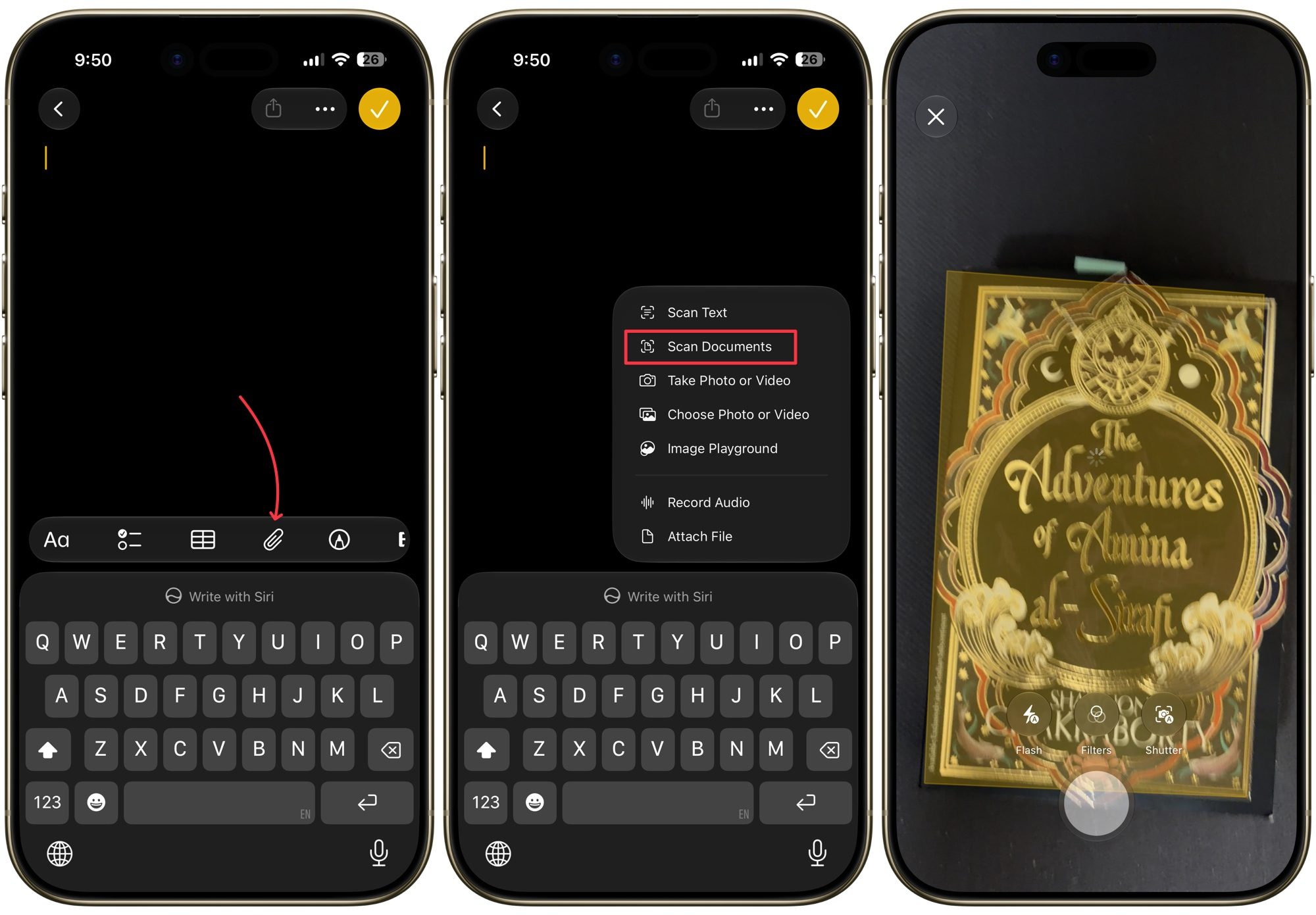
scanning-documents-inside-a-note

Scan documents using the Files app

The Files app follows a very similar routine, and honestly, it might be the better home for your scans if you are trying to keep things organized by folder. Long-press the Files app icon on your Home Screen and choose Scan Documents to jump straight into the scanner. 
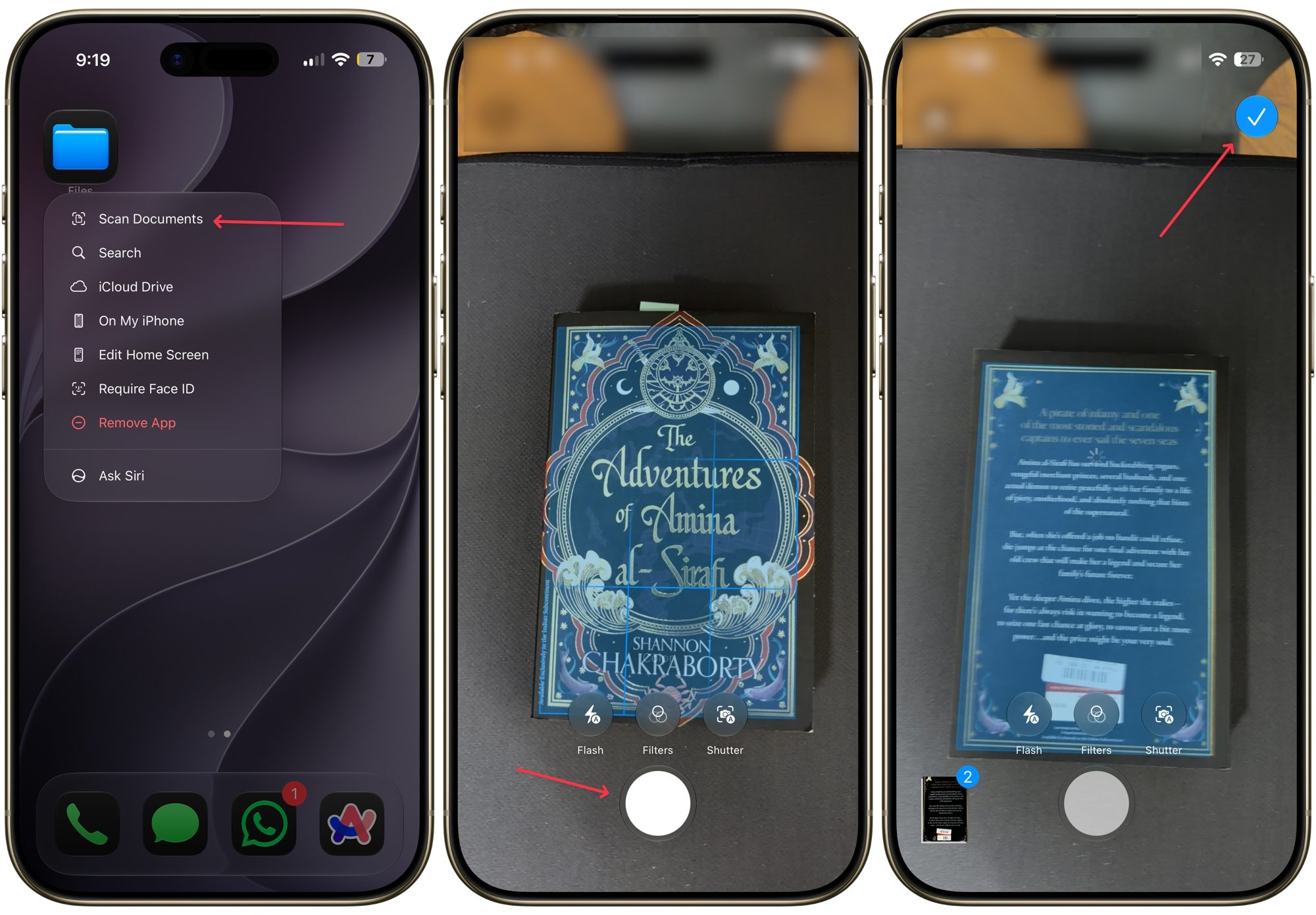
scanning documents via files app

From here, everything works the same way as it did in Notes. You capture the page, adjust the corners if needed, and repeat for as many pages as you need. The only extra step here is that once you tap Save, you will need to pick exactly which folder you want the file saved to before confirming in the top-right corner.

If you already know exactly where you want the scan to live, there is an even faster route. Open that specific folder inside the Files app, tap the three-dot menu in the top right corner, and select Scan Documents. Your file will save directly into that folder without any extra navigating.
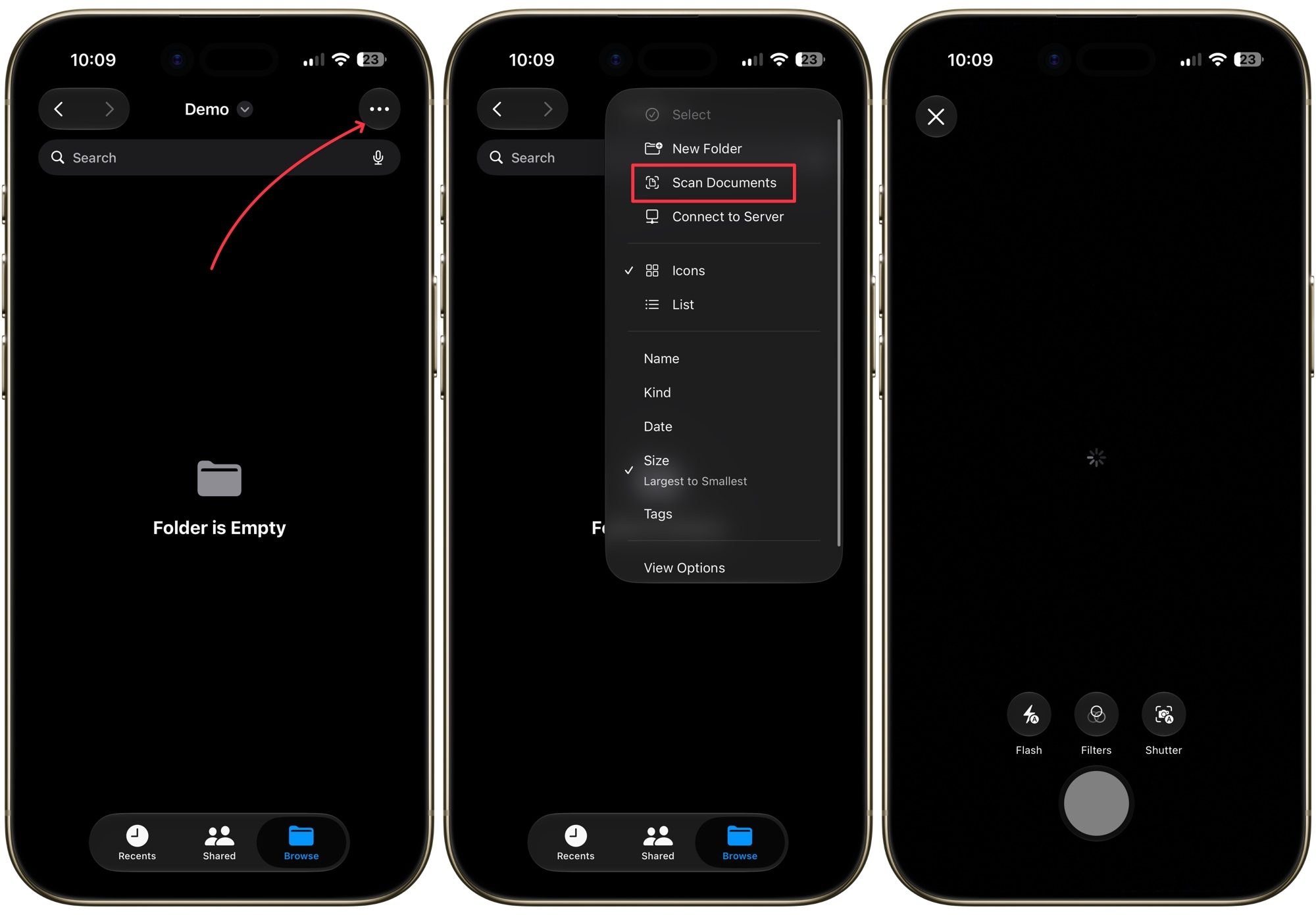
scanning documents inside a folder

Scanning documents is easy

Personally, I use the Files app to scan and save invoices and documents. Each type of document has its own folder, so everything is neatly organized and I can quickly find them. If you have been paying for a third-party app until now, I highly recommend you try the native option and see if you can remove a subscription from your list.

Share. Facebook Twitter Pinterest LinkedIn Tumblr Email

Keep Reading

Lenovo AeroBlade imagines a laptop as thin as a foldable phone, thanks to solid-state cooling

Lenovo puts Nvidia RTX Spark into its new Yoga Pro laptops for local AI at IFA 2026

Motorola’s new Edge 70 Plus packs a 200MP camera and a massive battery

We got GTA VI limited-edition DualSense controllers before GTA VI

Anker unveils smarter chargers and power banks built to fight heat and battery degradation

Anker’s new Soundcore Sleep earbuds can mask snoring and even track your heart rate

TCL P80 series finally marries eye-friendly NXTPAPER tech with an AMOLED panel

Anker’s new MindBase wants to be the brain of your entire home security system

I found 5 cleaning deals worth sweeping up this Labor Day

Editors Picks

From Emirates to the World: Oud of London Expands Its Global Journey

September 15, 2026

GEMS School of Research & Innovation launches specialist

September 15, 2026

The Gulf Region Solidifies Its Position as a Strategic Anchor of Global Luxury Growth

September 15, 2026

Advanced Technology Pioneers Competition Opens for Applications, Putting Real UAE Industry Challenges into the Hands of Emerging Talent

September 15, 2026

Subscribe to News

Get the latest UAE news and updates directly to your inbox.

Latest Posts

الذهب في أسبوع الحسم.. هل يؤجّل الفيدرالي حلم الـ5,000 دولار؟

September 15, 2026

Al Masraf and Moody’s Sign Strategic Agreement to Strengthen Risk Intelligence and Credit Capabilities

September 15, 2026

Dealing.com Redefines Online Investing with a Simpler, Smarter AI-Powered Experience

September 15, 2026
Facebook X (Twitter) Pinterest TikTok Instagram
© 2026 Daily Guardian UAE. All Rights Reserved.
  • Privacy Policy
  • Terms
  • Advertise
  • Contact

Type above and press Enter to search. Press Esc to cancel.