
Daily Guardian UAEDaily Guardian UAE
  • Home
  • UAE
  • What’s On
  • Business
  • World
  • Entertainment
  • Lifestyle
  • Sports
  • Technology
  • Travel
  • Web Stories
  • More
    • Editor’s Picks
    • Press Release
What's On

What’s next for your career? Ru’ya 2026 opens tomorrow with 150+ employers and thousands of opportunities

September 28, 2026

ICBA Announces Research Chair Initiative for Emirati Women to Mark Emirati Women’s Day

September 28, 2026

Mal Opens New Opportunities for Emirati Talent as It Builds from Abu Dhabi to the World

September 27, 2026

UBF CEOs Consultative Council Affirms Strength and Resikience of the Banking Industry

September 27, 2026

Sharjah Islamic Bank attracts US$1.3 billion order book for US$500 million Sukuk issuance

September 27, 2026
Facebook X (Twitter) Instagram
Finance Pro
Facebook X (Twitter) Instagram
Daily Guardian UAE
Subscribe
  • Home
  • UAE
  • What’s On
  • Business
  • World
  • Entertainment
  • Lifestyle
  • Sports
  • Technology
  • Travel
  • Web Stories
  • More
    • Editor’s Picks
    • Press Release
Daily Guardian UAEDaily Guardian UAE
Home » Microsoft Edge is about to lock out older ad blockers, just like Chrome did
Technology

Microsoft Edge is about to lock out older ad blockers, just like Chrome did

By dailyguardian.aeAugust 8, 20263 Mins Read
Share
Facebook Twitter LinkedIn Pinterest Email

Microsoft Edge is finally making the same controversial move that Google Chrome did earlier this year, and it could mean the end of some of the browser’s most popular ad blockers. Microsoft has announced that Edge is officially transitioning its extensions ecosystem to Manifest Version 3 (MV3), Google’s newer extension platform that promises better security, privacy, and performance. As part of that shift, the browser will gradually stop supporting older Manifest V2 (MV2) extensions over the coming months, meaning legacy extensions such as the original uBlock Origin will eventually stop working in Edge.

What is Manifest V3, and why is Microsoft adopting it?

Manifest V3 is the latest version of the browser extension framework used by Chromium-based browsers. Microsoft says it offers a more secure architecture by limiting background processes, tightening extension permissions, and reducing the attack surface for malicious extensions. According to the company, the update also improves performance by making extensions more efficient and less resource-intensive.

Microsoft says the transition will happen gradually. Beginning this month, remaining Manifest V2 extensions will start being disabled by default in Canary, Dev, and Beta versions of Edge before expanding to the Stable release in the coming months. Consumer devices are expected to complete the transition by the end of 2026, while enterprise-managed devices will continue supporting MV2 until early 2027. Microsoft also notes that only 58 MV2 extensions on the Edge Add-ons Store still see meaningful usage, and all but three already have Manifest V3 alternatives available.

What this means for Edge users

For most users, the biggest change will affect ad blockers and privacy extensions. Manifest V3 replaces the more powerful WebRequest API with the stricter Declarative Net Request API, meaning older extensions like the original uBlock Origin can no longer work without being rewritten. Fortunately, many developers have already released compatible alternatives, including uBlock Origin Lite, AdGuard, and Ghostery.
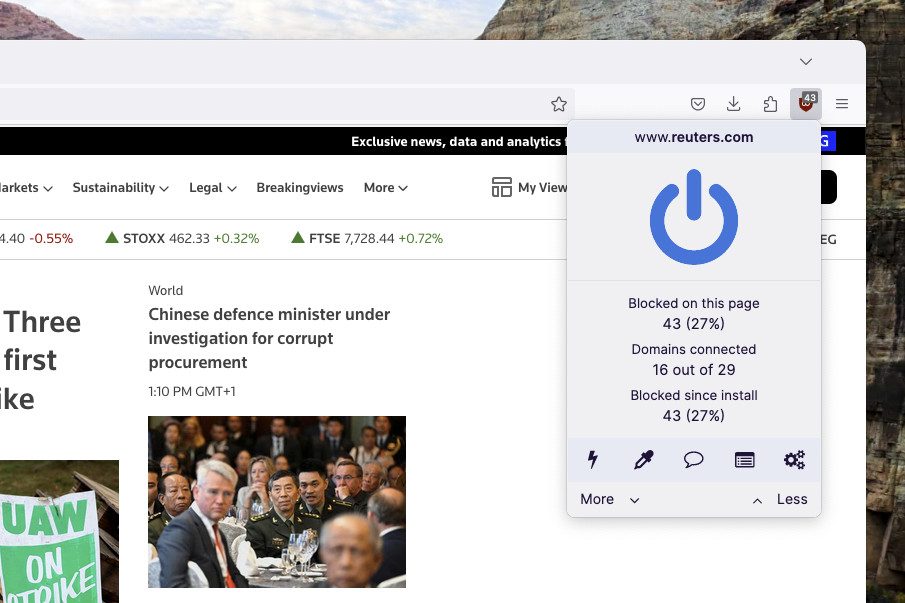
The uBlock Origin browser extension in Firefox, showing the extension's overlay describing how many ads and trackers it has blocked.

The shift has been controversial ever since Google introduced Manifest V3. Supporters argue it makes browser extensions safer, faster, and less resource-intensive, while critics believe it limits what advanced ad blockers and privacy tools can do, stripping away some of the power they previously had.

By adopting Manifest V3, Microsoft is bringing Edge fully in line with the Chromium ecosystem. For most users, the transition should be relatively smooth, but anyone still relying on older Manifest V2 extensions—especially classic ad blockers—should start looking for MV3-compatible replacements. The browser itself isn’t losing ad blocking, but some of the most capable tools will never work quite the same way again.

Share. Facebook Twitter Pinterest LinkedIn Tumblr Email

Keep Reading

Lenovo AeroBlade imagines a laptop as thin as a foldable phone, thanks to solid-state cooling

Lenovo puts Nvidia RTX Spark into its new Yoga Pro laptops for local AI at IFA 2026

Motorola’s new Edge 70 Plus packs a 200MP camera and a massive battery

We got GTA VI limited-edition DualSense controllers before GTA VI

Anker unveils smarter chargers and power banks built to fight heat and battery degradation

Anker’s new Soundcore Sleep earbuds can mask snoring and even track your heart rate

TCL P80 series finally marries eye-friendly NXTPAPER tech with an AMOLED panel

Anker’s new MindBase wants to be the brain of your entire home security system

I found 5 cleaning deals worth sweeping up this Labor Day

Editors Picks

ICBA Announces Research Chair Initiative for Emirati Women to Mark Emirati Women’s Day

September 28, 2026

Mal Opens New Opportunities for Emirati Talent as It Builds from Abu Dhabi to the World

September 27, 2026

UBF CEOs Consultative Council Affirms Strength and Resikience of the Banking Industry

September 27, 2026

Sharjah Islamic Bank attracts US$1.3 billion order book for US$500 million Sukuk issuance

September 27, 2026

Subscribe to News

Get the latest UAE news and updates directly to your inbox.

Latest Posts

From UAE to Global Markets: Cognit DX unveils homegrown enterprise AI platform Cortex and its AI film Studio

September 27, 2026

Arthur, Powell set to power Emirates Eagles’ Abu Dhabi T10 debut

September 26, 2026

UAE Food Cluster Convenes Future Food Forum 2026 Amid AED 40 Billion Sector Growth Push

September 26, 2026
Facebook X (Twitter) Pinterest TikTok Instagram
© 2026 Daily Guardian UAE. All Rights Reserved.
  • Privacy Policy
  • Terms
  • Advertise
  • Contact

Type above and press Enter to search. Press Esc to cancel.