
Daily Guardian UAEDaily Guardian UAE
  • Home
  • UAE
  • What’s On
  • Business
  • World
  • Entertainment
  • Lifestyle
  • Sports
  • Technology
  • Travel
  • Web Stories
  • More
    • Editor’s Picks
    • Press Release
What's On

Don’t hold your breath for a Macbook Neo refresh with a touchscreen anytime soon

March 17, 2026

OnePlus’ upcoming budget phone will raise the bar for Apple and Samsung mid-rangers

March 17, 2026

SpaceX’s Starship rocket test scores several firsts ahead of flight 12

March 17, 2026

Samsung’s upcoming Galaxy A57 mid-ranger just won’t stop appearing in leaks

March 17, 2026

Meta is secretly working on an AI detection tool after unleashing AI slop avalanche

March 17, 2026
Facebook X (Twitter) Instagram
Finance Pro
Facebook X (Twitter) Instagram
Daily Guardian UAE
Subscribe
  • Home
  • UAE
  • What’s On
  • Business
  • World
  • Entertainment
  • Lifestyle
  • Sports
  • Technology
  • Travel
  • Web Stories
  • More
    • Editor’s Picks
    • Press Release
Daily Guardian UAEDaily Guardian UAE
Home » iOS 17: How to delete a wallpaper on your iPhone
Technology

iOS 17: How to delete a wallpaper on your iPhone

By dailyguardian.aeNovember 18, 20232 Mins Read
Share
Facebook Twitter LinkedIn Pinterest Email

Over the years, Apple has made significant changes to how to customize wallpapers on iPhones. Currently, you can create wallpapers in pairs for both the home screen and lock screen of your iPhone. You can also add widgets to wallpapers and automatically activate a Focus mode when specific lock screens are in use.

Unfortunately, these features are somewhat difficult to use, and the process of deleting a wallpaper is confusing. This guide will help alleviate that confusion and make doing so a breeze

Ever since iOS 16 was released, Apple has included a highly customizable feature that allows you to personalize the look of your home and lock screens. This feature, not loved by all, offers a variety of built-in backgrounds, and you can import images as well. Once you’ve created your desired wallpaper combinations, they can be accessed under the Wallpaper feature in the iPhone Settings app. However, this isn’t where you go to delete those wallpaper combinations.

How to delete a wallpaper on your iPhone

To delete a wallpaper on your iPhone, you’ll need to use the phone’s long-press feature and follow additional instructions.

Step 1: To get started, lock your phone. The easiest way to do so is by pressing on the side button (on newer iPhones) or the top button (on older models).
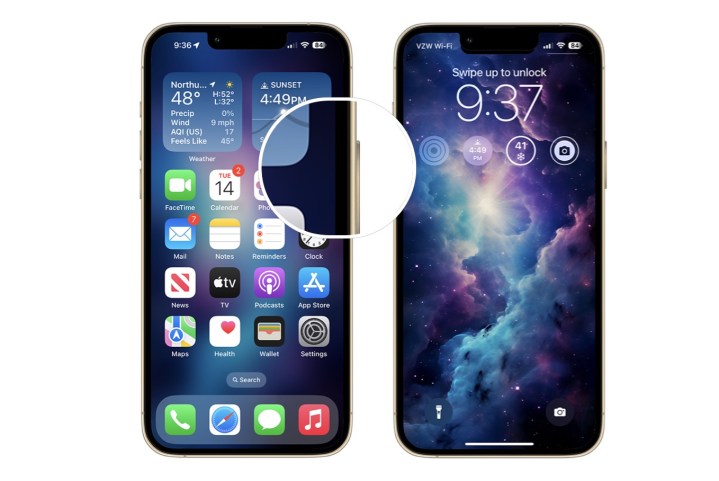
A screenshot showing how to lock the screen on a late model iPhone.

Step 2: With your iPhone locked, long press on the home screen.

Step 3: From this screen, go back and forth and see the installed wallpapers. Choose the one you wish to delete.
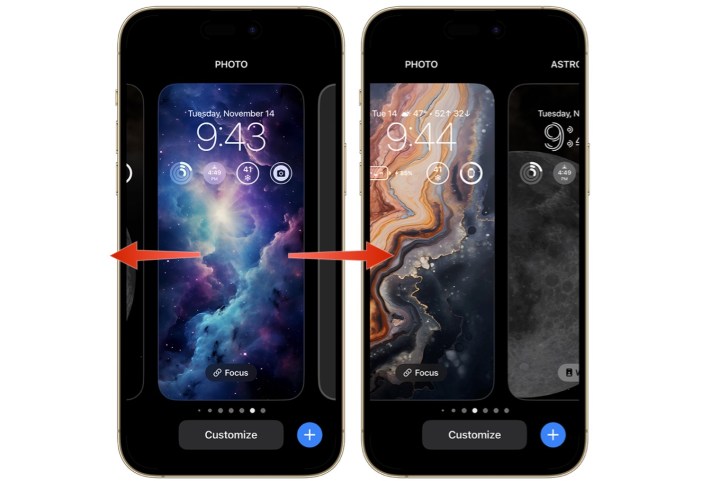
A screenshot showing how to swipe between wallpapers on iPhone.

Step 4: Swipe up, then tap the delete icon. Confirm by tapping Delete This Wallpaper.
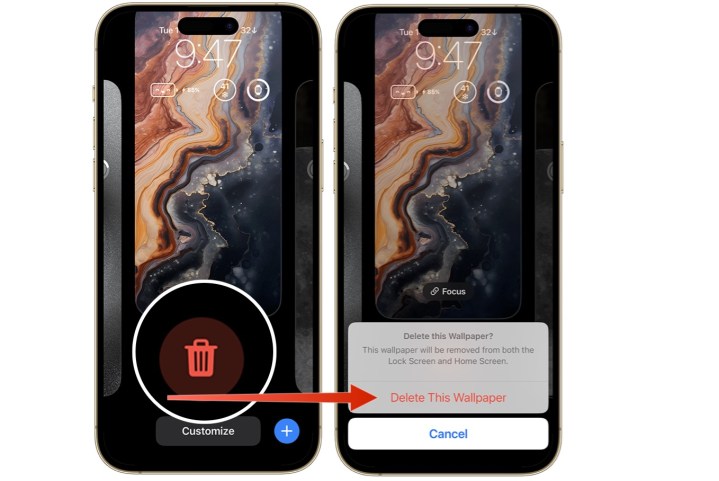
Screenshot showing how to delete a wallpaper on an iPhone.

Deleting a wallpaper on your iPhone requires following a few simple steps that starts with locking your phone. Once you do this, you’ll be done in just a few minutes.

Editors’ Recommendations


Share. Facebook Twitter Pinterest LinkedIn Tumblr Email

Keep Reading

Don’t hold your breath for a Macbook Neo refresh with a touchscreen anytime soon

OnePlus’ upcoming budget phone will raise the bar for Apple and Samsung mid-rangers

SpaceX’s Starship rocket test scores several firsts ahead of flight 12

Samsung’s upcoming Galaxy A57 mid-ranger just won’t stop appearing in leaks

Meta is secretly working on an AI detection tool after unleashing AI slop avalanche

Someone gave the MacBook Neo the 1TB storage upgrade it never got from Apple

Here’s how horror movies won big at the Oscars this year

NVIDIA announces DLSS 5 with photorealistic lighting to change the future of gaming

Split-screen multitasking is finally coming to iPhones, just not the one in your hands

Editors Picks

OnePlus’ upcoming budget phone will raise the bar for Apple and Samsung mid-rangers

March 17, 2026

SpaceX’s Starship rocket test scores several firsts ahead of flight 12

March 17, 2026

Samsung’s upcoming Galaxy A57 mid-ranger just won’t stop appearing in leaks

March 17, 2026

Meta is secretly working on an AI detection tool after unleashing AI slop avalanche

March 17, 2026

Subscribe to News

Get the latest UAE news and updates directly to your inbox.

Latest Posts

Someone gave the MacBook Neo the 1TB storage upgrade it never got from Apple

March 17, 2026

Al Junaidi Real Estate Signs MoU with DXR Real Estate to Market “Ti Villa” Project

March 17, 2026

Here’s how horror movies won big at the Oscars this year

March 17, 2026
Facebook X (Twitter) Pinterest TikTok Instagram
© 2026 Daily Guardian UAE. All Rights Reserved.
  • Privacy Policy
  • Terms
  • Advertise
  • Contact

Type above and press Enter to search. Press Esc to cancel.