
Daily Guardian UAEDaily Guardian UAE
  • Home
  • UAE
  • What’s On
  • Business
  • World
  • Entertainment
  • Lifestyle
  • Sports
  • Technology
  • Travel
  • Web Stories
  • More
    • Editor’s Picks
    • Press Release
What's On

NotebookLM can now automatically organize your research sources for you

April 26, 2026

Next iPad could ditch traditional naming as Apple rethinks its lineup

April 26, 2026

I’m rocking the original Switch in 2026. It just works because everything else got complicated

April 25, 2026

Why I chose the Supernote Nomad over other e-ink tablets

April 25, 2026

For the first time in years, I’m genuinely excited for a new MacBook Pro

April 25, 2026
Facebook X (Twitter) Instagram
Finance Pro
Facebook X (Twitter) Instagram
Daily Guardian UAE
Subscribe
  • Home
  • UAE
  • What’s On
  • Business
  • World
  • Entertainment
  • Lifestyle
  • Sports
  • Technology
  • Travel
  • Web Stories
  • More
    • Editor’s Picks
    • Press Release
Daily Guardian UAEDaily Guardian UAE
Home » Duolingo Year in Review 2023: how to find yours right now
Technology

Duolingo Year in Review 2023: how to find yours right now

By dailyguardian.aeDecember 4, 20232 Mins Read
Share
Facebook Twitter LinkedIn Pinterest Email

Duolingo, the wildly popular language learning app, just added a big new feature. No, it’s not a melting face app icon again — it’s the Duolingo Year in Review for 2023!

This is something we see from many popular apps toward the end of each year. There’s Spotify Wrapped, Apple Music Replay, Reddit Recap — you get the idea. Lots of apps summarize your activity at the end of the year, and the results are usually pretty interesting.

If you’re a Duolingo user and want to see how you spent your time on the app in 2023, here’s what to do.

How to find your Duolingo 2023 Year in Review

Accessing your Duolingo Year in Review is quite simple, but we’ll still guide you through the process — just in case.

Step 1: Open the Duolingo app on your smartphone.

Step 2: You should automatically see a pop-up for your 2023 Year in Review. Tap the blue See year in review button.
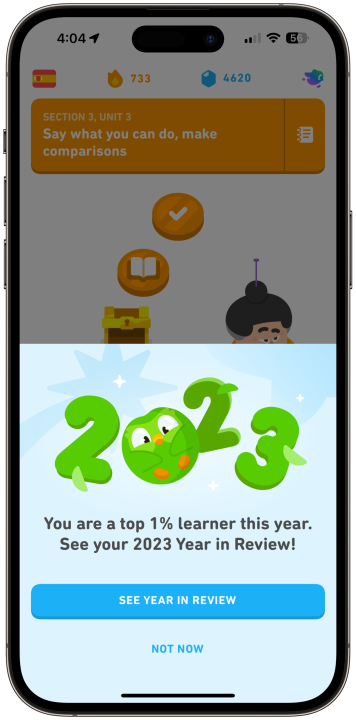
A screenshot of the Duolingo Year in Review 2023 running on an iPhone.

Step 3: If the pop-up doesn’t appear, tap the Profile button at the bottom of the screen and then tap the See year in review button there.
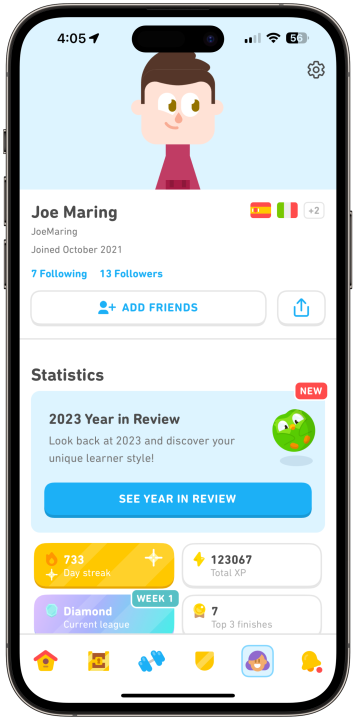
A screenshot of the Duolingo Year in Review 2023 running on an iPhone.

Step 4: Tap Start or swipe up on your screen to browse through your Duolingo 2023 Year in Review.

A screenshot of the Duolingo Year in Review 2023 running on an iPhone.

Step 5: You’ll see stats for how many lessons you completed, how many minutes you spent learning a new language, how many words you learned, and more.
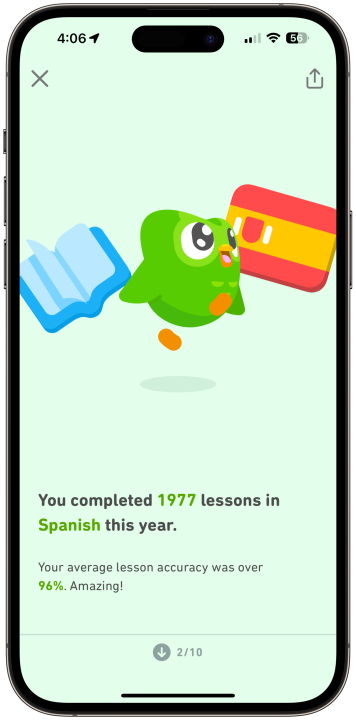
A screenshot of the Duolingo Year in Review 2023 running on an iPhone.

Step 6: Toward the end of the Year in Review, you can swipe up to see your unique “learner style.”

A screenshot of the Duolingo Year in Review 2023 running on an iPhone.

Step 7: On the final page, you can tap Share for a reward to share your Duolingo 2023 Year in Review. If you do share it, you’ll receive a special leaderboard badge.
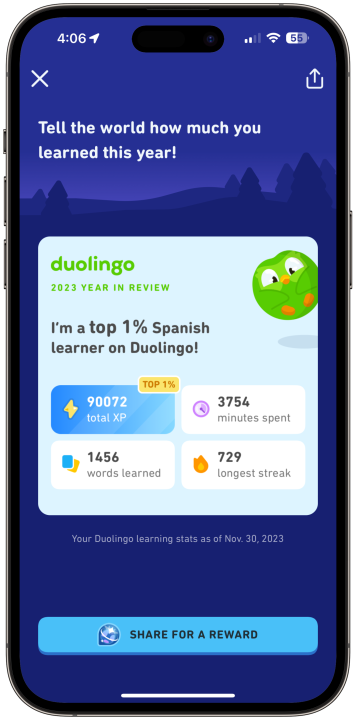
A screenshot of the Duolingo Year in Review 2023 running on an iPhone.

Step 8: Alternatively, tap the X icon in the top left corner to leave your Duolingo 2023 Year in Review.

The Duolingo 2023 Year in Review is available to anyone with a Duolingo account, and even if you’ve viewed it once, you can go back and watch it again at any time on your Profile page. Have fun!

Editors’ Recommendations


Share. Facebook Twitter Pinterest LinkedIn Tumblr Email

Keep Reading

NotebookLM can now automatically organize your research sources for you

Next iPad could ditch traditional naming as Apple rethinks its lineup

I’m rocking the original Switch in 2026. It just works because everything else got complicated

Why I chose the Supernote Nomad over other e-ink tablets

For the first time in years, I’m genuinely excited for a new MacBook Pro

Old tech keeps coming back because new tech got annoying and we miss simpler times

Cool phones are not dead, and this liquid-cooled gaming phone proves it

The future of vehicle diagnostics: Powering the EV transition

The best trick AI can pull is disappear into my gadgets instead of turning into a product

Editors Picks

Next iPad could ditch traditional naming as Apple rethinks its lineup

April 26, 2026

I’m rocking the original Switch in 2026. It just works because everything else got complicated

April 25, 2026

Why I chose the Supernote Nomad over other e-ink tablets

April 25, 2026

For the first time in years, I’m genuinely excited for a new MacBook Pro

April 25, 2026

Subscribe to News

Get the latest UAE news and updates directly to your inbox.

Latest Posts

Old tech keeps coming back because new tech got annoying and we miss simpler times

April 25, 2026

Cool phones are not dead, and this liquid-cooled gaming phone proves it

April 25, 2026

The future of vehicle diagnostics: Powering the EV transition

April 25, 2026
Facebook X (Twitter) Pinterest TikTok Instagram
© 2026 Daily Guardian UAE. All Rights Reserved.
  • Privacy Policy
  • Terms
  • Advertise
  • Contact

Type above and press Enter to search. Press Esc to cancel.