

What streamer hasn’t uttered some version of the phrase “clip that!” before? Whether it’s nailing a sick headshot, clutching out a save at the last second, or anything in between, Twitch clips are your badges of honor. These small, bite-sized videos can be a perfect highlight reel of awesome, funny, and epic moments that happen during your stream that you want to make sure get preserved, but simply saying, “clip that!” isn’t enough. Here’s a step-by-step guide on how to download Twitch clips so you never risk losing your best moments.
As it turns out, downloading Twitch clips is still super easy even if there isn’t a simple download button. There are quite a few ways to download clips from Twitch, which gives you options on how you want to approach it. Although we find the easiest way is to use Google Chrome or Firefox, you’re also welcome to use a few outside resources to download your favorite clip as well.
Downloading Twitch clips with Clipr
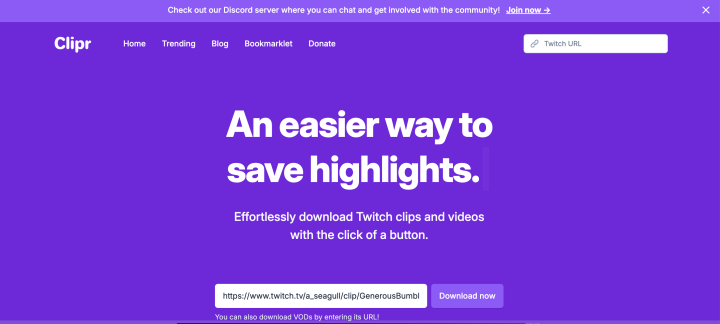
To download clips from Twitch, most people will use a third-party website. Clipr a popular website is made specifically to pull Twitch videos, so it’s definitely the easiest to use.
Step 1: Find the clip you’d like to download on Twitch. You can choose clips from your own collection or clips publicly shared by your favorite streamer. In the lower right-hand corner of the video, click the Share button. Copy the Clip Link.
Step 2: Go to the Clipr website. Paste the Clip Link URL into the blank form on the homepage, the press the Download Now button.
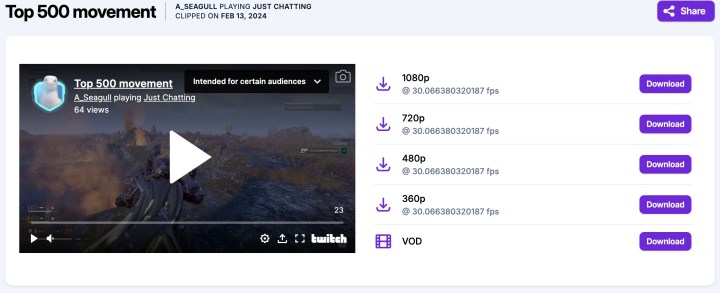
Step 3: On the next page, you’ll be met with several download options. Choose the video quality you’d like to download and select the Download button next to your pick.
Downloading Twitch clips with Firefox
Although using an outside source is nice, sometimes it’s better to download the clip directly from the browser. This will allow you to select the resolution you want to download and gives you more control over what you’re downloading to your computer. It’s a surefire way to get the resolution you want for the clip you love.
Downloading Twitch clips directly from the browser is pretty simple. However, for the easiest method to download clips, you’ll want to be sure to be using Firefox. This used to work on Chrome as well, but appears to no longer function on that browser. You’ll need to use the Inspect tool, but once you do that, the download process is very easy.
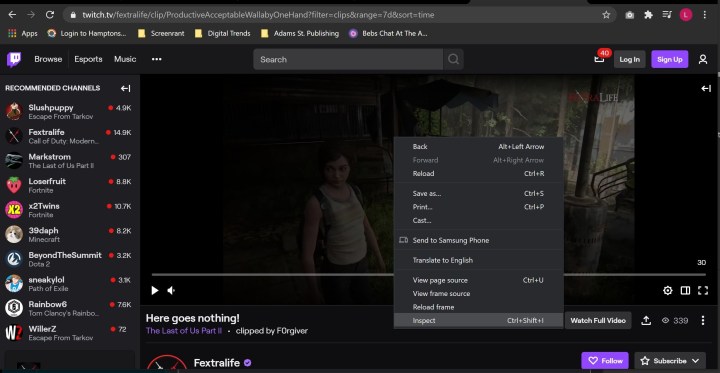
Step 1: Once you have the clip you want open, set the quality of the video you want to download. Once you find what resolution works best for you, pause the clip. Then, right-click on the video and hit Inspect.
Step 2: Scroll up a little bit until you see a line that has a link that reads “https://clips-media-assets2…” and ends with “.mp4” – you can copy and paste this line to search for it within the Inspect elements. It may look a little different with different videos, but the beginning of the link will be the same across the board.

Step 3: Double-click on this to get a chance to copy it. Once the item is highlighted, you can select either Control + C if on PC, Command + C on Mac, or right-click and select Copy.

Step 4: Open another window, paste the link, and delete any extra code you may have copied on accident. This should trigger the clip to automatically start downloading. Your downloaded clip will appear in your downloads folder and can be moved anywhere you need.
Downloading Twitch clips on mobile
While you can’t directly download clips on mobile devices, you can get around this by using Clipr once again.
Step 1: Find the clip you wish to download on the Twitch mobile app.
Step 2: Tap the Share button and choose Copy Link.
Step 3: Open your browser and go to the Clipr website. Paste the Clip Link URL into the blank form on the homepage, the press the Download Now button just like you would on desktop.
Editors’ Recommendations