
Daily Guardian UAEDaily Guardian UAE
  • Home
  • UAE
  • What’s On
  • Business
  • World
  • Entertainment
  • Lifestyle
  • Sports
  • Technology
  • Travel
  • Web Stories
  • More
    • Editor’s Picks
    • Press Release
What's On

Millions of Americans are talking to AI about health, and some are dangerously skipping real doctors

April 17, 2026

This beanie turns your thoughts into text, and it’s the least obnoxious wearable I’ve seen in years

April 17, 2026

I didn’t expect food reels to help my diet – but they might

April 17, 2026

Steam spotted cooking up a game price tracker to save patient souls a few dollars

April 17, 2026

Microsoft leaks predict the obvious: The Surface line has no answer for the MacBook Neo

April 17, 2026
Facebook X (Twitter) Instagram
Finance Pro
Facebook X (Twitter) Instagram
Daily Guardian UAE
Subscribe
  • Home
  • UAE
  • What’s On
  • Business
  • World
  • Entertainment
  • Lifestyle
  • Sports
  • Technology
  • Travel
  • Web Stories
  • More
    • Editor’s Picks
    • Press Release
Daily Guardian UAEDaily Guardian UAE
Home » How to enable ray tracing in Minecraft for better graphics
Technology

How to enable ray tracing in Minecraft for better graphics

By dailyguardian.aeMarch 13, 20243 Mins Read
Share
Facebook Twitter LinkedIn Pinterest Email

Minecraft is known for many qualities, but graphics are not typically among them. The incredibly flexible and dynamic building game chose a more simple yet pleasing art style to better serve its mechanics. That being said, while that blocky aesthetic will never go out of style, there are plenty of ways to improve the looks since it originally came out in 2011. Aside from graphics packs and shaders, the most impressive visual update you can add to Minecraft is ray tracing.

Ray tracing is one of the latest and most impressive graphical improvements video games have seen in the last few years. This system focuses on making light sources behave more realistically, which alone can make a game look years newer than it really is. Everything from shadows and reflections to world lighting just feel more real. However, it isn’t something that’s on by default. Whether you’re playing on PC or the Xbox Series X/S, here’s how you can try out ray tracing in Minecraft for yourself.

How to turn on ray tracing on PC

PC is the most popular Minecraft platform and where ray tracing is most common in games since it is generally too taxing for consoles to handle. Here’s how to turn it on.

Step 1: Load up your copy of Minecraft Bedrock Edition.

Step 2: If you don’t have a ray tracing-enabled texture pack, open the Marketplace.

Step 3: Use the search function and type in “ray tracing.”

Step 4: Download a ray tracing-enabled pack.

Step 5: Wait for the download to complete.

Step 6: Create a world using this pack.

Step 7: Return to the main menu.

Step 8: Go into Settings.

Step 9: Select Video.

Step 10: Scroll down and toggle on the Ray tracing slider.

Step 11: Load back into your world and enjoy the view!

How to use Ray Tracing with an Nvidia graphics card

If you have an Nvidia brand graphics card, turning on ray tracing is a much simpler process.

Step 1: Open the Settings section of the GeForce Experience

Step 2: Select General.

Step 3: Enable Experimental Features.

Step 4: Move to the Game tab and select the Enable Nvidia RTX option next to Minecraft.

Step 5: Launch Minecraft and enable RTX in the Video Settings.
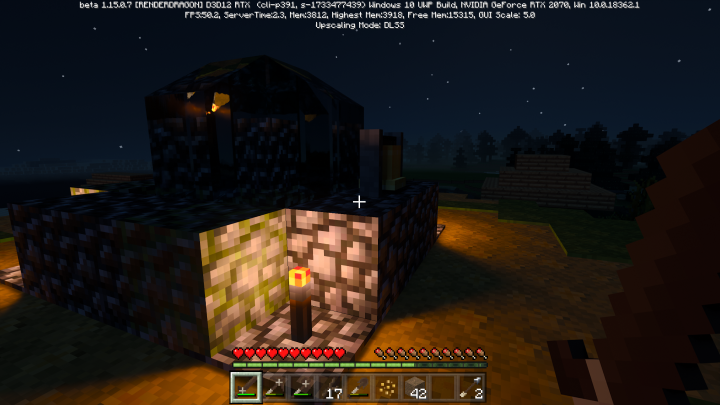
Minecraft RTX ray tracing beta

How to turn on ray tracing on Xbox Series X/S

While ray tracing is technically available for Xbox Series X/S users, it is still in a preview stage, meaning you will need to do all the steps above on PC as well as the ones following to make it work.

Step 1: Host a Minecraft world on PC with ray tracing enabled.

Step 2: Download the Xbox Insider Hub app on your Xbox console.

Step 3: Sign up to be an Insider.

Step 4: Locate the Minecraft preview option under Previews.

Step 5: Select Join.

Step 6: Invite your Xbox account to your PC Minecraft world.

Step 7: Once in the world on your Xbox, open Settings.

Step 8: Select Video.

Step 9: Scroll down and toggle on Ray tracing.

Eventually, ray tracing should come to the standard Xbox versions of Minecraft, but for now, this is the only way to experience high-end lighting on your console.

Editors’ Recommendations


Share. Facebook Twitter Pinterest LinkedIn Tumblr Email

Keep Reading

Millions of Americans are talking to AI about health, and some are dangerously skipping real doctors

This beanie turns your thoughts into text, and it’s the least obnoxious wearable I’ve seen in years

I didn’t expect food reels to help my diet – but they might

Steam spotted cooking up a game price tracker to save patient souls a few dollars

Microsoft leaks predict the obvious: The Surface line has no answer for the MacBook Neo

Canva AI 2.0 aims to reshape how you turn ideas into polished projects

This AI lets self-driving cars “remember” past drives to plan safer routes

Intel Core Series 3 processors are here and they promise more performance for less money

Canva can now automate repetitive tasks and help you build interactive experience without coding

Editors Picks

This beanie turns your thoughts into text, and it’s the least obnoxious wearable I’ve seen in years

April 17, 2026

I didn’t expect food reels to help my diet – but they might

April 17, 2026

Steam spotted cooking up a game price tracker to save patient souls a few dollars

April 17, 2026

Microsoft leaks predict the obvious: The Surface line has no answer for the MacBook Neo

April 17, 2026

Subscribe to News

Get the latest UAE news and updates directly to your inbox.

Latest Posts

Canva AI 2.0 aims to reshape how you turn ideas into polished projects

April 17, 2026

The AI spend cycle is still going strong, says AvaTrade, as TSMC reports record profit for fourth straight quarter

April 16, 2026

This AI lets self-driving cars “remember” past drives to plan safer routes

April 16, 2026
Facebook X (Twitter) Pinterest TikTok Instagram
© 2026 Daily Guardian UAE. All Rights Reserved.
  • Privacy Policy
  • Terms
  • Advertise
  • Contact

Type above and press Enter to search. Press Esc to cancel.