
Daily Guardian UAEDaily Guardian UAE
  • Home
  • UAE
  • What’s On
  • Business
  • World
  • Entertainment
  • Lifestyle
  • Sports
  • Technology
  • Travel
  • Web Stories
  • More
    • Editor’s Picks
    • Press Release
What's On

Google’s secret AI tool feels like a professional photoshoot powerhouse in your pocket

February 20, 2026

This lens breakthrough could put utterly cheap thermal cameras in phones and cars

February 20, 2026

Verizon hears you: phone unlocks are maddening

February 20, 2026

A $379.99 QD-OLED monitor is a better upgrade than most PC parts

February 20, 2026

NASA’s report into troubled Starliner flight makes for uncomfortable reading

February 20, 2026
Facebook X (Twitter) Instagram
Finance Pro
Facebook X (Twitter) Instagram
Daily Guardian UAE
Subscribe
  • Home
  • UAE
  • What’s On
  • Business
  • World
  • Entertainment
  • Lifestyle
  • Sports
  • Technology
  • Travel
  • Web Stories
  • More
    • Editor’s Picks
    • Press Release
Daily Guardian UAEDaily Guardian UAE
Home » How to scan a QR code on Android and iPhone
Technology

How to scan a QR code on Android and iPhone

By dailyguardian.aeFebruary 25, 20243 Mins Read
Share
Facebook Twitter LinkedIn Pinterest Email

As smartphones have become more and more ubiquitous, so have QR codes. These maze-looking squares are a type of matrix bar code that contains data — usually, QR codes point to a website or open a designated application.

Although they may look confusing, QR codes are really easy to use. Follow the steps below to turn your iPhone or Android phone into an instant QR code scanner using nothing more than your default camera app.

How to scan a QR code on an iPhone

Apple’s iPhones have built-in QR code scanning capabilities right in the camera app itself, so there’s no need to download a separate scanning app unless you really want to. Ever since iOS 12, there’s even a direct QR code reader in the Control Center, so you can launch it even faster. In other words, if you have one of the best iPhones, this should work.

Step 1: Open the Camera app, or open the dedicated QR code reader from your Control Center by swiping up from the home page and selecting the QR code button.
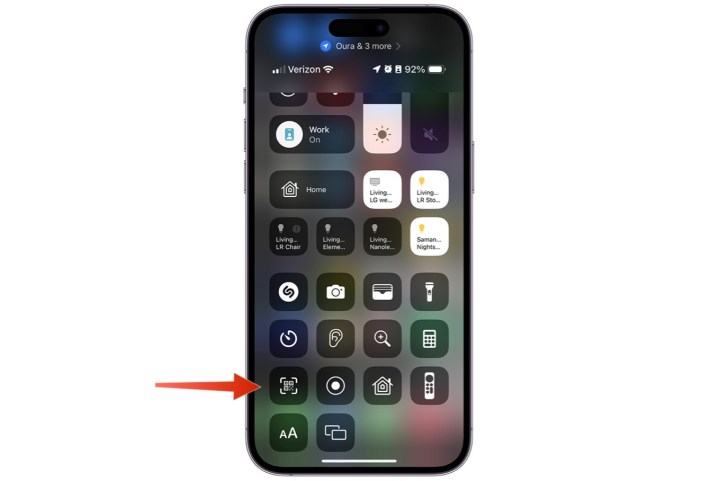
Screenshot showing the QR Code button in the iPhone Control Center.

Step 2: Point your camera at the QR code. If you’re using the QR code scanner, make sure the QR code is inside the box on the screen. It will either open immediately (on the scanner), or a link will appear at the top of your screen (in the camera); just select it to go to the link in your browser.
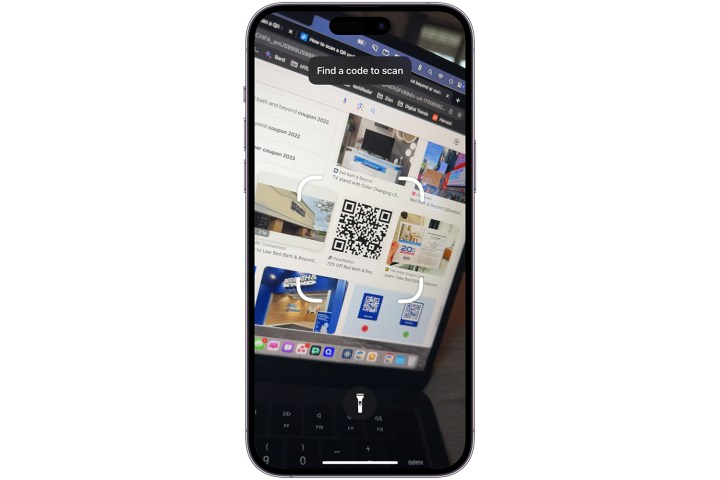
Screenshot showing the iPhone Camera app zeroing in on a QR code.

How to add the QR code shortcut to your iPhone

The dedicated QR code scanner is a handy way to quickly open a QR code, largely because it has a built-in button to help scan the code, unlike the Camera app. As such, it’s often more useful if scanning a QR code on a physical sheet. If you don’t see this QR code shortcut on your iPhone, here’s how to add it.

Step 1: If you don’t see the QR code icon in your Control Center on iOS, you can start adding it by going to the Settings app.

Step 2: Tap Control Center.

Step 3: Find Code reader under the More controls section.
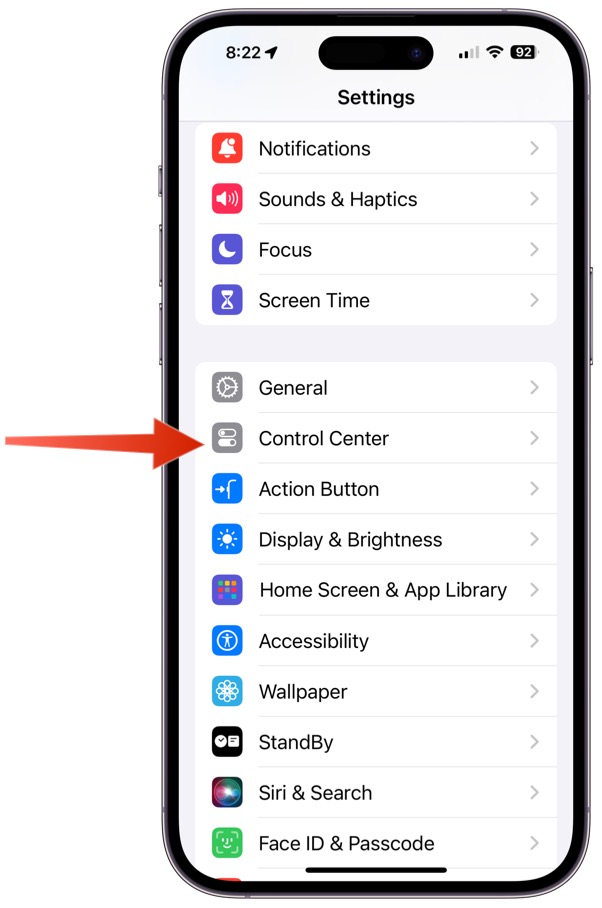
Screenshot showing location of Control Center access via the Systems app on iPhone.

Step 4: Tap the green Plus icon to add it.
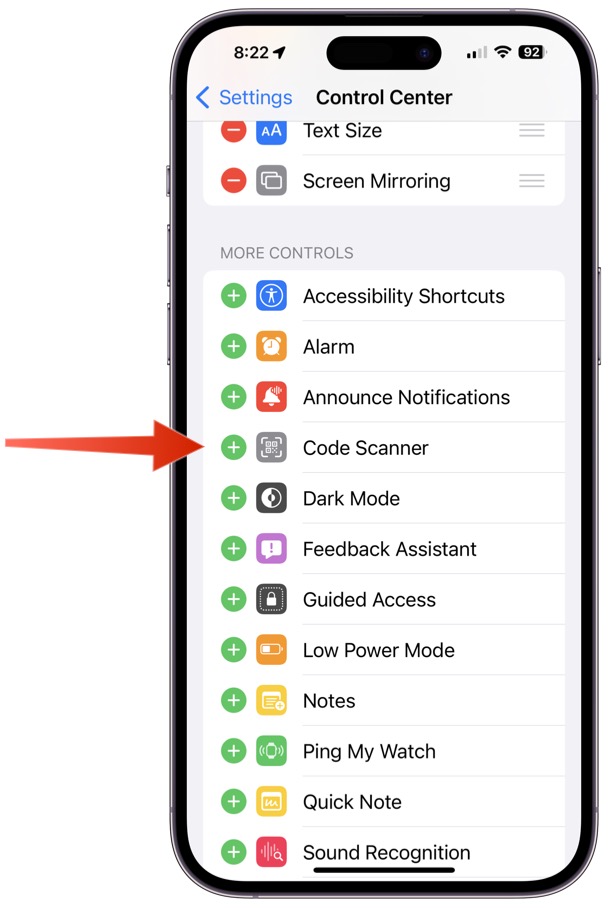
how to scan a qr code iphone scanner

How to scan a QR code on an Android phone

QR codes aren’t solely the domain of iPhones. The best Android phones can scan through the camera app or, that failing, Google Assistant.

If you have an older Android phone and the following steps don’t work for you, we recommend QR Code Reader, which is a simple and highly effective alternative (albeit one that comes with ads).

Step 1: Open the Camera app on your phone.
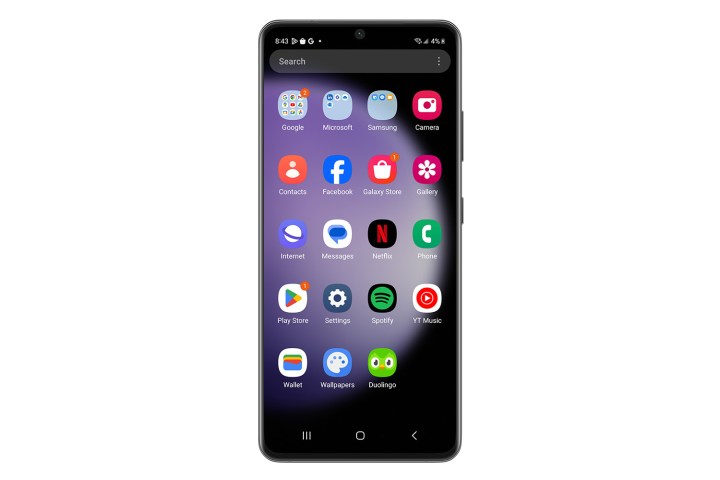
Screenshot showing apps on an Android-based smartphone.

Step 2: Point your camera’s viewfinder at the QR code. There will often be a slight pause as it works out the code.

Step 3: If successful, a link should appear in a small pop-up window. Select it to go to the address.
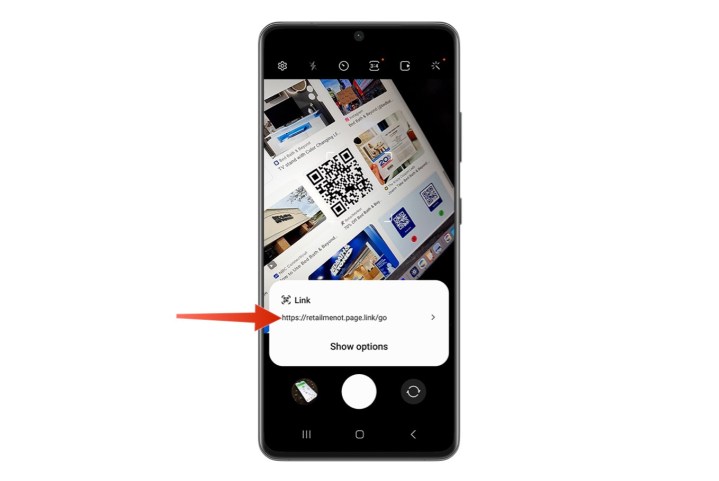
Screenshot showing QR code on an Android-based device.

Make sure to be careful with QR codes

Just because you can do something, doesn’t mean you should. QR codes, while extremely useful, can also be used maliciously. While the QR codes themselves aren’t to blame, the content they give you can harm your device.

While rare, this sort of QR code-based malware is possible, so we recommend always being careful about which QR codes you scan. Make sure you trust the person or organization you’re scanning the code from and make sure to cancel any downloads if you’re not expecting one. Like with anything on the internet, approach QR codes with a bit of common sense.

Editors’ Recommendations


Share. Facebook Twitter Pinterest LinkedIn Tumblr Email

Keep Reading

Google’s secret AI tool feels like a professional photoshoot powerhouse in your pocket

This lens breakthrough could put utterly cheap thermal cameras in phones and cars

Verizon hears you: phone unlocks are maddening

A $379.99 QD-OLED monitor is a better upgrade than most PC parts

NASA’s report into troubled Starliner flight makes for uncomfortable reading

Researchers find Tesla Model 3 and Cybertruck are hackable machines on wheels

Researchers find Tesla Model 3 and Cybertruck are hackable machines on wheels

Researchers find Tesla Model 3 and Cybertruck are hackable machines on wheels

Warframe finally lands on Android and its next stop is Switch 2

Editors Picks

This lens breakthrough could put utterly cheap thermal cameras in phones and cars

February 20, 2026

Verizon hears you: phone unlocks are maddening

February 20, 2026

A $379.99 QD-OLED monitor is a better upgrade than most PC parts

February 20, 2026

NASA’s report into troubled Starliner flight makes for uncomfortable reading

February 20, 2026

Subscribe to News

Get the latest UAE news and updates directly to your inbox.

Latest Posts

Researchers find Tesla Model 3 and Cybertruck are hackable machines on wheels

February 20, 2026

Researchers find Tesla Model 3 and Cybertruck are hackable machines on wheels

February 20, 2026

Researchers find Tesla Model 3 and Cybertruck are hackable machines on wheels

February 20, 2026
Facebook X (Twitter) Pinterest TikTok Instagram
© 2026 Daily Guardian UAE. All Rights Reserved.
  • Privacy Policy
  • Terms
  • Advertise
  • Contact

Type above and press Enter to search. Press Esc to cancel.