

Amazon’s Fire TV Cube has long been one of the best options for streaming your favorite movies and television shows around your home — especially if you already have Amazon Prime Video and regularly access Amazon content. But regardless of whether you have your eye on a new Fire TV Cube or you just broke one out of the box, it’s important to know what you’re getting into, and that includes how to set it up.
Our guide will run you through the basics of setup, what you need to know about logging into the Fire TV Cube, and what to consider along the way. Let’s get started.
How to set up your Fire TV Cube
Step 1: Unpackage your Fire TV Cube and find a place for it in your home theater. Amazon recommends that you place the Fire TV Cube at least 1 to 2 feet away from any speakers you have. That may be difficult in tight setups, but it’s not especially important unless you find that speaker vibration or interference is starting to affect the Fire TV Cube’s performance.
Step 2: Attach the HDMI cable that came with your Fire TV Cube to a spare HDMI port on your TV. If you don’t have any spare ports, you can use an HDMI splitter, but this can affect performance, so it’s best avoided if possible (see our final step on attaching peripherals as a way to free up a spot).
Step 3: Plug the power adapter into an outlet and then into your Fire TV Cube.
Step 4: Put batteries in your Fire TV remote, and turn on your TV. Make sure the TV is on the correct HDMI input if necessary. If you use any smart speakers or similar devices with your TV, make sure they are also connected.
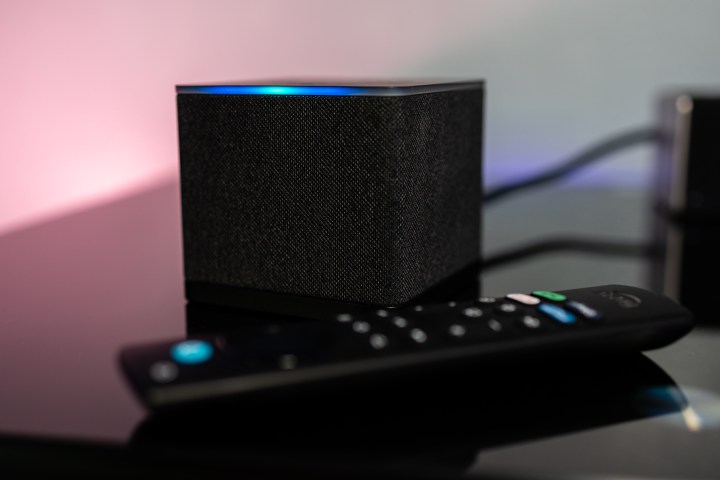
Step 5: At this point, the Fire TV Cube should be displaying some on-screen instructions. You’ll need to complete these steps with the Fire TV remote. Typically, the Fire TV Cube should detect the remote and automatically pair it, although this can take several seconds.
If the Fire TV remote isn’t pairing correctly, find the Home button with its house-shaped icon and hold it down for around 10 seconds. You should then see a new message to press the Play/pause button to continue.
Step 6: Connect to Wi-Fi with the on-screen instructions. The Fire TV Cube will display available Wi-Fi networks, so pick yours and input your Wi-Fi password to give it access. Note that recent Fire TV Cube models also include an Ethernet port for a direct cable connection to your router. This can provide a more reliable, faster connection that you may prefer if your setup allows for it.
Step 7: Wait for the Fire TV Cube to update. This can take a few minutes to download and install.
Step 8: Now you’ll be prompted to sign in with your Amazon account login and password. This is necessary to enable Amazon Prime Video (assuming you’re signed up) and other features. Once entered, you’ll need to hop online with another device to complete the two-factor authentication, so have your phone nearby.
Step 9: Once you are logged in, the Fire TV Cube will ask if you want to set up control options for connected devices like soundbars and smart speakers. This isn’t necessary, but if it’s possible, you can route controls through the Fire TV Cube and avoid juggling as many remotes.

Step 10: Your Fire TV Cube should now bring up the home screen with its advertisements, available apps, and content categories. Now is a good time to download any important apps that you know you’ll be using and log in to get them working. If you plan on purchasing content like apps or games, make sure that you have the correct default payment option chosen on your Amazon account.

Connect peripherals
We’re mentioning this specifically because there’s a difference between older Fire TV Cube models and those that launched in 2022 and beyond. The 2019 model only has an HDMI output and a Micro USB port for power — just the basics you need for setup. You won’t be attaching anything else to this model.
The newer version, however, add an HDMI input that allows you to attach a nearby device and turn it on with an Alexa voice command, among other tricks. That could be useful if you have, for example, a compatible cable box as part of your system. Now is the time to attach devices like that.
Supported boxes included devices from Verizon, Comcast, Charter Spectrum, DirecTV, Dish Network, Cox, AT&T, CenturyLink, and others, so if you have a newer cable box, then it’s likely to have control compatibility with the Fire TV Cube.
Troubleshooting your Fire TV Cube setup
If you run into problems during setup, you can restart your Fire TV Cube at any time by holding down the Action button on the Fire TV Cube for about 10 seconds. This will shut the Fire TV Cube down, and you can press the Action button one more time to reboot it. Or, you could just unplug the Fire TV Cube entirely and plug it back in. This should solve many problems. Since this is your first setup, take extra time to make sure that all cables are fully plugged into the right ports, too.
Are you also considering a Fire TV stick? Stop by our article on how to set up one of these affordable dongles too.
For further reading, check out our Fire TV tips and tricks post as well as our Fire TV Stick issues post that has some hints relevant to the Fire TV Cube, too.
Editors’ Recommendations