
Daily Guardian UAEDaily Guardian UAE
  • Home
  • UAE
  • What’s On
  • Business
  • World
  • Entertainment
  • Lifestyle
  • Sports
  • Technology
  • Travel
  • Web Stories
  • More
    • Editor’s Picks
    • Press Release
What's On

Think vibe-coding will turn you into a rich entrepreneur? You might want to read the risk brief

May 2, 2026

We built AI to save us from email, and it somehow made email even more soul-sucking

May 2, 2026

Formula 1 Etihad Airways Abu Dhabi Grand Prix sets a Guinness World Record

May 2, 2026

Apollonia and Synergy Partner to Improve Oral Health for Children with Autism

May 2, 2026

Google Meet’s AI note-taker just got a whole lot better and less overwhelming

May 2, 2026
Facebook X (Twitter) Instagram
Finance Pro
Facebook X (Twitter) Instagram
Daily Guardian UAE
Subscribe
  • Home
  • UAE
  • What’s On
  • Business
  • World
  • Entertainment
  • Lifestyle
  • Sports
  • Technology
  • Travel
  • Web Stories
  • More
    • Editor’s Picks
    • Press Release
Daily Guardian UAEDaily Guardian UAE
Home » How to turn on Bluetooth in Windows and connect your devices
Technology

How to turn on Bluetooth in Windows and connect your devices

By dailyguardian.aeNovember 17, 20242 Mins Read
Share
Facebook Twitter LinkedIn Pinterest Email

Bluetooth is one of the best ways to connect a range of devices to your PC or laptop, from game controllers to wireless speakers and headphones. While most PCs will have Bluetooth enabled by default, though, some may require you to enable it yourself. That goes for both Windows 11 and Windows 10, and though the methods are very similar, they’re not identical.

Here’s how to turn on Bluetooth in Windows.

How to enable Bluetooth in Windows 11

You can enable Bluetooth in Windows 11 in just a few clicks using the Settings menu. Here’s how.

Step 1: Launch the Windows Settings menu by pressing Windows key + I. Alternatively, search for Settings in the Windows search bar and select the corresponding result.

Step 2: Select Bluetooth and devices from the left-hand menu.

Windows 11 settings menu.

Step 3: Select the Bluetooth toggle on the right-hand side so that it’s set to On to turn Bluetooth on.

Windows 11 bluetooth settings menu.

Step 4: To connect a new Bluetooth device to your PC, select Add a device on the Bluetooth settings page. Then select the type of device you want to add, and follow the on-screen instructions to connect it.

How to enable Bluetooth in Windows 10

The process for turning Bluetooth on in Windows 10 is much the same, but it looks a little different.

Step 1: Open the Action Center (it looks like a comment bubble on the right end of the Windows 10 taskbar).

Step 2: Select the the All Settings button. Then, select Devices and select Bluetooth & Other Devices on the left-hand side.

Step 3: Within the Settings menu’s Bluetooth section, toggle Bluetooth to the On position. Once you’ve turned Bluetooth on, you can select Add Bluetooth or Other Device. After the *Add a Device *window pops up, select Bluetooth, and Windows 10 will start searching for Bluetooth wireless devices.

Note: Make sure to set your Bluetooth device to pairing mode to connect it.
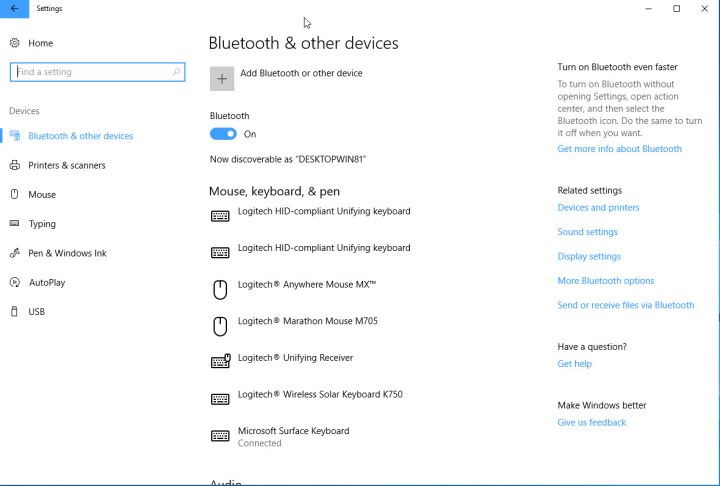
Windows 10 settings menu.

Want to learn some more Windows tips and tricks? Here are our top secrets to get to grips with it.


Share. Facebook Twitter Pinterest LinkedIn Tumblr Email

Keep Reading

Think vibe-coding will turn you into a rich entrepreneur? You might want to read the risk brief

We built AI to save us from email, and it somehow made email even more soul-sucking

Google Meet’s AI note-taker just got a whole lot better and less overwhelming

ChatGPT just landed ads, Now, Google won’t rule out ads in Gemini app, of course.

Just like the MacBook Neo, Apple might serve another pricing slam with the iPhone 18 Pro

Apple just made the Mac mini more expensive without raising its price

Self-driving cars will no longer go scot-free in California as penalties go into effect

Microsoft built an AI agent for laywers in Word. Let’s hope it doesn’t go berserk.

You can now check a product’s price history spanning a whole year on Amazon

Editors Picks

We built AI to save us from email, and it somehow made email even more soul-sucking

May 2, 2026

Formula 1 Etihad Airways Abu Dhabi Grand Prix sets a Guinness World Record

May 2, 2026

Apollonia and Synergy Partner to Improve Oral Health for Children with Autism

May 2, 2026

Google Meet’s AI note-taker just got a whole lot better and less overwhelming

May 2, 2026

Subscribe to News

Get the latest UAE news and updates directly to your inbox.

Latest Posts

ChatGPT just landed ads, Now, Google won’t rule out ads in Gemini app, of course.

May 2, 2026

Just like the MacBook Neo, Apple might serve another pricing slam with the iPhone 18 Pro

May 2, 2026

Apple just made the Mac mini more expensive without raising its price

May 2, 2026
Facebook X (Twitter) Pinterest TikTok Instagram
© 2026 Daily Guardian UAE. All Rights Reserved.
  • Privacy Policy
  • Terms
  • Advertise
  • Contact

Type above and press Enter to search. Press Esc to cancel.