
Daily Guardian UAEDaily Guardian UAE
  • Home
  • UAE
  • What’s On
  • Business
  • World
  • Entertainment
  • Lifestyle
  • Sports
  • Technology
  • Travel
  • Web Stories
  • More
    • Editor’s Picks
    • Press Release
What's On

Global Humanitarian Leaders Look to the Future of Humanitarian Action in Dubai Ahead of DIHAD 2026      

August 24, 2026

Google’s $899 Pixel 11 can’t properly play Genshin Impact, and we’ve been here before

August 24, 2026

Sunmarke and Regent Schools Celebrate Exam Success

August 24, 2026

Dubai and India: Strengthening Trade Ties in Bengaluru

August 24, 2026

HUAWEI MatePad Air: A Game Changer for Mobile Professionals

August 24, 2026
Facebook X (Twitter) Instagram
Finance Pro
Facebook X (Twitter) Instagram
Daily Guardian UAE
Subscribe
  • Home
  • UAE
  • What’s On
  • Business
  • World
  • Entertainment
  • Lifestyle
  • Sports
  • Technology
  • Travel
  • Web Stories
  • More
    • Editor’s Picks
    • Press Release
Daily Guardian UAEDaily Guardian UAE
Home » iOS 18.2: How to use ChatGPT with Siri
Technology

iOS 18.2: How to use ChatGPT with Siri

By dailyguardian.aeOctober 29, 20242 Mins Read
Share
Facebook Twitter LinkedIn Pinterest Email

Ever since Apple announced the AI stack known as Apple Intelligence earlier this year, one of the most highly anticipated features has been the ChatGPT-Siri camaraderie. In a nutshell, the queries presented to Siri will be offloaded to ChatGPT if it can’t provide a satisfactory answer.

Or to put it in simpler terms, Siri is simply getting an even smarter companion. Thanks to the multi-modal (aka the ability to comprehend text and multimedia content) skills of ChatGPT, users will also be able to ask questions that would require processing an image or file. In a nutshell, the integration makes Siri far more useful than it ever was. Here’s how to make sure it works.

Enabling ChatGPT Siri integration step 5.

How to enable ChatGPT integration for Siri

Months after announcing it, Apple finally enabled it with the iOS 18.2 update. And here’s the best part. Users don’t have to install any app or even make an OpenAI account for using ChatGPT on their iPhone. Here’s what you need to do in order to enable ChatGPT for Siri commands:

Step 1: Make sure that your iPhone is running iOS 18.2 or a later version.

Step 2: Open the Settings app.

Step 3: Look for the section titled Apple Intelligence & Siri.

Enabling ChatGPT Siri integration step 1.

Step 4: Scroll down to the Extend Apple Intelligence & Siri section. Now, select the ChatGPT option underneath.
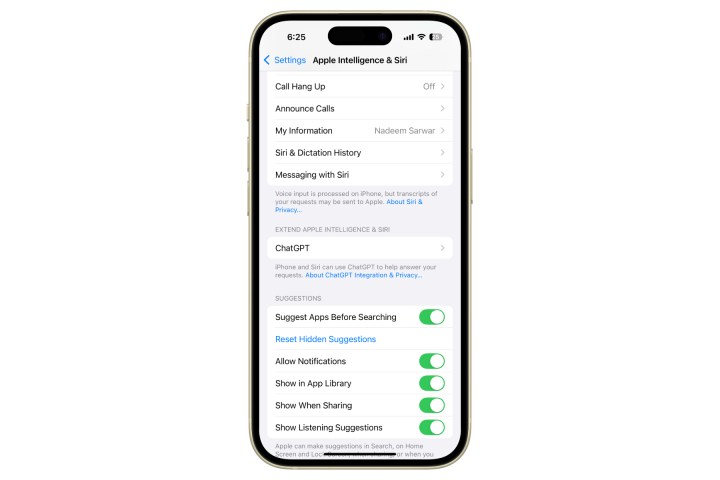
Enabling ChatGPT Siri integration step 2.

Step 5: Select Set up against the ChatGPT option at the top of the screen.
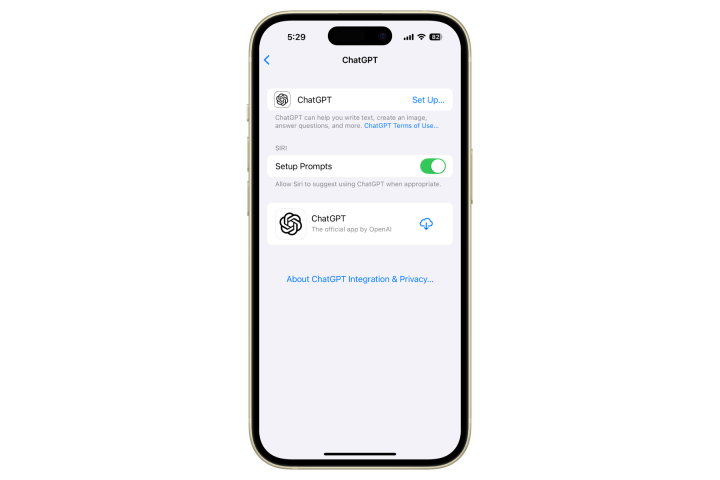
Enabling ChatGPT Siri integration step 3.

Step 6: On the pop-up page that appears, select Next, followed by Enable ChatGPT.
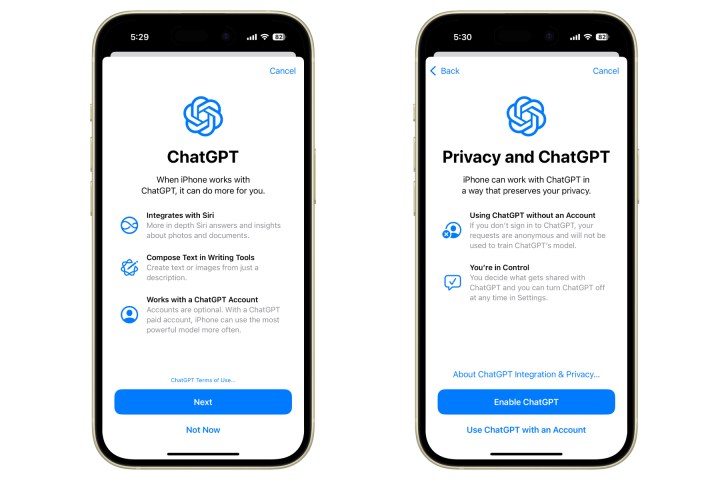
Enabling ChatGPT Siri integration step 4.

Step 7: On the ChatGPT page in Settings, there’s another Siri header with a toggle that says Confirm ChatGPT requests. Enable this one, as well.

As mentioned above, Siri is simply tapping into the natural language and reasoning capabilities of ChatGPT, which the latter acquired after training on a vast amount of data. Therefore, users don’t need to create a dedicated account or sign-in to their existing OpenAI account.

However, for users that seek to access the more advanced ChatGPT features, such as custom chatbots, they require a sign-in for verifying the subscription status. These features would require access to the ChatGPT app, which can be downloaded directly from the ChatGPT dashboard in the Settings app.


Share. Facebook Twitter Pinterest LinkedIn Tumblr Email

Keep Reading

Google’s $899 Pixel 11 can’t properly play Genshin Impact, and we’ve been here before

Samsung thinks Exynos 2700 can beat Qualcomm’s best next-gen chip

I never cared about Mac desktop widgets until I found this app

Apple’s September 2026 event: Everything we know about the iPhone 18 Pro and iPhone Ultra launch event

Samsung may be planning two Galaxy S27 Ultra sizes next year

In China, AI has reached dumpling shops where you also get to feed on compute tokens

Silicon Valley wants AI everywhere. It just doesn’t want us to notice

Pixel Watch 5 vs. Galaxy Watch 9 vs. Apple Watch Series 11: There’s more than one way to take your health seriously

A new iMac is coming before the end of 2026, but don’t expect much beyond M6

Editors Picks

Google’s $899 Pixel 11 can’t properly play Genshin Impact, and we’ve been here before

August 24, 2026

Sunmarke and Regent Schools Celebrate Exam Success

August 24, 2026

Dubai and India: Strengthening Trade Ties in Bengaluru

August 24, 2026

HUAWEI MatePad Air: A Game Changer for Mobile Professionals

August 24, 2026

Subscribe to News

Get the latest UAE news and updates directly to your inbox.

Latest Posts

Discover Thailand’s Premier Wellness and Shopping Circuit

August 24, 2026

Samsung thinks Exynos 2700 can beat Qualcomm’s best next-gen chip

August 24, 2026

I never cared about Mac desktop widgets until I found this app

August 24, 2026
Facebook X (Twitter) Pinterest TikTok Instagram
© 2026 Daily Guardian UAE. All Rights Reserved.
  • Privacy Policy
  • Terms
  • Advertise
  • Contact

Type above and press Enter to search. Press Esc to cancel.