
Daily Guardian UAEDaily Guardian UAE
  • Home
  • UAE
  • What’s On
  • Business
  • World
  • Entertainment
  • Lifestyle
  • Sports
  • Technology
  • Travel
  • Web Stories
  • More
    • Editor’s Picks
    • Press Release
What's On

Victoria’s Secret Unveils Its Brand-New Store at The Beach, JBR

September 12, 2026

Aster Guardians Global Nursing Award 2026 names Agimol Pradeep from UK winner of USD 250,000 prize

September 12, 2026

Odisha Secures $25.4 bn UAE Investment Proposals, 6 Lakh Jobs

September 12, 2026

20 Business Councils Unite in Dubai to Boost UAE Global Trade Ties

September 12, 2026

Hamdan bin Mohammed visits Aster Pharmacy’s distribution centre in Dubai

September 11, 2026
Facebook X (Twitter) Instagram
Finance Pro
Facebook X (Twitter) Instagram
Daily Guardian UAE
Subscribe
  • Home
  • UAE
  • What’s On
  • Business
  • World
  • Entertainment
  • Lifestyle
  • Sports
  • Technology
  • Travel
  • Web Stories
  • More
    • Editor’s Picks
    • Press Release
Daily Guardian UAEDaily Guardian UAE
Home » iOS 17: How to delete a wallpaper on your iPhone
Technology

iOS 17: How to delete a wallpaper on your iPhone

By dailyguardian.aeNovember 18, 20232 Mins Read
Share
Facebook Twitter LinkedIn Pinterest Email

Over the years, Apple has made significant changes to how to customize wallpapers on iPhones. Currently, you can create wallpapers in pairs for both the home screen and lock screen of your iPhone. You can also add widgets to wallpapers and automatically activate a Focus mode when specific lock screens are in use.

Unfortunately, these features are somewhat difficult to use, and the process of deleting a wallpaper is confusing. This guide will help alleviate that confusion and make doing so a breeze

Ever since iOS 16 was released, Apple has included a highly customizable feature that allows you to personalize the look of your home and lock screens. This feature, not loved by all, offers a variety of built-in backgrounds, and you can import images as well. Once you’ve created your desired wallpaper combinations, they can be accessed under the Wallpaper feature in the iPhone Settings app. However, this isn’t where you go to delete those wallpaper combinations.

How to delete a wallpaper on your iPhone

To delete a wallpaper on your iPhone, you’ll need to use the phone’s long-press feature and follow additional instructions.

Step 1: To get started, lock your phone. The easiest way to do so is by pressing on the side button (on newer iPhones) or the top button (on older models).
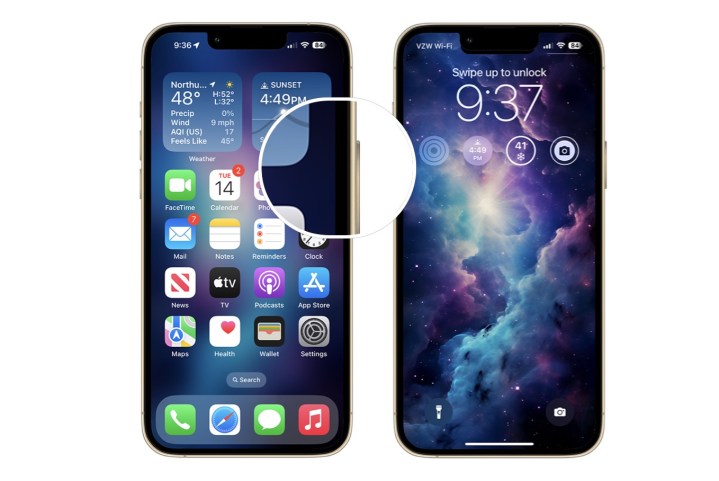
A screenshot showing how to lock the screen on a late model iPhone.

Step 2: With your iPhone locked, long press on the home screen.

Step 3: From this screen, go back and forth and see the installed wallpapers. Choose the one you wish to delete.
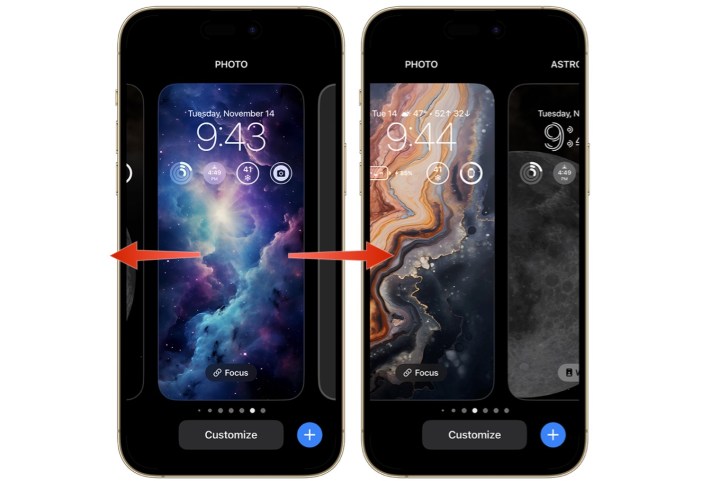
A screenshot showing how to swipe between wallpapers on iPhone.

Step 4: Swipe up, then tap the delete icon. Confirm by tapping Delete This Wallpaper.
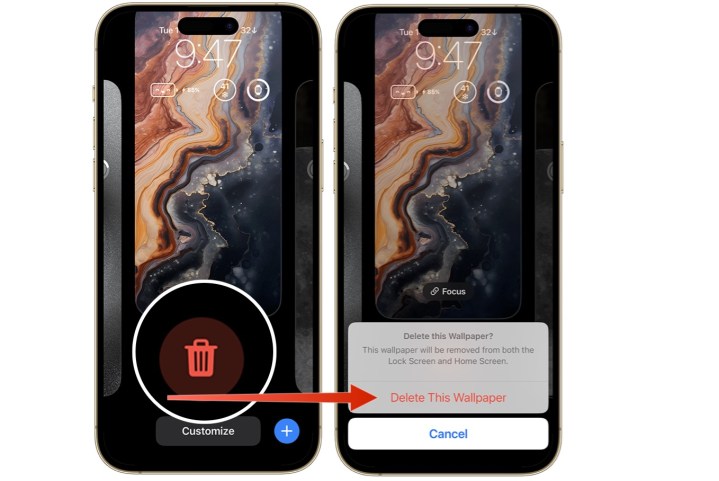
Screenshot showing how to delete a wallpaper on an iPhone.

Deleting a wallpaper on your iPhone requires following a few simple steps that starts with locking your phone. Once you do this, you’ll be done in just a few minutes.

Editors’ Recommendations


Share. Facebook Twitter Pinterest LinkedIn Tumblr Email

Keep Reading

Lenovo AeroBlade imagines a laptop as thin as a foldable phone, thanks to solid-state cooling

Lenovo puts Nvidia RTX Spark into its new Yoga Pro laptops for local AI at IFA 2026

Motorola’s new Edge 70 Plus packs a 200MP camera and a massive battery

We got GTA VI limited-edition DualSense controllers before GTA VI

Anker unveils smarter chargers and power banks built to fight heat and battery degradation

Anker’s new Soundcore Sleep earbuds can mask snoring and even track your heart rate

TCL P80 series finally marries eye-friendly NXTPAPER tech with an AMOLED panel

Anker’s new MindBase wants to be the brain of your entire home security system

I found 5 cleaning deals worth sweeping up this Labor Day

Editors Picks

Aster Guardians Global Nursing Award 2026 names Agimol Pradeep from UK winner of USD 250,000 prize

September 12, 2026

Odisha Secures $25.4 bn UAE Investment Proposals, 6 Lakh Jobs

September 12, 2026

20 Business Councils Unite in Dubai to Boost UAE Global Trade Ties

September 12, 2026

Hamdan bin Mohammed visits Aster Pharmacy’s distribution centre in Dubai

September 11, 2026

Subscribe to News

Get the latest UAE news and updates directly to your inbox.

Latest Posts

Sherpa Communications Wins Best Digital Campaign Award in Advertising & PR at Marquee Awards 2026

September 11, 2026

Gargash Motors Unveils the GAC GS7 PHEV in the UAE

September 11, 2026

A glittering evening as DP World ILT20 Season 5 is launched featuring legends Brett Lee and Shoaib Akhtar

September 11, 2026
Facebook X (Twitter) Pinterest TikTok Instagram
© 2026 Daily Guardian UAE. All Rights Reserved.
  • Privacy Policy
  • Terms
  • Advertise
  • Contact

Type above and press Enter to search. Press Esc to cancel.